System Trading

Optimize Your Trading with Skyscraper_Fix and ColorAML EA for MetaTrader 5
MetaTrader5
Optimize Your Trading with Skyscraper_Fix and ColorAML EA for MetaTrader 5

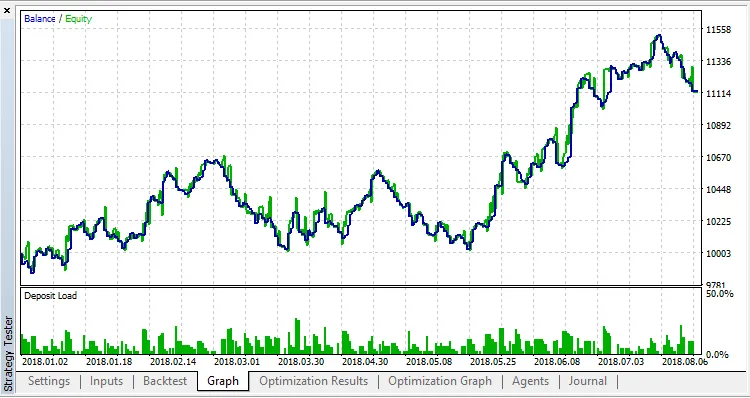
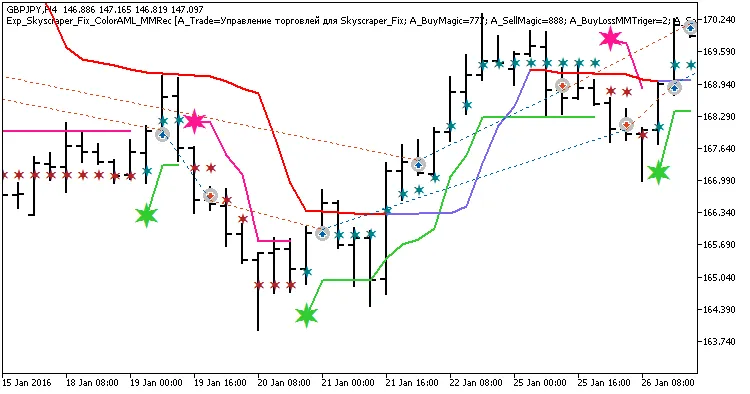
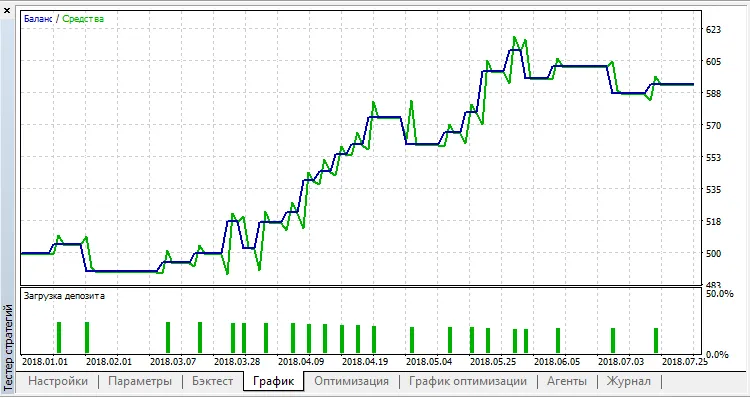
Hey traders! If you're keen on boosting your trading strategy, check out this powerful Expert Advisor (EA) that combines two independent trading systems using the Skyscraper_Fix and ColorAML indicators. This EA not only helps you make trades but also adjusts the volume of upcoming trades based on the performance of previous ones. Trading signals pop up when a bar closes and a trend shifts, which is indicated by a color change in either of the two indicators. This nifty feature means you can stay ahead of the game! Let’s dive into how you can manage your trade volumes with some handy input variables. For the system using the Skyscraper_Fix indicator, here’s what you need to know: input uint    A_BuyLossMMTriger=2;  // Number of losing Buy trades to lower Money Management input uint    A_SellLossMMTriger=2; // Number of losing Sell trades to lower Money Management input double  A_SmallMM=0.01       // Portion of deposit in a trade when losing input double  A_MM=0.1             // Portion of deposit in a trade during normal conditions So, what does this mean? If the last two trades in one direction were both losses, the EA will open the next trade in the same direction with a volume of 0.01 lot. However, if at least one of those last two trades was profitable, it will kick off the next trade with a volume of 0.1 lots. But that’s not all! The ColorAML trading system offers similar input options: input uint    B_BuyLossMMTriger=2  // Number of losing Buy trades to lower Money Management input uint    B_SellLossMMTriger=2; // Number of losing Sell trades to lower Money Management input double  B_SmallMM=0.01       // Portion of deposit in a trade when losing input double  B_MM=0.1             // Portion of deposit in a trade To ensure your EA runs smoothly, make sure the compiled files for Skyscraper_Fix.ex5 and ColorAML.ex5 indicators are in the <terminal_data_directory>\MQL5\Indicators folder. During testing, default input parameters were utilized. Notably, Stop Loss and Take Profit settings were not applied. Fig. 1. Examples of trades on the chart Here’s a sneak peek at the test results for GBPJPY on the H4 timeframe over the year 2016: Fig. 2. Test results chart

2018.10.26
Maximize Your Trading with the Skyscraper_Fix_ColorAML_X2MACandle EA
MetaTrader5
Maximize Your Trading with the Skyscraper_Fix_ColorAML_X2MACandle EA

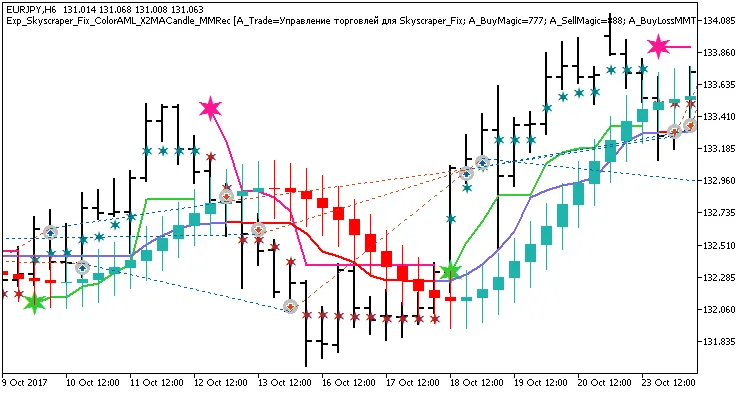
Are you ready to take your trading game to the next level? Introducing the Skyscraper_Fix_ColorAML_X2MACandle Expert Advisor (EA) for MetaTrader 5! This powerhouse combines three independent trading systems utilizing the Skyscraper_Fix, ColorAML, and X2MACandle indicators, all packed into one efficient EA. The magic happens as the EA dynamically adjusts the volume of upcoming trades based on the outcomes of previous ones. You'll receive trading signals right when a bar closes, indicating a trend change, as shown by any of the three indicators altering their colors. This EA is an enhanced version of the Exp_Skyscraper_Fix_ColorAML and Exp_Skyscraper_Fix_ColorAML_MMRec codes, adding the X2MACandle indicator into the mix for even more trading opportunities. The EA's inputs are organized into three categories—A, B, and C—based on the indicators used: A - Skyscraper_Fix; B - ColorAML; C - X2MACandle; To get the most out of each system, you'll need to configure them individually by disabling the others in the EA inputs: input bool    A_BuyPosOpen=true;    //A Permission to enter long positions input bool    A_SellPosOpen=true   //A Permission to enter short positions For smooth operation, ensure that the compiled files for the indicators Skyscraper_Fix.ex5, ColorAML.ex5, and X2MACandle.ex5 are located in your <terminal_data_directory>\MQL5\Indicators folder. During the tests below, we utilized the default input parameters for the Expert Advisor, with no Stop Loss or Take Profit settings applied. Fig. 1. Examples of trades on the chart Here are the testing results for 2017 on the EURJPY H6 timeframe: Fig. 2. Test results chart

2018.10.26
Mastering the Exp_BrainTrend2 EA: A Comprehensive Guide for Traders
MetaTrader5
Mastering the Exp_BrainTrend2 EA: A Comprehensive Guide for Traders

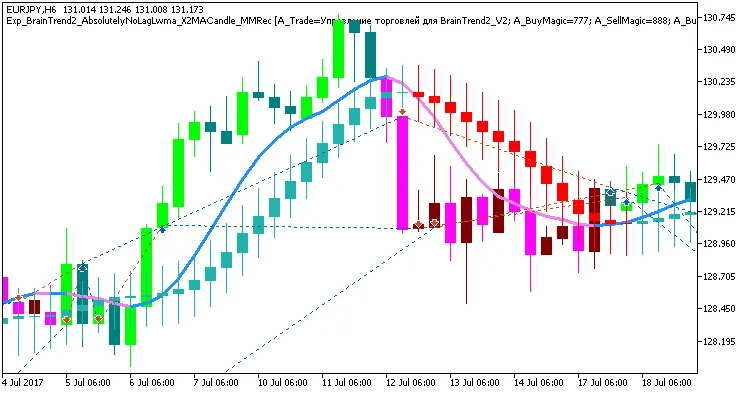
Are you ready to take your trading to the next level? Let’s dive into the Exp_BrainTrend2_AbsolutelyNoLagLwma_X2MACandle_MMRec, a robust system designed for MetaTrader 5. This Expert Advisor harnesses the power of three independent trading systems using the BrainTrend_V2, AbsolutelyNoLagLWMA, and X2MACandle indicators. It’s like having a Swiss Army knife for trading! What makes this EA special? It can adjust the volume of your trades based on the outcomes of previous trades—talk about smart trading! You'll get trading signals when a bar closes and the trend shifts, indicated by a color change in one of the three indicators. This EA is a step up from the Exp_BrainTrend2_AbsolutelyNoLagLwma and Exp_BrainTrend2_AbsolutelyNoLagLwma_MMRec codes, adding an extra layer of strategy with the X2MACandle indicator. The EA's settings are neatly organized into three groups—A, B, and C—corresponding to the indicators used in each trading system: A - BrainTrend2_V2; B - AbsolutelyNoLagLwma; C - X2MACandle; Each trading system can be customized individually. Just disable the ones you’re not using by adjusting the EA inputs: input bool    A_BuyPosOpen=true;    // A Permission to enter long positions input bool    A_SellPosOpen=true;   // A Permission to enter short positions To ensure the EA functions smoothly, make sure you have the compiled files for BrainTrend2_V2.ex5, AbsolutelyNoLagLwma.ex5, and X2MACandle.ex5 in your <terminal_data_directory>\MQL5\Indicators folder. For the tests we conducted, we used the default input parameters for the Expert Advisor. Just a heads-up: we didn’t implement Stop Loss or Take Profit in these tests. Fig. 1. Examples of trades on the chart We conducted testing for the year 2017 on the EURJPY H6 timeframe: Fig. 2. Test results chart

2018.10.26
Gordago EA: Your Go-To Trading Assistant for MetaTrader 5
MetaTrader5
Gordago EA: Your Go-To Trading Assistant for MetaTrader 5

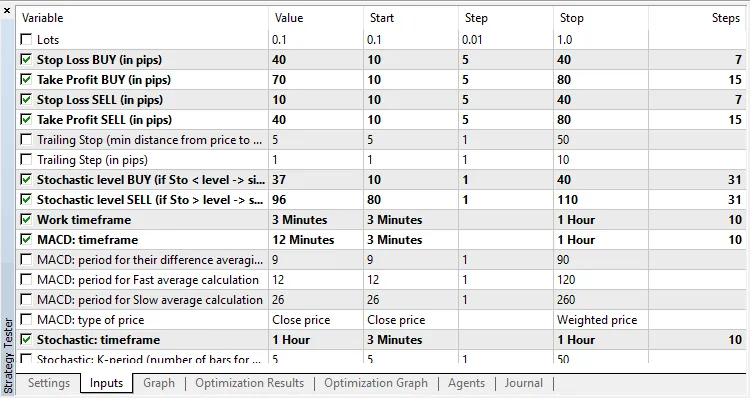
Author of the Idea: Scriptor MQL5 Code Author: barabashkakvn Meet Gordago EA, a powerful trading robot designed for MetaTrader 5, utilizing the iMACD (Moving Average Convergence Divergence) and iStochastic (Stochastic Oscillator) indicators. This expert advisor only engages when a new bar appears, while trailing operates on every tick to keep your trades optimally managed. Key Features of Gordago EA: Set your preferred working timeframe (Work Timeframe) to determine when new bars emerge. Customize the MACD indicator timeframe (MACD: Timeframe). Adjust the Stochastic indicator timeframe (Stochastic: Timeframe). Define different stop loss and take profit levels for both BUY and SELL positions. When generating trading signals, the Stochastic indicator is checked against specific levels: For a BUY signal, the Stochastic value on the current bar (#0) must be less than the Stochastic Level BUY. For a SELL signal, the Stochastic value on the current bar (#0) must exceed the Stochastic Level SELL. Here’s how the trading signals are calculated: BUY Signal Equation:(MACD #0 > MACD #1) AND (MACD #1 < 0.0) AND (Stochastic #0 < Stochastic Level BUY) AND (Stochastic #0 > Stochastic #1) SELL Signal Equation:(MACD #0 < MACD #1) AND (MACD #1 > 0.0) AND (Stochastic #0 > Stochastic Level SELL) AND (Stochastic #0 < Stochastic #1) Optimized Parameters: For quicker optimization, you can use the OHLC mode, but remember to run tests in "Every tick" or "Every tick based on real ticks" mode afterwards to ensure accuracy. After optimizing for USDJPY, the following parameters are set as defaults in the EA:

2018.10.26
Unlock Trading Success with the XCCI Histogram Volume EA for MetaTrader 5
MetaTrader5
Unlock Trading Success with the XCCI Histogram Volume EA for MetaTrader 5

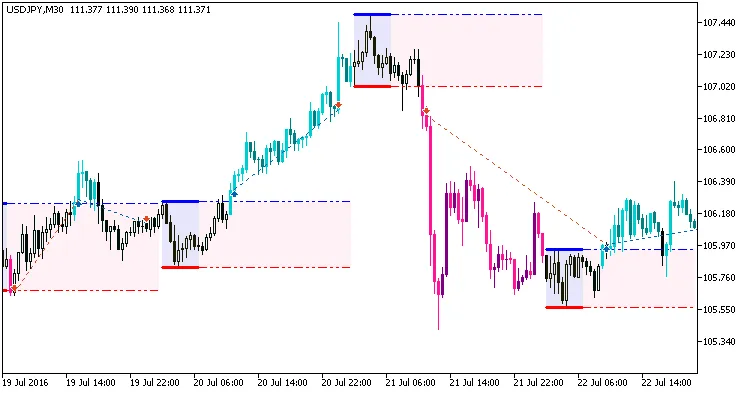
If you're looking to enhance your trading experience with MetaTrader 5, the XCCI Histogram Volume indicator is a fantastic tool to consider. This trading system generates signals based on the closing of bars, specifically when they break through overbought or oversold levels. It’s crucial to note that each of these levels has its own unique position, complete with a magic number and size for each breakthrough. input uint Magic1=555;&nbsp;&nbsp;&nbsp;&nbsp;&nbsp;&nbsp;&nbsp;&nbsp;&nbsp;&nbsp;&nbsp;&nbsp;// Magic number for standard signal orders input uint Magic2=777;&nbsp;&nbsp;&nbsp;&nbsp;&nbsp;&nbsp;&nbsp;&nbsp;&nbsp;&nbsp;&nbsp;&nbsp;// Magic number for strong signal orders input double MM1=0.1;&nbsp;&nbsp;&nbsp;&nbsp;&nbsp;&nbsp;&nbsp;&nbsp;&nbsp;&nbsp;&nbsp;&nbsp; // Percentage of deposit for normal signal trades input double MM2=0.2;&nbsp;&nbsp;&nbsp;&nbsp;&nbsp;&nbsp;&nbsp;&nbsp;&nbsp;&nbsp;&nbsp;&nbsp; // Percentage of deposit for strong signal trades For the EA to function smoothly, make sure the compiled XCCI_Histogram_Vol.ex5 indicator file is located in your &lt;terminal_data_directory&gt;\MQL5\Indicators folder. In the tests below, the default input parameters of the Expert Advisor were utilized. Notably, Stop Loss and Take Profit settings were not implemented during these tests. Fig. 1. Examples of trades on the chart Here are the testing results for USDJPY on the H4 timeframe during the year 2017: Fig. 2. Test results chart

2018.10.26
Unlocking Trading Potential with the XRSI Histogram Vol System for MetaTrader 5
MetaTrader5
Unlocking Trading Potential with the XRSI Histogram Vol System for MetaTrader 5

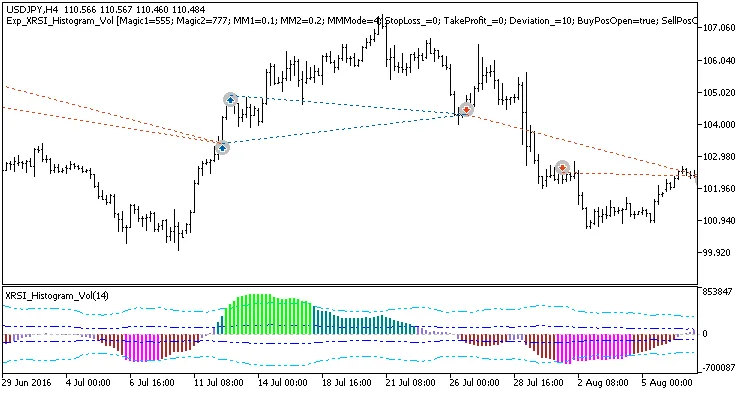
Are you looking to enhance your trading strategy? The XRSI Histogram Vol trading system is a fantastic tool that generates signals based on the XRSI Histogram Vol indicator. This system kicks into action when a bar closes and a breakthrough occurs at either the overbought or oversold levels. Each level comes with its own unique position, magic number, and size for a breakthrough, allowing for precise trade management.input uint Magic1=555;&nbsp;&nbsp;&nbsp;&nbsp;&nbsp;&nbsp;&nbsp;&nbsp;&nbsp;&nbsp;&nbsp;&nbsp;// Magic number for orders by a normal signal input uint Magic2=777;&nbsp;&nbsp;&nbsp;&nbsp;&nbsp;&nbsp;&nbsp;&nbsp;&nbsp;&nbsp;&nbsp;&nbsp;// Magic number for orders by a strong signal input double MM1=0.1;&nbsp;&nbsp;&nbsp;&nbsp;&nbsp;&nbsp;&nbsp;&nbsp;&nbsp;&nbsp;&nbsp;&nbsp; // Share of a deposit in a deal (normal signal) input double MM2=0.2;&nbsp;&nbsp;&nbsp;&nbsp;&nbsp;&nbsp;&nbsp;&nbsp;&nbsp;&nbsp;&nbsp;&nbsp; // Share of a deposit in a deal (strong signal) To ensure the Expert Advisor (EA) runs smoothly, make sure you have the compiled XRSI_Histogram_Vol.ex5 indicator file in your &lt;terminal_data_directory&gt;\MQL5\Indicators folder. This setup is crucial for optimal performance.The default input parameters for the EA were used during the tests outlined below, and note that Stop Loss and Take Profit settings were not applied during these tests.Fig. 1. Examples of trades on the chartHere's a quick look at the testing results for the USDJPY pair on the H4 chart over the year 2017:Fig. 2. Test results chart

2018.10.26
Boost Your Trading with the Iin_MA_Signal System for MetaTrader 5
MetaTrader5
Boost Your Trading with the Iin_MA_Signal System for MetaTrader 5

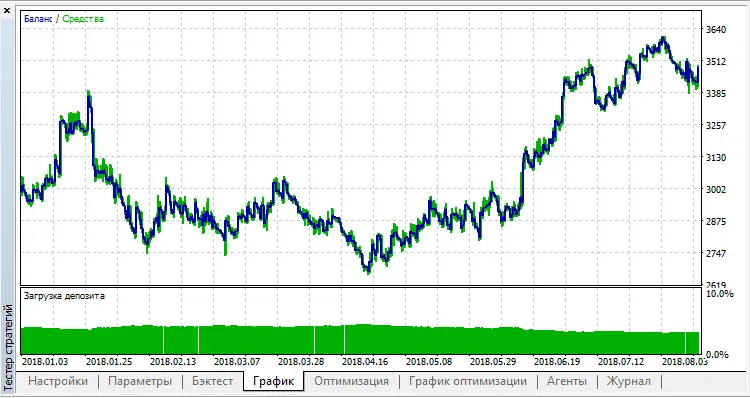
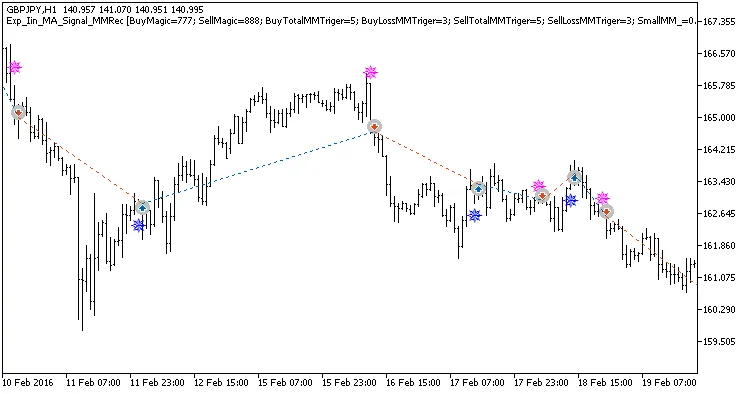
If you're looking to step up your trading game, the Iin_MA_Signal system is a solid choice. It provides actionable trading signals and allows you to adjust your trade volumes based on the outcomes of your previous trades. This clever approach helps you manage risk while maximizing your profit potential. When the market trends change, as indicated by the color label of the Iin_MA_Signal, trading signals are generated at the close of each bar. This is where the magic happens! Setting Up Your EA: Key Parameters The Expert Advisor (EA) comes with a customizable block of input variables that lets you manage your position volumes: input uint BuyTotalMMTriger=5; // Last Buy trades to calculate stop loss input uint BuyLossMMTriger=3; // Losing Buy trades to reduce MM input uint SellTotalMMTriger=5; // Last Sell trades to calculate stop loss input uint SellLossMMTriger=3; // Losing Sell trades to reduce MM input double SmallMM_=0.01; // Deposit share in a deal if loss input double MM=0.1; // Deposit share in a deal during normal trading input MarginMode MMMode=LOT; // Method for determining lot value With these inputs, if you have three losing trades in the last five, the EA will open the next trade in the same direction with a volume of 0.01 lots. Otherwise, it will trade at 0.1 lots. Enhanced Features This EA is a refined version of the Exp_Iin_MA_Signal. It includes an updated block for opening and closing positions: //---- Deal execution //---- Closing long position by magic number &nbsp;&nbsp; BuyPositionClose_M(BUY_Close,Symbol(),Deviation_,BuyMagic); //---- Closing short position by magic number &nbsp;&nbsp; SellPositionClose_M(SELL_Close,Symbol(),Deviation_,SellMagic); &nbsp;&nbsp; double mm; //---- Opening long position by magic number &nbsp;&nbsp; if(BUY_Open) &nbsp;&nbsp;&nbsp;&nbsp; { &nbsp;&nbsp;&nbsp;&nbsp;&nbsp;&nbsp;mm=BuyTradeMMRecounterS(BuyMagic,BuyTotalMMTriger,BuyLossMMTriger,SmallMM_,MM); // Define long position volume based on previous deal results &nbsp;&nbsp;&nbsp;&nbsp;&nbsp;&nbsp;BuyPositionOpen_M1(BUY_Open,Symbol(),UpSignalTime,mm,MMMode,Deviation_,StopLoss_,TakeProfit_,BuyMagic); &nbsp;&nbsp;&nbsp;&nbsp; } //---- Opening short position by magic number &nbsp;&nbsp; if(SELL_Open) &nbsp;&nbsp;&nbsp;&nbsp; { &nbsp;&nbsp;&nbsp;&nbsp;&nbsp;&nbsp;mm=SellTradeMMRecounterS(SellMagic,SellTotalMMTriger,SellLossMMTriger,SmallMM_,MM); // Define short position volume based on previous deal results &nbsp;&nbsp;&nbsp;&nbsp;&nbsp;&nbsp;SellPositionOpen_M1(SELL_Open,Symbol(),DnSignalTime,mm,MMMode,Deviation_,StopLoss_,TakeProfit_,SellMagic); &nbsp;&nbsp;&nbsp;&nbsp; } For the EA to work properly, make sure the compiled Iin_MA_Signal.ex5 indicator file is in the &lt;terminal_data_directory&gt;\MQL5\Indicators folder. In the tests below, the default input parameters for the Expert Advisor without stops were used. Fig. 1. Examples of trades on the chart Here are the testing results for GBPJPY on the H1 timeframe over the year 2017: Fig. 2. Test results chart

2018.10.26

Maximize Your Trading with the AMA Trader for MetaTrader 5
MetaTrader5
Maximize Your Trading with the AMA Trader for MetaTrader 5

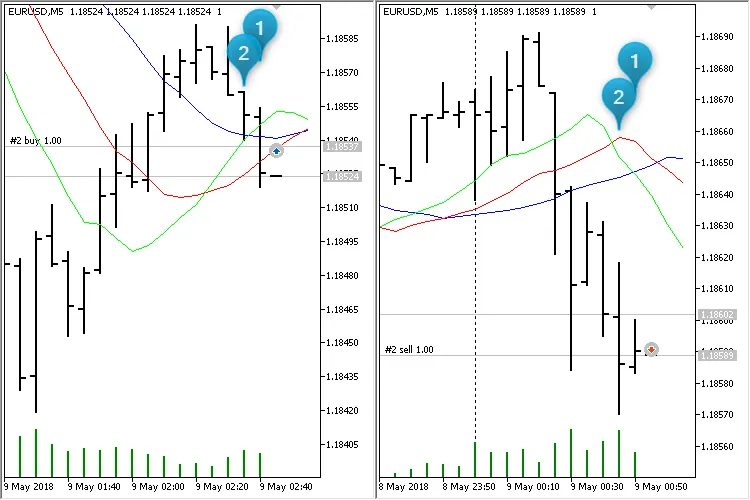
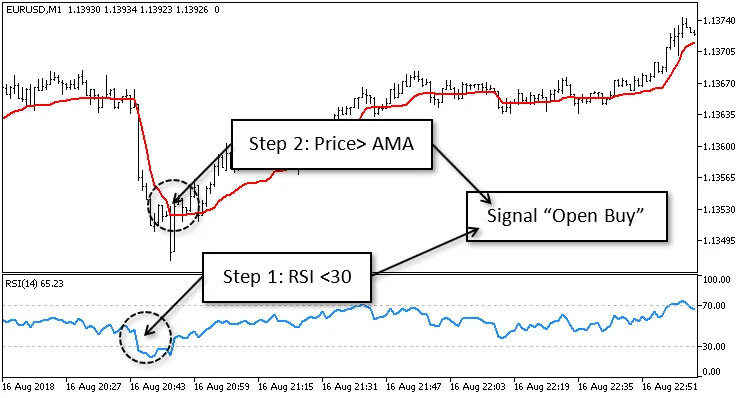
Author: josef strauss MQL5 Code Creator: barabashkakvn The AMA Trader EA utilizes the Adaptive Moving Average (AMA) and the Relative Strength Index (RSI) to generate trading signals. Let’s break down how a typical "Open Buy" signal is created: **Step 1:** The RSI must be below the 30 level (as set in the RSI Level Down parameter of the EA). **Step 2:** The price must break above the AMA indicator. The Step Length (the number of bars between Step 1 and Step 2) is crucial for optimizing the interplay between these two indicators. Martingale Strategy When a new trading order comes in, the EA calculates profit for both BUY and SELL positions separately. Here’s how it works: Open Buy If the profit on BUY positions is less than 0.0, the EA will open two BUY positions. Otherwise, it opens just one BUY position. Open Sell If the profit on SELL positions is less than 0.0, it opens two SELL positions. Otherwise, it opens one SELL position. Fund Management For managing funds, I've implemented a straightforward system: Profit Limit for Closing All Positions - once the total profit from the EA on a specific symbol reaches a certain point, all positions will be closed. Essentially, this helps to secure your profits. Keep an eye on your trading account balance while the EA is running. If your account balance surpasses your saved balance by the Withdrawal amount, withdraw that sum and close all positions. Example with EURUSD on M5:

2018.10.26
First Previous 9 10 11 12 13 14 15 16 17 18 19 Next Last