MetaTrader Free EA

Unlocking the Power of Probability: A Forex Expert Advisor for MetaTrader 5
MetaTrader5
Unlocking the Power of Probability: A Forex Expert Advisor for MetaTrader 5

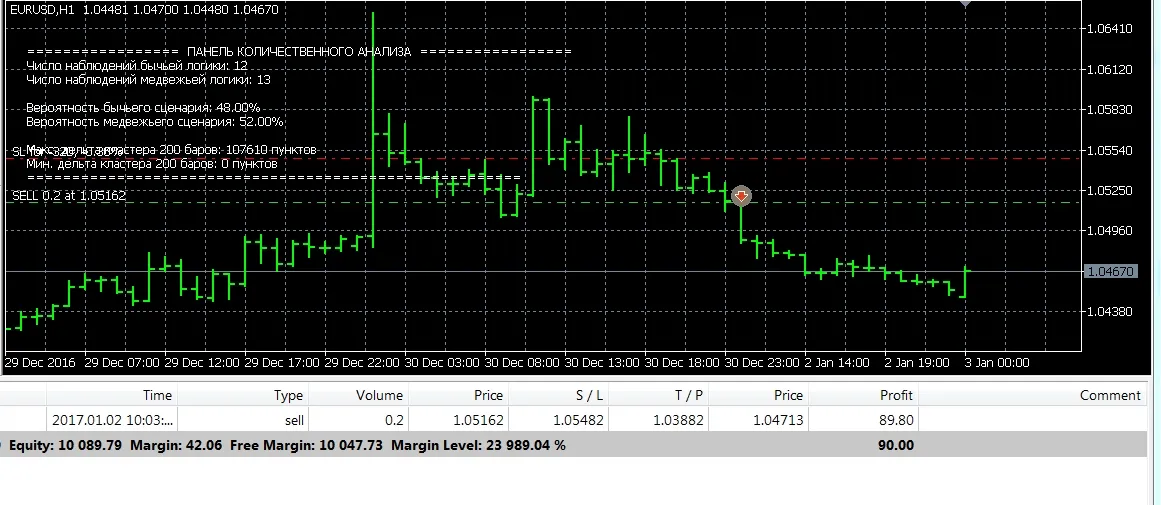
Hey there, fellow traders! Today, I’m excited to share one of my all-time favorite projects—a Forex Expert Advisor (EA) designed for the MetaTrader 5 platform that harnesses the power of probability theory. This nifty tool helps you gauge the chances of price movements in your favorite financial instruments. This EA dives into the price history of a selected asset, analyzing a default of 10,000 bars. It tracks how often the price closes above or below the opening price by a set number of pips (400 pips by default) across a cluster of bars (50 bars by default). With this data, it calculates the probabilities of price increases or decreases and displays these insights right onto your chart! But that’s not all—this EA can actually execute trades based on its probability calculations. If it determines that the likelihood of a price rise is greater than 51%, it’ll open a buy position. Conversely, if it sees a fall probability exceeding 51%, it’ll go ahead and sell. When it comes to trading positions, you have some flexibility. You can either set a fixed lot size or let the EA calculate it based on your specified risk and your current account balance. Plus, if you’ve set Stop Loss and Take Profit values, the EA will automatically adjust these levels when it opens a position. To get started, make sure to set the following flag to True: input bool EnableCheckBars = true; Just a heads-up, though—this EA isn't designed to generate profits on its own. The idea of counting movements, waves, and predicting Stop Loss or Take Profit levels with simple algorithms is a bit of a long shot. The market is a complex beast, and relying solely on this kind of analysis can be a gamble. So, there you have it! If you're looking to leverage probability theory in your trading strategy, this EA could be a valuable addition to your toolkit. Happy trading!

2025.11.04
KopierMaschineMT5: The Ultimate Trade Copier for MetaTrader 5
MetaTrader5
KopierMaschineMT5: The Ultimate Trade Copier for MetaTrader 5

If you're looking to streamline your trading experience on MetaTrader 5, then you need to check out KopierMaschineMT5. This powerful tool is designed to make trading easier and more efficient by allowing you to copy trades from multiple vendors directly to a single account. Let's dive into its features and how it works! Features The software operates in two modes: Master and Slave. Copy trades from different vendors into one slave account. Toggle Stop Loss and Take Profit copying on or off. Enable or disable the copying of pending orders. Conflict-free operation alongside other Expert Advisors. Compatible with accounts that have suffixes and prefixes. Change the trading direction as needed. Copy trades based on proportional volume relative to the balance, fixed volume, or the supplier's volume. Set conditions to open trades when the price on the slave account deviates from the provider's price by a specified amount. How It Works Ensure both the supplier's account terminal and the slave account terminal are open at the same time. On the terminal with the supplier account, set the Expert Advisor to WorkMode=Master and click the ON button on the panel. On the terminal with the subordinate account, set the Expert Advisor to WorkMode=Slave, select the provider's account on the panel, choose the desired trade copying options, and then click the ON button. Once these steps are completed, trades from the provider account will seamlessly copy over to the subordinate account. With KopierMaschineMT5, you can take your trading game to the next level. Whether you're a seasoned pro or just starting, this tool can help you make more informed trading decisions with ease!

2025.11.03
Unlocking Trading Success with SAR_MACD_EA on MetaTrader 4
MetaTrader4
Unlocking Trading Success with SAR_MACD_EA on MetaTrader 4

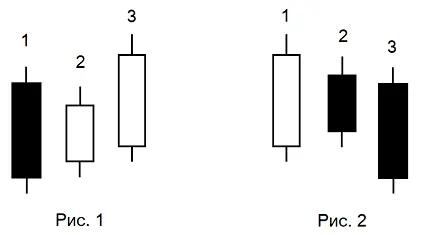
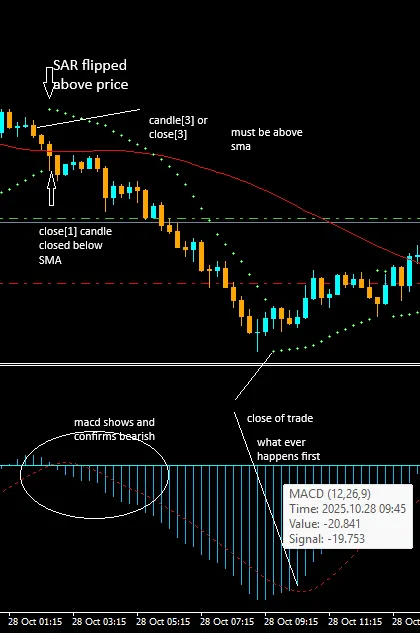
If you’re diving into the world of trading, you might want to take a closer look at the SAR_MACD_EA for MetaTrader 4. This expert advisor operates on a 15-minute bar or candle chart, leveraging the MACD as an early signal for market direction. The primary focus here is the Parabolic SAR, which serves as the first signal for potential buy or sell opportunities. Here’s how it works: when the close of a bar or candle indicates a price action, we look back to see if the third candle prior was below the Simple Moving Average (SMA) while the previous candle closed above it. If the SAR flips below the price at this point, that's your buy signal. If the MACD shows a bullish move and the SAR is below the price, but the previous candle's close (close[1]) remains below the SMA, the strategy dictates waiting for five candles to see if the price closes above the SMA. Let’s break this down with some examples: In the first example, you’ll notice that as soon as the candle closes below the SMA, the third candle should ideally be above it. During this timeframe, the SAR should also flip above the price. By this point, the MACD should confirm a bearish move, either simultaneously or in the previous candles. Now, here’s a look at a buy scenario: This visual demonstrates the ideal conditions for executing a buy based on our strategy. Keeping track of these signals can be a game-changer for your trading approach!

2025.10.30
Mastering Pin Bar Trading with ExpPinBar: Your Go-To Expert Advisor for MetaTrader 5
MetaTrader5
Mastering Pin Bar Trading with ExpPinBar: Your Go-To Expert Advisor for MetaTrader 5

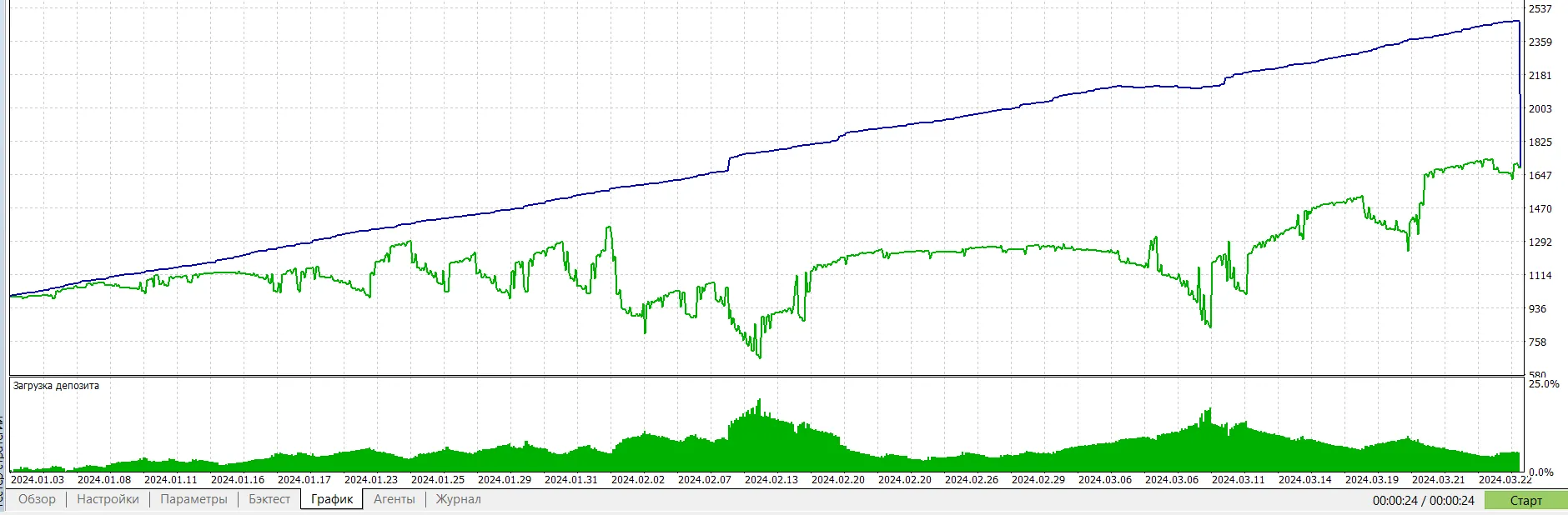
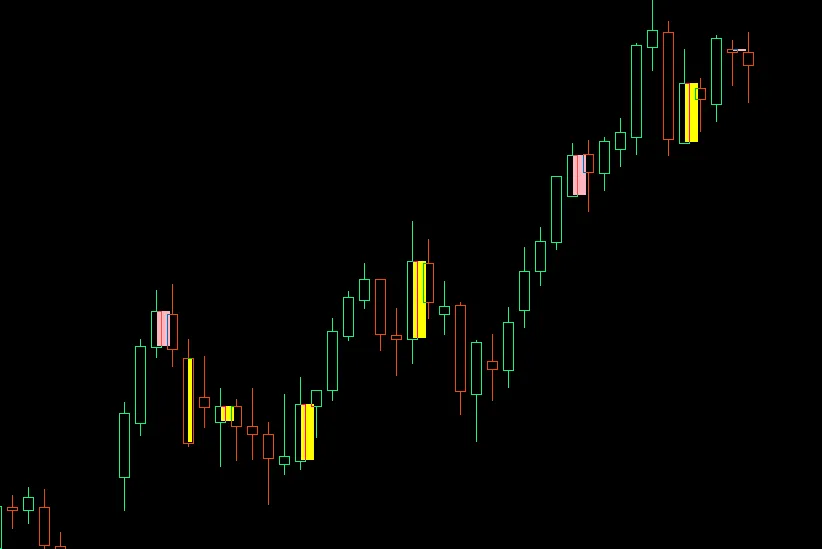
Welcome to the world of pin bar trading! If you’re looking to refine your strategy, the ExpPinBar Expert Advisor is a fantastic tool designed specifically for trading based on the Price Action PinBar indicator. This EA opens positions based on signals generated by the indicator, and to help you manage those trades, it comes packed with a robust trailing functionality from the trailing library. You can choose from various methods like classic trailing, Parabolic SAR, moving averages, and more. Configuring Your Pin Bar Indicator Minimum Size of a Candle - This parameter sets the minimum height of a candle (in pips) that the EA will consider. Candles smaller than this are ignored, helping you filter out the noise in low-volatility markets. If you want to sift through weak signals, consider increasing this value. Maximum Candle Body Size - This defines the maximum size of the candle body relative to the full height of the candle (ranging from 0 to 1). A smaller value emphasizes classic Pin Bars, which have long shadows and small bodies. For clearer signals, values between 0.2 and 0.4 are ideal. Body Position Relative to Previous Candle - This parameter dictates how deep the body of the Pin Bar can extend into the previous candle's range. Keep values between 0.2 and 0.4 to find those classic reversal patterns where the body is near the edge. Aspect Ratio of Shadows - This sets the minimum ratio between the main shadow and the opposite shadow. Higher values (1.5 - 2.5) will filter for candles with pronounced long shadows, helping you focus on the best signals. Advisor Settings Position Volume - The size of your trade position. Slippage (in points) - The maximum price deviation you’re willing to accept during execution. Magic Number - A unique identifier for your trades. Stop Loss (in points) - Set your stop loss in points; use 0 for none or -1 to place it based on the Pin Bar shadow. Take Profit (in points) - Define your take profit level; again, use 0 for none. Stop Loss Deviation (in points) - This controls the deviation of the stop loss from the Pin Bar shadow. Trailing Settings Trailing Type - Choose your preferred trailing method. Trailing Start - Set the profit level at which trailing will start. Trailing Step (in points) - Define the step size for the trailing mechanism. Trailing Offset (in points) - Set how far from the current price your trailing stop should be. Indicator Settings Used in Trailing Indicator's Timeframe - The timeframe for the indicator used in trailing calculations. MA Period - The calculation period for the moving average. MA Shift - The horizontal shift applied to the moving average. AMA Fast EMA Period - The fast EMA period for the adaptive moving average. AMA Slow EMA Period - The slow EMA period for the adaptive moving average. VIDYA CMO Period - The CMO period for dynamic averaging. Parabolic SAR Step - The step for the Parabolic SAR indicator. Parabolic SAR Max - The maximum value for the Parabolic SAR. MA Applied Price - Determines the price used for moving average calculations. MA Smoothing Method - The type of smoothing applied to the moving average. Indicator Data Index - The specific bar of data from the indicator. To get started with the iPinBars indicator and the trailing classes library is essential for the Expert Advisor to function smoothly. Here’s a glimpse of how the Expert Advisor performed over the past year on the EURUSD H4 chart, utilizing fixed stop levels and a straightforward trailing approach:

2025.10.22
Unlock Your Trading Potential: The ExpWPRBB Expert Advisor for MetaTrader 5
MetaTrader5
Unlock Your Trading Potential: The ExpWPRBB Expert Advisor for MetaTrader 5

Hey fellow traders! Today, I want to introduce you to the ExpWPRBB Expert Advisor, a nifty tool designed for MetaTrader 5 that employs a straightforward trading strategy using two powerful indicators: the Williams' Percent Range (WPR) and Bollinger Bands (BB). This EA only opens positions when both indicators align, making it a reliable choice for those looking to streamline their trading. How It Works Here’s the lowdown on how the ExpWPRBB operates: Buy Signal: The WPR exits the oversold zone, and the opening price of the bar is below the average BB line. Sell Signal: The WPR comes out of the overbought zone, and the opening price of the bar is above the average BB line. The width of the Bollinger Bands, combined with the ATR (Average True Range), is used to set your Stop Loss and Take Profit levels. A key point to remember is that this EA works exclusively on hedging accounts. Plus, it features a non-trading mode where you can display signal labels, allowing you to monitor signals visually in the strategy tester. Input Parameters Let’s dive into the specifics: WPR (Williams' Percent Range) InpPeriodWPR: This is the period for WPR calculation, representing the number of bars for the indicator's value. InpOverboughtWPR: The overbought level for WPR, usually set between -20 to 0. InpOversoldWPR: The oversold level for WPR, typically ranging from -80 to -100. BB (Bollinger Bands) InpPeriodBB: The period for calculating the Bollinger Bands. InpDeviationBB: This is the standard deviation multiplier for determining the bands' width. InpShiftBB: The shift of the Bollinger Bands relative to the current bar. InpPriceBB: The price type used for calculating the Bollinger Bands. ATR (Average True Range) InpPeriodATR: The period for calculating the ATR, based on the number of bars. Trading Settings InpSignalsOnly: If true, the EA will only place signal labels without executing trades. InpVolume: This refers to the position volume, or lot size, for opening trades. InpDeviation: Slippage in points, indicating the maximum allowable price deviation when executing an order. InpMagic: A unique identifier for the EA's positions, useful for tracking. InpStopLoss: The Stop Loss level in points; set to 0 if not used, or -1 for automatic calculation based on Bollinger Bands width. InpTakeProfit: The Take Profit level in pips; set to 0 if not used, or -1 for automatic calculation based on ATR value. InpSLMltp: A multiplier for adjusting the Stop Loss size if it's set to -1. InpTPMltp: A multiplier for adjusting the Take Profit size if it's set to -1. The default values for these parameters are optimized for testing on the H4 chart period, making it a great starting point. Test Results Check out these test results using the default parameters on the H4 chart: Happy trading, and may your charts be ever in your favor!

2025.10.21
Unlock Trading Success with Heikin Ashi EA for MetaTrader 4
MetaTrader4
Unlock Trading Success with Heikin Ashi EA for MetaTrader 4

Are you ready to take your trading to the next level? Meet the Heikin Ashi EA for MetaTrader 4, designed specifically to harness the power of Heikin Ashi candles. This Expert Advisor (EA) smooths out price action and filters the market noise, giving you a crystal-clear view of market trends. With this EA, you can ride the strong trends, steer clear of false reversals, and trade with confidence! Key Features & Parameters 1. Heikin Ashi Candle Integration Smoothed Trend Visualization – Say goodbye to random noise and hello to clearer signals. Bullish/Bearish Color Detection – This EA only trades when there’s a definitive trend shift in the Heikin Ashi candles. Customizable Heikin Ashi Settings – Tailor the smoothing options to align with your trading strategy. 2. Smart Trade Management Close on Trend Flip – Get out of trades promptly when the candle colors change. Equity & Profit Controls – Automatically close all trades when your floating profit or loss hits your predefined level. Why You Should Use Heikin Ashi TrendMap EA ✅ Clear Trend Detection – Filters out choppy price movements and misleading signals.✅ Works on Any Pair & Timeframe – Perfect for everything from scalping to swing trading.✅ Hands-Free Automation – Executes trades without any delays or second-guessing.✅ Emotion-Free Trading – Trades are based on Heikin Ashi rules, eliminating human error.✅ Flexible Settings – Adaptable for both aggressive and conservative trading styles.

2025.10.14
Master Your Trades with the Assisted Position Closing Tool for MetaTrader 5
MetaTrader5
Master Your Trades with the Assisted Position Closing Tool for MetaTrader 5

Hey fellow traders! Today, I want to share some insights about a handy tool that can really streamline your trading experience on MetaTrader 5. Let’s dive right in! Understanding the Parameters This tool has two key parameters that you need to set: Stop Loss Amount: This is your first parameter. Remember, it needs to be a negative value. If you don’t input this, the tool won’t function, so it’s crucial! Take Profit Multiplier: The second parameter is based on the stop loss you just set. This multiplier will help you optimize your take profit strategy. Pros and Cons Now, let’s talk about the upsides and downsides of this tool: Disadvantage: One downside is that it doesn’t recognize pending orders. Keep this in mind if you often rely on those. Advantage: On the flip side, if you set a stop loss, it automatically defaults to orders that don’t require the tool to operate. This is fantastic for those of us juggling both long-term and short-term trades! Stop Loss Strategies So, how does this tool handle stop losses? Well, it offers two approaches: Guided Closing: You can set a stop loss for one of your orders, which guides the closing of your position. Multiple Closing: Alternatively, it allows you to close a position using a multiple of the input value. Perfect for Discipline This tool is a game changer, especially for those of us who often trade with stop losses. If you find yourself frequently adjusting your stop losses on a whim, this can help instill some discipline in your trading strategy. In conclusion, the Assisted Position Closing Tool for MetaTrader 5 is definitely worth considering if you’re looking to manage your trades more effectively. Happy trading!

2025.10.08

Crypto Market

Currency Pair
Current
Start Price
High
Low
Change
Change %
BTCUSDT
103,345.19
106,369.27
107,130.00
102,476.09
-3,024.08
-2.84 %
ETHUSDT
3,448.64
3,596.69
3,636.24
3,405.24
-148.05
-4.12 %
XRPUSDT
2.4087
2.5362
2.5592
2.3787
-0.1275
-5.03 %
SOLUSDT
155.42
168.03
171.94
153.59
-12.61
-7.50 %
DOGEUSDT
0.17286
0.18208
0.18443
0.17140
-0.00922
-5.06 %
TRXUSDT
0.2988
0.2973
0.3012
0.2962
0.0015
+0.50 %
ADAUSDT
0.5603
0.5963
0.6052
0.5528
-0.0360
-6.04 %

FX Margin Market

Currency Pair
Current
Start Price
High
Low
Change
Change %
EURUSD
1.15771
1.15802
1.15862
1.15736
-0.00031
-0.03 %
GBPUSD
1.31398
1.31469
1.31525
1.31361
-0.00071
-0.05 %
USDJPY
154.297
154.133
154.341
154.030
0.164
+0.11 %
AUDUSD
0.65224
0.65249
0.65307
0.65122
-0.00025
-0.04 %
USDCAD
1.40153
1.40127
1.40193
1.40044
0.00026
+0.02 %
NZDUSD
0.56555
0.56518
0.56560
0.56441
0.00037
+0.07 %