
If you're looking to step up your trading game, the Iin_MA_Signal system is a solid choice. It provides actionable trading signals and allows you to adjust your trade volumes based on the outcomes of your previous trades. This clever approach helps you manage risk while maximizing your profit potential.
When the market trends change, as indicated by the color label of the Iin_MA_Signal, trading signals are generated at the close of each bar. This is where the magic happens!
Setting Up Your EA: Key Parameters
The Expert Advisor (EA) comes with a customizable block of input variables that lets you manage your position volumes:
inputuint BuyTotalMMTriger=5; // Last Buy trades to calculate stop lossinputuint BuyLossMMTriger=3; // Losing Buy trades to reduce MMinputuint SellTotalMMTriger=5; // Last Sell trades to calculate stop lossinputuint SellLossMMTriger=3; // Losing Sell trades to reduce MMinputdouble SmallMM_=0.01; // Deposit share in a deal if lossinputdouble MM=0.1; // Deposit share in a deal during normal tradinginput MarginMode MMMode=LOT; // Method for determining lot value
With these inputs, if you have three losing trades in the last five, the EA will open the next trade in the same direction with a volume of 0.01 lots. Otherwise, it will trade at 0.1 lots.
Enhanced Features
This EA is a refined version of the Exp_Iin_MA_Signal. It includes an updated block for opening and closing positions:
//---- Deal execution//---- Closing long position by magic number
   BuyPositionClose_M(BUY_Close,Symbol(),Deviation_,BuyMagic);

//---- Closing short position by magic number
   SellPositionClose_M(SELL_Close,Symbol(),Deviation_,SellMagic);

   double mm;
//---- Opening long position by magic number
   if(BUY_Open)
     {
      mm=BuyTradeMMRecounterS(BuyMagic,BuyTotalMMTriger,BuyLossMMTriger,SmallMM_,MM); // Define long position volume based on previous deal results
      BuyPositionOpen_M1(BUY_Open,Symbol(),UpSignalTime,mm,MMMode,Deviation_,StopLoss_,TakeProfit_,BuyMagic);
     }

//---- Opening short position by magic number
   if(SELL_Open)
     {
      mm=SellTradeMMRecounterS(SellMagic,SellTotalMMTriger,SellLossMMTriger,SmallMM_,MM); // Define short position volume based on previous deal results
      SellPositionOpen_M1(SELL_Open,Symbol(),DnSignalTime,mm,MMMode,Deviation_,StopLoss_,TakeProfit_,SellMagic);
     }
For the EA to work properly, make sure the compiled Iin_MA_Signal.ex5 indicator file is in the <terminal_data_directory>\MQL5\Indicators folder.
In the tests below, the default input parameters for the Expert Advisor without stops were used.
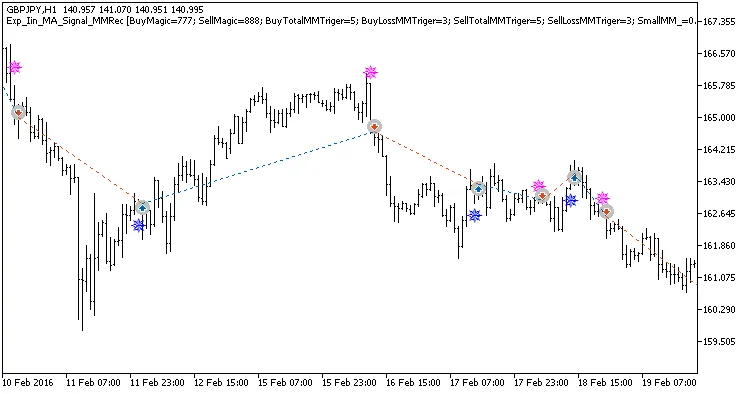
Fig. 1. Examples of trades on the chart
Here are the testing results for GBPJPY on the H1 timeframe over the year 2017:
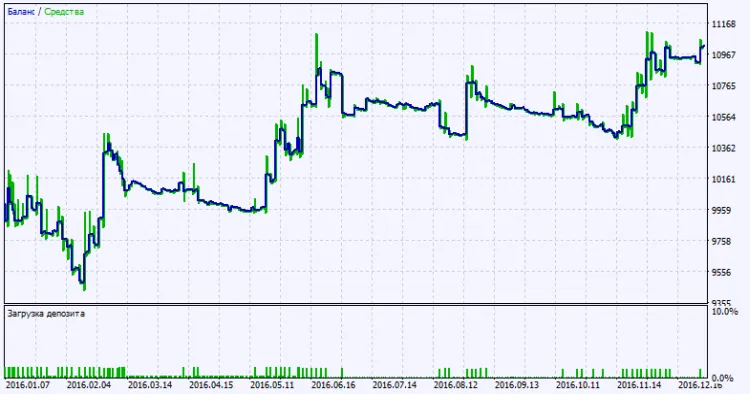
Fig. 2. Test results chart




Comments 0