
Meet the Creator:Scriptor
MQL5 Code Author:barabashkakvn
The Flat Trend EA utilizes the FlatTrend indicator, designed to help you identify whether the market is in a flat or trending state.
Here's how the histogram color buffers work when you set the signal timeframe to PERIOD_CURRENT:

When the Use hour flag is activated, the EA will evaluate the FlatTrend indicator from the specified Start Hour to End Hour on the Current Bar. If it detects a signal, it will open a Buy or Sell position. Be sure to set a stop loss (if Stop Loss isn't set to "0.0") and a take profit (if Take Profit isn't set to "0.0").
If you want to maximize your gains, trailing is enabled when the Trailing Stop is not set to "0.0".
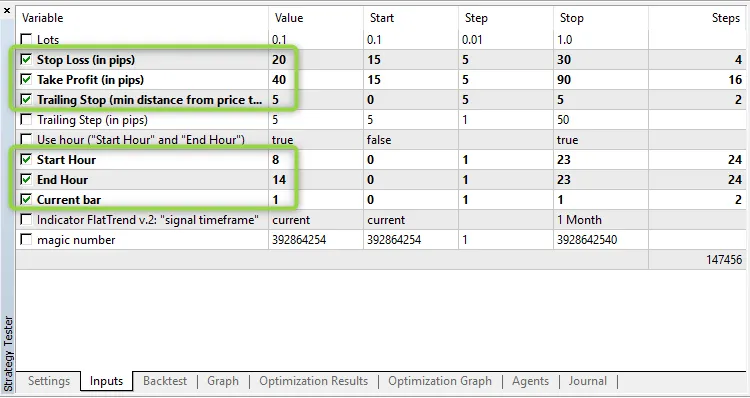
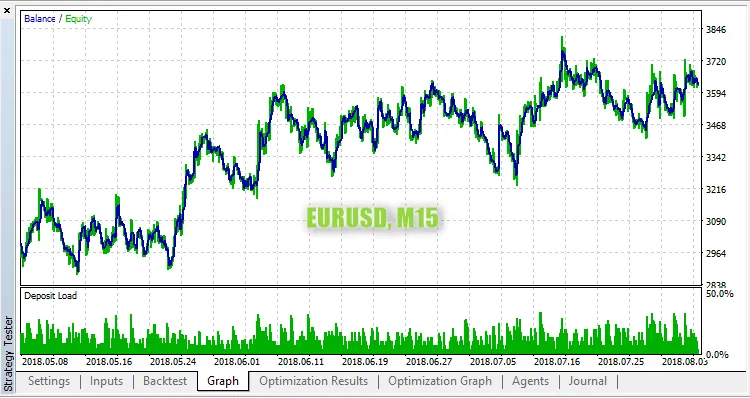
This EA has been tested on the EUR/USD pair using the 15-minute timeframe with the following parameters:




Comments 0