
Hey traders! If you're keen on boosting your trading strategy, check out this powerful Expert Advisor (EA) that combines two independent trading systems using the Skyscraper_Fix and ColorAML indicators. This EA not only helps you make trades but also adjusts the volume of upcoming trades based on the performance of previous ones.
Trading signals pop up when a bar closes and a trend shifts, which is indicated by a color change in either of the two indicators. This nifty feature means you can stay ahead of the game!
Let’s dive into how you can manage your trade volumes with some handy input variables. For the system using the Skyscraper_Fix indicator, here’s what you need to know:
inputuint A_BuyLossMMTriger=2; // Number of losing Buy trades to lower Money Managementinputuint A_SellLossMMTriger=2; // Number of losing Sell trades to lower Money Managementinputdouble A_SmallMM=0.01 // Portion of deposit in a trade when losinginputdouble A_MM=0.1 // Portion of deposit in a trade during normal conditions
So, what does this mean? If the last two trades in one direction were both losses, the EA will open the next trade in the same direction with a volume of 0.01 lot. However, if at least one of those last two trades was profitable, it will kick off the next trade with a volume of 0.1 lots.
But that’s not all! The ColorAML trading system offers similar input options:
inputuint B_BuyLossMMTriger=2 // Number of losing Buy trades to lower Money Managementinputuint B_SellLossMMTriger=2; // Number of losing Sell trades to lower Money Managementinputdouble B_SmallMM=0.01 // Portion of deposit in a trade when losinginputdouble B_MM=0.1 // Portion of deposit in a trade
To ensure your EA runs smoothly, make sure the compiled files for Skyscraper_Fix.ex5 and ColorAML.ex5 indicators are in the <terminal_data_directory>\MQL5\Indicators folder.
During testing, default input parameters were utilized. Notably, Stop Loss and Take Profit settings were not applied.
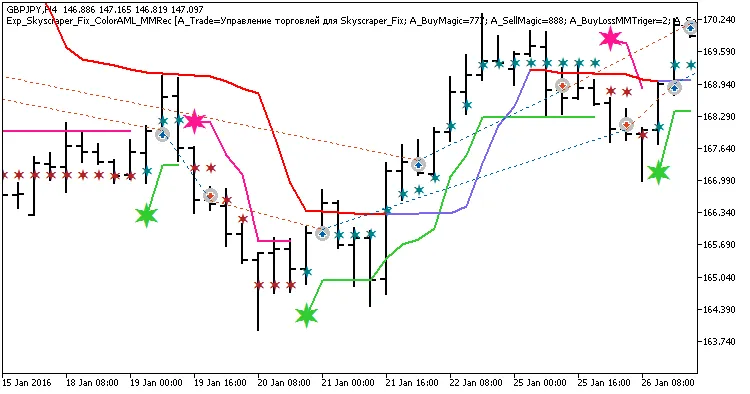
Fig. 1. Examples of trades on the chart
Here’s a sneak peek at the test results for GBPJPY on the H4 timeframe over the year 2016:
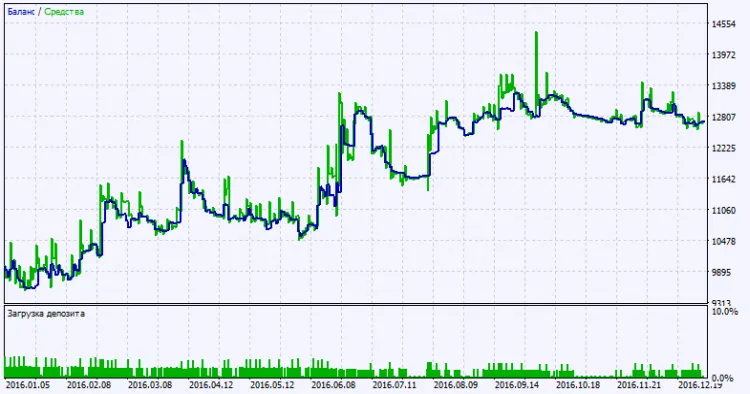
Fig. 2. Test results chart




Comments 0