Technical Indicator

Track Your EA Profits Effortlessly with This MetaTrader 4 Indicator
MetaTrader4
Track Your EA Profits Effortlessly with This MetaTrader 4 Indicator

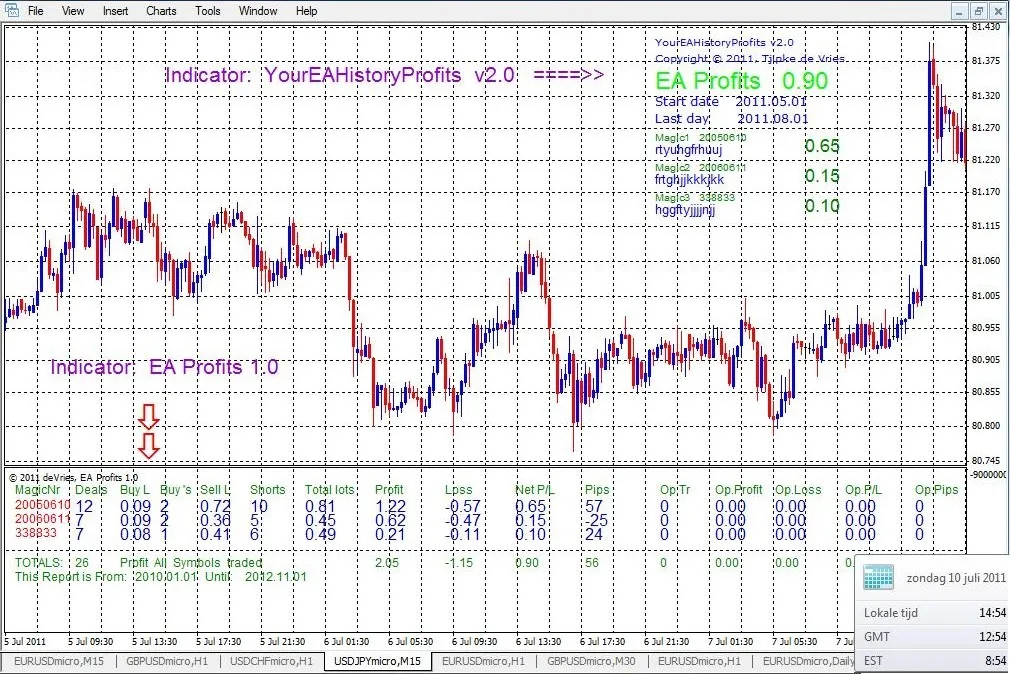
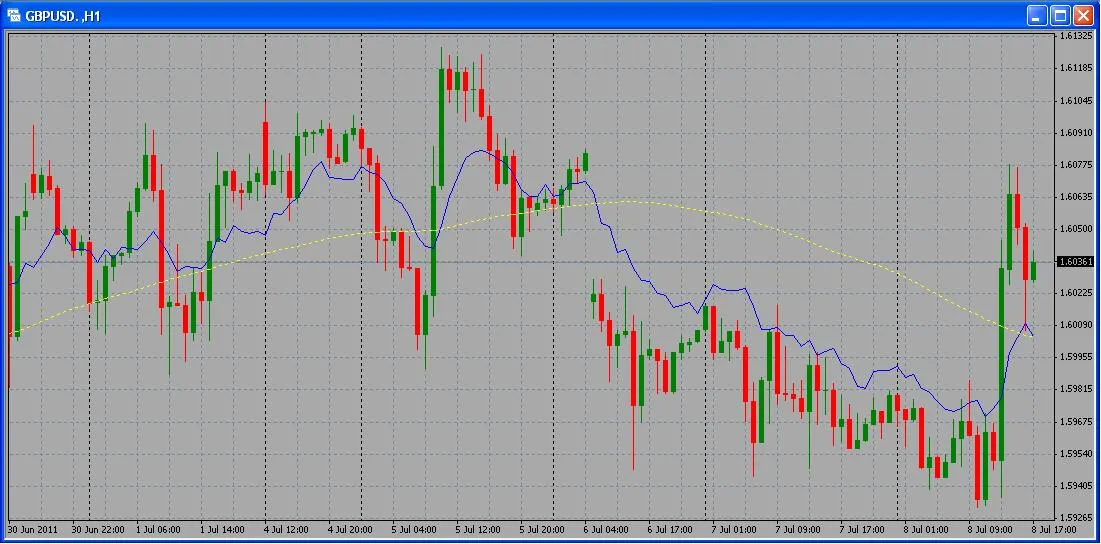
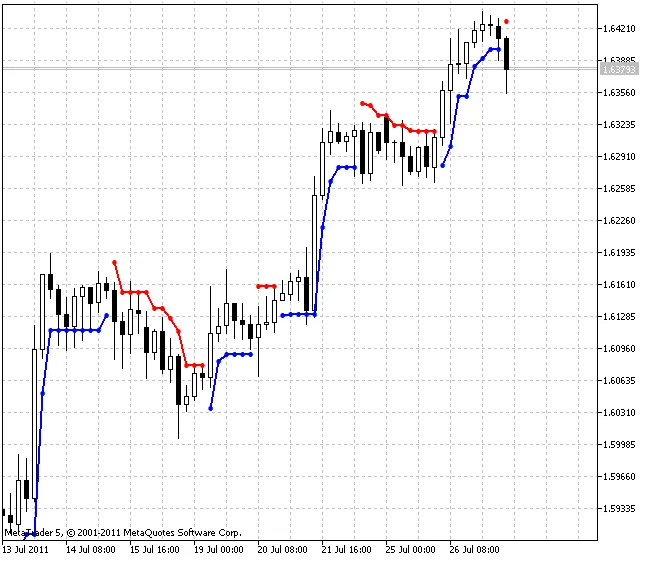
Description: Are you looking for an easy way to monitor the profits generated by your Expert Advisors (EAs) on MetaTrader 4? Look no further! This nifty indicator allows you to visualize the earnings of your EA over a specified period. Your EA's profit history is displayed right on the main chart. Plus, you can customize the colors, font size, font type, and the position of the indicator on your chart to suit your trading style. The first version supports up to 5 magic numbers but doesn’t display the EA names on the chart. It’s designed specifically to showcase the profits of a single EA across multiple magic numbers. Check out the image below for a visual representation: Version 2 takes it up a notch, allowing for a maximum of 10 magic numbers. It calculates profits based on all symbols or just the symbol currently displayed on your chart. You can also include the EA name for each magic number! extern string datetobegin = "year1_month_day"; extern datetime firstday = D'2011.05.01'; // 1 May 2011 extern string finishday = "year2_month_day"; extern datetime lastday = D'2011.08.01'; extern string All_Pairs = "True: All Pairs -- False: Chart Symbol()"; extern bool All_pairs = True; extern int Magic1 = 0; extern string EAnameMagic1 = ""; Here’s a look at some additional settings available in YourEAHistoryProfits: extern int yline = 10; // Adjusts vertical position on the chart extern int xcolom1 = 10; // Moves the indicator to the right based on volume extern int xcolom2 = 150; extern color TotalsUpColor = Lime; extern color TotalsDnColor = Red; // Distinguishes between last closed trades extern color ProfitUpColor = Green; extern color ProfitDnColor = Red; extern color DefaultColor = Blue; extern string note3 = "Font Size"; extern int MagicNrsSize = 8; extern int EAnameSize = 10; This snippet gives you a glimpse of the code behind YourEAHistoryProfits, and yes, you can pick your preferred font type too! EA Profits is an indicator that operates in a separate window, showing both the results of closed trades and the performance of open trades. With this tool, keeping track of your trading success has never been easier!

2011.07.18
Mastering the Ergodic DTI-Oscillator for Better Trading Strategies
MetaTrader5
Mastering the Ergodic DTI-Oscillator for Better Trading Strategies

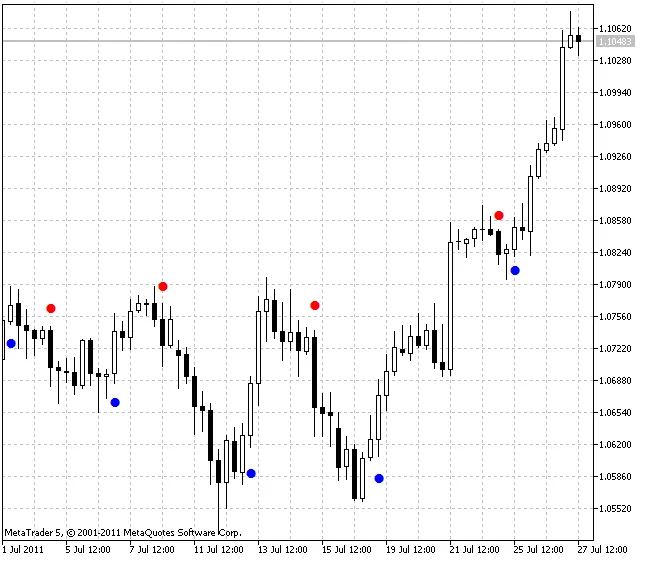
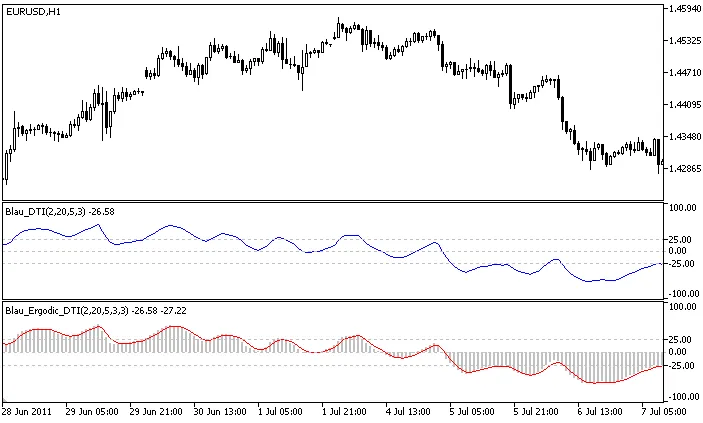
Author: Andrey N. Bolkonsky If you're looking to enhance your trading game, the Ergodic DTI-Oscillator is a must-have tool in your toolkit. This innovative indicator, based on the Directional Trend Index, was popularized by William Blau in his book "Momentum, Direction, and Divergence: Applying the Latest Momentum Indicators for Technical Analysis". How to Install the Ergodic DTI-Oscillator Make sure to place WilliamBlau.mqh in your terminal_data_folder\MQL5\Include\ Put Blau_Ergodic_DTI.mq5 in your terminal_data_folder\MQL5\Indicators\ Ergodic DTI-Oscillator by William Blau Understanding the Calculation The Ergodic DTI-Oscillator is calculated as follows: Ergodic_DTI(q,r,s,u) = DTI(q,r,s,u)SignalLine(q,r,s,u,ul) = EMA( Ergodic_DTI(q,r,s,u) ,ul) Where: Ergodic_DTI() - This represents the Ergodic Line, derived from the Directional Trend Index DTI(q,r,s,u); SignalLine() - This is the Signal Line, calculated using EMA(ul) on the Ergodic Line; ul - The period used for smoothing the Signal Line. Input Parameters Graphic Plot #0 - Ergodic Line (Directional Trend Index): q - The number of bars used in the DTI calculation (default is q=2); r - The period for the 1st EMA applied to the DTI (default is r=20); s - The period for the 2nd EMA applied after the 1st smoothing (default is s=5); u - The period for the 3rd EMA applied after the 2nd smoothing (default is u=3); Graphic Plot #1 - Signal Line: ul - The smoothing period for the Signal Line (default is ul=3); Important Notes Ensure that q>0; All values for r, s, and u must be greater than 0. If any of these are set to 1, smoothing will not be applied; Make sure ul>0. If ul=1, the Signal Line and Ergodic Line will be identical; Minimum rates should be calculated as: (q-1+r+s+u+ul-4+1).

2011.07.15
Unlocking the Power of the Directional Trend Index (DTI) for Better Trading Decisions
MetaTrader5
Unlocking the Power of the Directional Trend Index (DTI) for Better Trading Decisions

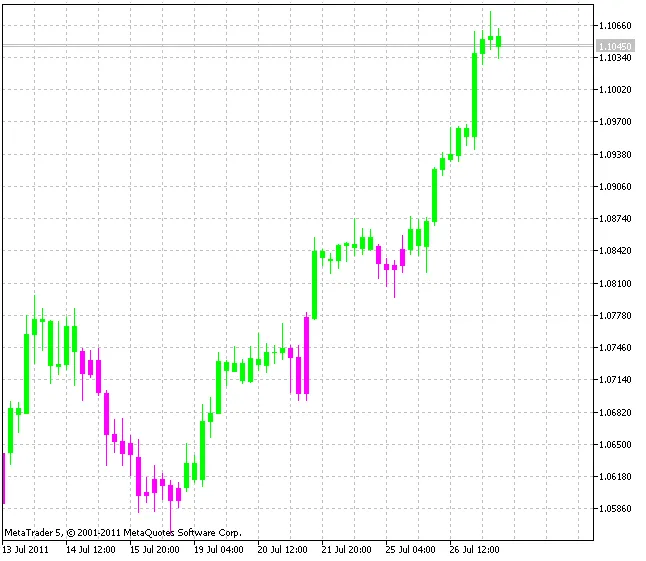
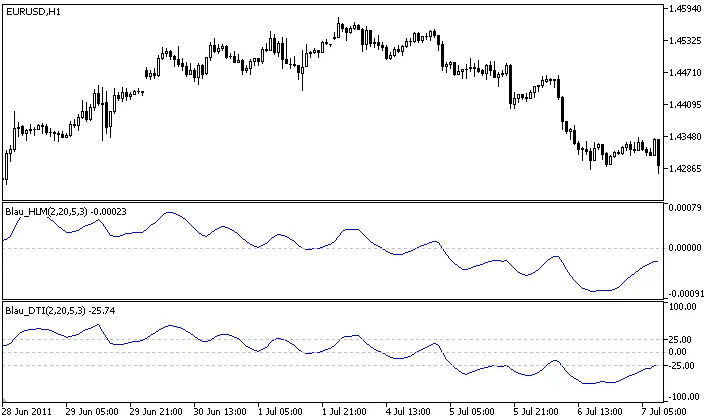
Author: Andrey N. Bolkonsky Hey there, traders! Today, we're diving into the Directional Trend Index (DTI), a nifty indicator developed by William Blau. If you're keen to enhance your trading strategy, this tool might just be your new best friend. You can find more about it in Blau's book, "Momentum, Direction, and Divergence: Applying the Latest Momentum Indicators for Technical Analysis". Make sure to place WilliamBlau.mqh in your terminal_data_folder\MQL5\Include\ And don’t forget to put Blau_DTI.mq5 in your terminal_data_folder\MQL5\Indicators\ Directional Trend Index (DTI) Indicator by William Blau How the DTI is Calculated: So, how does the Directional Trend Index work? Here’s the formula:                        100 * EMA(EMA(EMA( HLM(q) ,r),s),u)             100 * HLM(q,r,s,u)DTI(q,r,s,u) = ––––––––––––––––––––––––––––––––– = –––––––––––––––––––––––––––––                         EMA(EMA(EMA( |HLM(q)| ,r),s),u)          EMA(EMA(EMA( |HLM(q)| ,r),s),u)if EMA(EMA(EMA(|HLM(q)|,r),s),u)=0, then DTI(price,q,r,s,u)=0 In this formula: q - the number of bars used to calculate Up Trend Momentum and Down Trend Momentum; HLM(q) = HMU(q) - LMD(q) - the Composite High/Low Momentum; |HLM(q)| - the absolute value of HLM(q); HLM(q,r,s,u) - triple smoothed HLM(q); EMA(...,r) - the first smoothing: EMA(r), applied to HLM(q) the absolute values of HLM(q); EMA(EMA(...,r),s) - the second smoothing: EMA(s), applied to the result of the first smoothing; EMA(EMA(EMA(...,r),s),u) - the third smoothing: EMA(u), applied to the result of the second smoothing. Input Parameters: q - number of bars used in HLM calculation (default is q=2); r - period of the first EMA applied to HLM (default is r=20); s - period of the second EMA applied to the result of the first smoothing (default is s=5); u - period of the third EMA applied to the result of the second smoothing (default is u=3). Important Notes: Ensure that q > 0; r, s, and u must be greater than 0. If any of these are equal to 1, smoothing won’t be applied; Minimum rates = (q-1+r+s+u-3+1).

2011.07.15
Understanding the Composite High-Low Momentum Indicator for MetaTrader 5
MetaTrader5
Understanding the Composite High-Low Momentum Indicator for MetaTrader 5

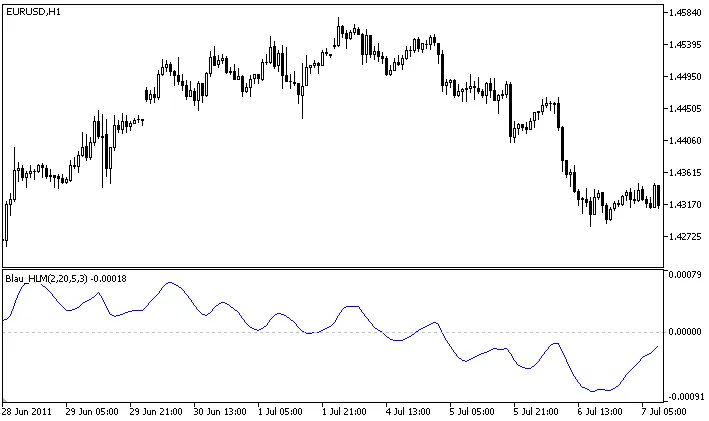
Author: Andrey N. Bolkonsky The Composite High-Low Momentum indicator is a powerful tool outlined by William Blau in his book, "Momentum, Direction, and Divergence: Applying the Latest Momentum Indicators for Technical Analysis". This indicator helps traders assess momentum trends in the market effectively. Make sure to place WilliamBlau.mqh in your terminal_data_folder\MQL5\Include\ Place Blau_HLM.mq5 in your terminal_data_folder\MQL5\Indicators\ Composite High-Low Momentum Indicator by William Blau Calculation: To calculate the Composite High-Low Momentum, you can use the following formula: HLM(q) = HMU(q) - LMD(q) Where: q - number of bars for calculating Up Trend Momentum and Down Trend Momentum; HMU(q) - Up Trend Momentum (q bars); LMD(q) - Down Trend Momentum (q bars). The smoothed version of the Composite High/Low Momentum can be calculated as follows: HLM(q,r,s,u) = EMA(EMA(EMA( HLM(q) ,r),s),u) = EMA(EMA(EMA( HMU(q)-HMD(q) ,r),s),u) In this case: q - number of bars for calculating Up Trend Momentum and Down Trend Momentum; HMU(q) - Up Trend Momentum (q bars); LMD(q) - Down Trend Momentum (q bars); HLM(q)=HMU(q)-LMD(q) - Composite High/Low Momentum; EMA(HLM(q),r) - 1st smoothing - EMA(r) applied to the Composite High/Low Momentum; EMA(EMA(...,r),s) - 2nd smoothing - EMA(s) applied to the result of the 1st smoothing; EMA(EMA(EMA(...,r),s),u) - 3rd smoothing - EMA(u) applied to the result of the 2nd smoothing. Input Parameters: q - number of bars for HLM calculation (default is q=2); r - period of the 1st EMA applied to HLM (default is r=20); s - period of the 2nd EMA applied to the result of the 1st smoothing (default is s=5); u - period of the 3rd EMA applied to the result of the 2nd smoothing (default is u=3). Important Notes: Ensure q>0; Make sure that r>0, s>0, u>0. If any of r, s, or u equals 1, the smoothing is not applied; The minimum rates must equal (q-1+r+s+u-3+1).

2011.07.14
Unlocking the Ergodic CSI Oscillator: A Guide for MetaTrader 5 Traders
MetaTrader5
Unlocking the Ergodic CSI Oscillator: A Guide for MetaTrader 5 Traders

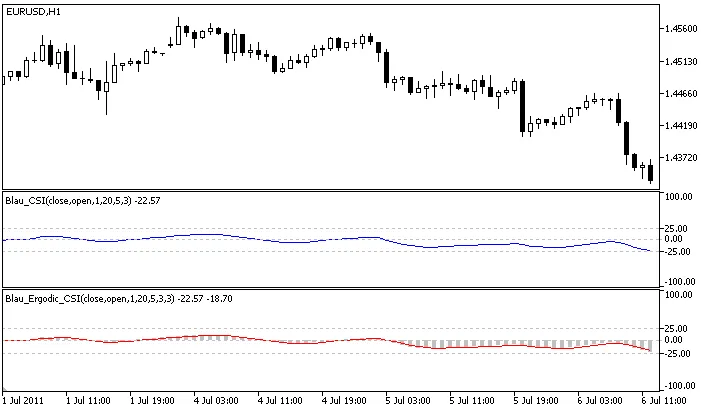
Author: Andrey N. Bolkonsky If you're keen on enhancing your trading strategies, the Ergodic CSI Oscillator is one tool you won’t want to overlook. Developed by William Blau and discussed in his book "Momentum, Direction, and Divergence: Applying the Latest Momentum Indicators for Technical Analysis", this oscillator is based on the Candlestick Index. Make sure to place WilliamBlau.mqh in terminal_data_folder\MQL5\Include\ Place Blau_Ergodic_CSI.mq5 in terminal_data_folder\MQL5\Indicators\ Ergodic CSI-Oscillator by William Blau How It Works: The CSI Oscillator is calculated using the following formulas: Ergodic_CSI(price1,price2,q,r,s,u) = CSI(price1,price2,q,r,s,u)SignalLine(price1,price2,q,r,s,u,ul) = EMA( Ergodic_CSI(price1,price2,q,r,s,u) ,ul) Breaking it down: Ergodic_CSI(): This gives you the Ergodic line based on the Candlestick Index. SignalLine(): This is the Signal Line, which is an Exponential Moving Average (EMA) applied to the Ergodic line. ul: This refers to the period of the Signal Line. Input Parameters: Graphic Plot #0 - Ergodic Line (Candlestick Index): q: Number of bars used for Candlestick Momentum calculation (default is q=1). r: Period of the first EMA applied to Candlestick Momentum (default is r=20). s: Period of the second EMA applied to the first smoothing result (default is s=5). u: Period of the third EMA applied to the second smoothing result (default is u=3). Graphic Plot #1 - Signal Line: ul: This is the period of the Signal Line, with EMA(ul) applied to the Ergodic line (default is ul=3). AppliedPrice1: This refers to the price type (default is AppliedPrice1=PRICE_CLOSE). AppliedPrice2: This is another price type (default is AppliedPrice2=PRICE_OPEN). Important Notes: Ensure that q>0. For r, s, or u, ensure they are greater than zero. If any are equal to 1, no smoothing is applied. ul>0. If ul=1, the Signal Line and Ergodic Lines will be identical. Minimum rates = (q-1+r+s+u+ul-4+1). Now that you have a better understanding of the Ergodic CSI Oscillator, it’s time to give it a try in your trading strategies. It could be the edge you’ve been searching for!

2011.07.14
Unlocking the Ergodic CMI Oscillator: A Trader's Guide
MetaTrader5
Unlocking the Ergodic CMI Oscillator: A Trader's Guide

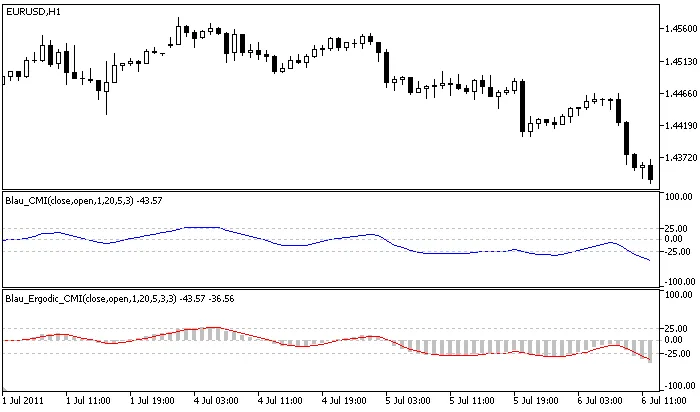
Author: Andrey N. Bolkonsky The Ergodic CMI-Oscillator, rooted in the Candlestick Momentum Index, is a powerful tool introduced by William Blau in his insightful book, "Momentum, Direction, and Divergence: Applying the Latest Momentum Indicators for Technical Analysis". Make sure to place WilliamBlau.mqh in your terminal_data_folder\MQL5\Include\ Drop Blau_CMI.mq5 into your terminal_data_folder\MQL5\Indicators\ Ergodic CMI-Oscillator by William Blau Calculation Breakdown: The Ergodic CMI-Oscillator is calculated as follows: Ergodic_CMI(price1, price2, q, r, s, u) = CMI(price1, price2, q, r, s, u)SignalLine(price1, price2, q, r, s, u, ul) = EMA(Ergodic_CMI(price1, price2, q, r, s, u), ul) Where: Ergodic_CMI() - The Ergodic Candlestick Momentum Index CMI(price1, price2, q, r, s, u); SignalLine() - The Signal Line, which is an exponentially smoothed moving average EMA(ul), applied to the Ergodic; ul - The period of the signal line. Input Parameters: Graphic Plot #0 - Ergodic (Candlestick Momentum Index): q - Number of bars used in the calculation of Candlestick Momentum (default is q=1); r - Period of the 1st EMA(r), applied to Candlestick Momentum (default is r=20); s - Period of the 2nd EMA(s), applied to the result of the 1st smoothing (default is s=5); u - Period of the 3rd EMA(u), applied to the result of the 2nd smoothing (default is u=3); Graphic Plot #1 - Signal Line: ul - Period of the Signal Line - EMA(ul), applied to Ergodic (default is ul=3); AppliedPrice1 - Price type (default is AppliedPrice1=PRICE_CLOSE); AppliedPrice2 - Price type (default is AppliedPrice2=PRICE_OPEN). Important Notes: Ensure q>0; r>0, s>0, u>0. If r, s, or u equal 1, smoothing is not applied; ul>0. If ul=1, the signal and main lines will coincide; Minimum rates = (q-1+r+s+u+ul-4+1).

2011.07.14
Unlocking the Candlestick Index: A Trader's Guide to Blau_CSI for MetaTrader 5
MetaTrader5
Unlocking the Candlestick Index: A Trader's Guide to Blau_CSI for MetaTrader 5

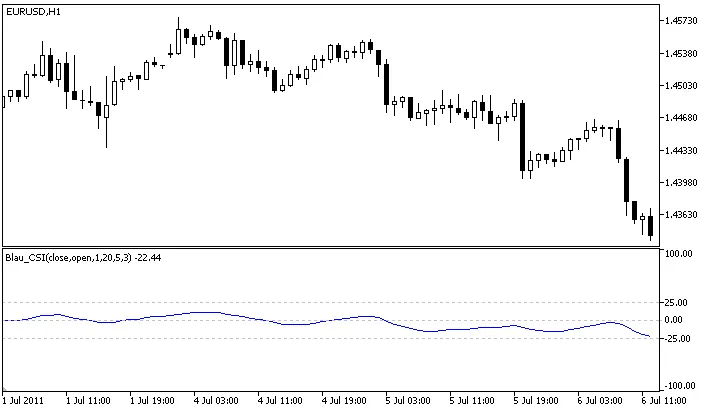
Author: Andrey N. Bolkonsky The Candlestick Index (CSI), developed by William Blau, is a powerful tool for traders looking to analyze market momentum. If you’re familiar with the Candlestick Momentum Indicator, you’ll appreciate how the CSI builds on that foundation. Blau discusses this in detail in his book "Momentum, Direction, and Divergence: Applying the Latest Momentum Indicators for Technical Analysis". The Candlestick Index values are normalized to fit within the range of [–100,+100]. Positive CSI values indicate overbought conditions, while negative values suggest oversold scenarios in the market. Place WilliamBlau.mqh in terminal_data_folder\MQL5\Include\ Place Blau_CSI.mq5 in terminal_data_folder\MQL5\Indicators\ Candlestick Index by William Blau How It’s Calculated: The CSI is calculated using the following formula:                                          100 * EMA(EMA(EMA( cmtm(price1,price2,q) ,r),s),u)           100 * CMtm(price1,price2,q,r,s,u)CSI(price1,price2,q,r,s,u) = –––––––––––––––––––––––––––––––––––––––––––– = ––––––––––––––––––––––––––––––––––                                                      EMA(EMA(EMA( HH(q)-LL(q) ,r),s),u)                  EMA(EMA(EMA( HH(q)-LL(q) ,r),s),u) if EMA(EMA(EMA(HH(q)-LL(q),r),s),u)=0, then CSI(price1,price2,q,r,s,u)=0 Where: q - number of bars used for the Candlestick Momentum calculation; price1 - the close price; price2 - the open price from q bars ago; cmtm(price1,price2,q) - calculates the q-period Candlestick Momentum; LL(q) - the lowest price over q bars; HH(q) - the highest price over q bars; HH(q) - LL(q) - the price range for the q bars; CMtm(price1,price2,q,r,s,u) - the triple smoothed Candlestick Momentum; EMA(...,r) - first smoothing using EMA(r), applied to: Candlestick Momentum (q bars); Price Range (q bars); EMA(EMA(...,r),s) - second smoothing using EMA(s), applied to the result of the first smoothing; EMA(EMA(EMA(...,r),s),u) - third smoothing using EMA(u), applied to the result of the second smoothing. Input Parameters: q - number of bars for Candlestick Momentum (default q=1); r - period of the first EMA(r) for Candlestick Momentum (default r=20); s - period of the second EMA(s) for the first smoothing (default s=5); u - period of the third EMA(u) for the second smoothing (default u=3); AppliedPrice1 - price type (default AppliedPrice1=PRICE_CLOSE); AppliedPrice2 - price type (default AppliedPrice2=PRICE_OPEN). Important Notes: Ensure q>0; Make sure r>0, s>0, u>0. If r, s, or u equal 1, smoothing won’t be applied; Minimum rates = (q-1+r+s+u-3+1).

2011.07.12
Unlocking the Candlestick Momentum Index (CMI) for MetaTrader 5
MetaTrader5
Unlocking the Candlestick Momentum Index (CMI) for MetaTrader 5

Author: Andrey N. Bolkonsky The Candlestick Momentum Index (CMI), inspired by the Candlestick Momentum Indicator, is a powerful tool introduced by William Blau in his acclaimed book, "Momentum, Direction, and Divergence: Applying the Latest Momentum Indicators for Technical Analysis". Make sure to place WilliamBlau.mqh under terminal_data_folder\MQL5\Include\ Put Blau_CMI.mq5 in terminal_data_folder\MQL5\Indicators\ The CMI values are normalized within the range of [-100,+100]. This normalization allows positive CMI values to indicate overbought market conditions, while negative values signal oversold conditions. It’s a nifty way to gauge market sentiment! Candlestick Momentum Index Calculation: The CMI is calculated using the following formula: 100 * EMA(EMA(EMA(cmtm(price1,price2,q),r),s),u)                 100 * CMtm(price1,price2,q,r,s,u)CMI(price1,price2,q,r,s,u) = –––––––––––––––––––––––––––––––––––––––––––– = –––––––––––––––––––––––––––––––––––––––––                                              EMA(EMA(EMA(|cmtm(price1,price2,q)|,r),s),u)           EMA(EMA(EMA(|cmtm(price1,price2,q)|,r),s),u) if EMA(EMA(EMA(|cmtm(price1,price2,q)|,r),s),u)=0, then CMI(price1,price2,q,r,s,u)=0 Where: q: Number of bars used to calculate Candlestick Momentum; price1: Close price; price2: Open price from q bars ago; cmtm(price1,price2,q): price1 - price2[q-1] - Candlestick Momentum; |cmtm(price1,price2,q)|: Absolute value of Candlestick Momentum; CMtm(price,q,r,s,u): Triple smoothed Candlestick Momentum; EMA(...,r): First smoothing EMA(r) applied to: Candlestick Momentum; Absolute value of Candlestick Momentum; EMA(EMA(...,r),s): Second smoothing - EMA(s), applied to the result of the first smoothing; EMA(EMA(EMA(...,r),s),u): Third smoothing - EMA(u), applied to the result of the second smoothing. Input parameters: q: Number of bars for Candlestick Momentum calculation (default q=1); r: Period of the first EMA applied to Candlestick Momentum (default r=20); s: Period of the second EMA (default s=5); u: Period of the third EMA (default u=3); AppliedPrice1: Price type (default AppliedPrice1=PRICE_CLOSE); AppliedPrice2: Price type (default AppliedPrice2=PRICE_OPEN). Note: q > 0; r > 0, s > 0, u > 0. If r, s, or u are equal to 1, the smoothing is not applied; Minimum rates = (q-1+r+s+u-3+1).

2011.07.12

Unlocking the Candlestick Momentum Indicator for MetaTrader 5
MetaTrader5
Unlocking the Candlestick Momentum Indicator for MetaTrader 5

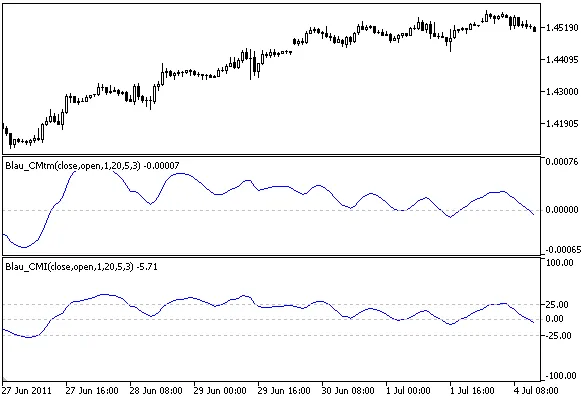
Author: Andrey N. Bolkonsky The Candlestick Momentum Indicator (also known as the q-period Candlestick Momentum) is a powerful tool developed by William Blau. You can dive deeper into its mechanics in his book, "Momentum, Direction, and Divergence: Applying the Latest Momentum Indicators for Technical Analysis". Ensure WilliamBlau.mqh is placed in terminal_data_folder\MQL5\Include\ Place Blau_CMtm.mq5 in terminal_data_folder\MQL5\Indicators\ At its core, momentum is the difference between the current price (like the closing price of a bar) and a price from a few bars back. This concept is versatile and can be applied across any timeframe. As William Blau describes, Candlestick Momentum is defined as the price change over a fixed interval: cmtm = close - open Where: close: the closing price of the bar (candle); open: the opening price of the bar (candle). The momentum can be either positive or negative. If the closing price is higher than the opening price, we have positive momentum. Conversely, if the opening price exceeds the closing price, it results in negative momentum. The definition of Candlestick Momentum can be expanded to include: It can be applied to any timeframe. The prices used (closing price, opening price) can be adjusted as needed. Understanding the q-period Candlestick Momentum Candlestick Momentum Indicator by William Blau Calculation: The formula for calculating Candlestick Momentum is: cmtm(price1,price2,q) = price1 - price2[q-1] Where: q: the number of bars used in the calculation of Candlestick Momentum; price1: the closing price; price2[q–1]: the opening price from q bars ago. The smoothed q-period Candlestick Momentum is calculated using the following formula: CMtm(price1,price2,q,r,s,u) = EMA(EMA(EMA( cmtm(price1,price2,q) ,r),s),u) Where: q: the number of bars for Candlestick Momentum; price1: the closing price; price2: the opening price from q bars ago; cmtm(price1,price2,q): the basic q-period Candlestick Momentum; EMA(cmtm(price1,price2,q),r): 1st smoothing using EMA (r) on the q-period Candlestick Momentum; EMA(EMA(...,r),s): 2nd smoothing using EMA(s) on the result of the 1st smoothing; EMA(EMA(EMA(...,r),s),u): 3rd smoothing using EMA(u) on the result of the 2nd smoothing. Input parameters: q: the period for the Candlestick Momentum Indicator (default q=1); r: the period of the 1st EMA (default r=20); s: the period of the 2nd EMA (default s=5); u: the period of the 3rd EMA (default u=3); AppliedPrice1: price type (default AppliedPrice=PRICE_CLOSE); AppliedPrice2: price type (default AppliedPrice=PRICE_OPEN). Note: q must be greater than 0; r, s, and u must be greater than 0. If any of these values are equal to 1, smoothing will not be applied; Minimum rates = (q-1+r+s+u-3+1).

2011.07.12
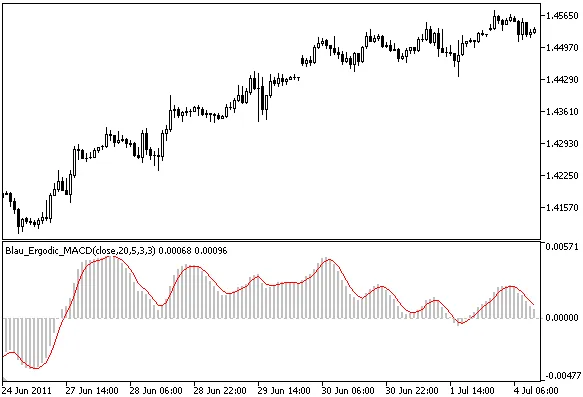
Unlocking Trading Insights with the Ergodic MACD Oscillator by William Blau
MetaTrader5
Unlocking Trading Insights with the Ergodic MACD Oscillator by William Blau

Author: Andrey N. Bolkonsky The Ergodic MACD Oscillator, crafted by William Blau, is an advanced tool detailed in his book "Momentum, Direction, and Divergence: Applying the Latest Momentum Indicators for Technical Analysis". To get started, make sure to place WilliamBlau.mqh in your terminal_data_folder\MQL5\Include\ Then, drop Blau_Ergodic_MACD.mq5 into terminal_data_folder\MQL5\Indicators\ Erogdic MACD Oscillator by William Blau How It Works: The Ergodic MACD Oscillator is calculated using the following formula: Ergodic_MACD(price,r,s,u) = MACD(price,r,s,u)SignalLine(price,r,s,u,ul) = EMA( Ergodic_MACD(price,r,s,u) ,ul) Where: Ergodic_MACD() - This represents the Ergodic MACD calculated with parameters (price, r, s, u); SignalLine() - The signal line is an exponentially smoothed moving average applied to the MACD. Unlike the standard MACD, which uses a simple moving average, the Ergodic MACD employs an exponentially smoothed moving average, as proposed by William Blau. Input Parameters: For the Ergodic plot (MACD): r - Period for the first EMA (slow), default is r=20; s - Period for the second EMA (fast), default is s=5; u - Period for the third EMA, default is u=3. For the Signal Line: ul - Smoothing period for the signal line, default is ul=3. AppliedPrice - Select the price type (default: PRICE_CLOSE). Important Notes: Ensure r > 1 and s > 1; Keep in mind that s < r (William Blau advises this, but there's no code check); u > 0. If u = 1, no smoothing is applied; ul > 0. If ul = 1, the signal and ergodic lines will be identical; Minimum rates = ([max(r,s)] + u + ul - 3 + 1).

2011.07.08
Mastering the Blau_MACD Indicator for MetaTrader 5: A Trader's Guide
MetaTrader5
Mastering the Blau_MACD Indicator for MetaTrader 5: A Trader's Guide

Author: Andrey N. Bolkonsky If you're diving into technical analysis, you might want to check out the Moving Averages Convergence/Divergence (MACD) Indicator by William Blau. This tool is detailed in his book, Momentum, Direction, and Divergence: Applying the Latest Momentum Indicators for Technical Analysis. The MACD Indicator is calculated by subtracting two exponentially smoothed moving averages (EMA). The fast EMA has a period of s, while the slow EMA uses a period of r. The value of the MACD shows the relationship between the fast s-period EMA and the slow r-period EMA. When EMA(s) is greater than EMA(r), the MACD is positive. If EMA(s) is less than EMA(r), it’s negative. A rising MACD indicates divergence between the moving averages, while a falling MACD suggests they are converging. Place WilliamBlau.mqh in terminal_data_folder\MQL5\Include\ Place Blau_SM_Stochastic.mq5 in terminal_data_folder\MQL5\Indicators\ Moving Averages Convergence/Divergence by William Blau. Calculation: The MACD is calculated using the following formula: macd(price,r,s) = EMA(price,s) - EMA(price,r)s &lt; r Where: price - the closing price of the current period; EMA(price,r) - the slow EMA based on period r; EMA(price,s) - the fast EMA based on period s. William Blau’s formula for MACD looks like this: MACD(price,r,s,u) = EMA( macd(price,r,s) ,u) = EMA( EMA(price,s)-EMA(price,r) ,u)s &lt; r Where: price - the closing price; EMA(price,r) - first smoothing using the slow EMA; EMA(price,s) - second smoothing using the fast EMA; macd(r,s)=EMA(price,s)-EMA(price,r) - the convergence/divergence of the moving averages; EMA(macd(r,s),u) - third smoothing applied to the MACD. Input parameters:r - period of the first EMA (slow), default is r=20;s - period of the second EMA (fast), default is s=5;u - period of the third EMA applied to the MACD, default is u=3;AppliedPrice - type of price, default is AppliedPrice=PRICE_CLOSE.Note:r&gt;1, s&gt;1;s&lt;r (according to William Blau, no checks are implemented in the code);u&gt;0. If u=1, no smoothing is applied;Minimum rates =([max(r,s)]+u-2+1).

2011.07.08
Mastering the Ergodic Mean Deviation Index Oscillator for MetaTrader 5
MetaTrader5
Mastering the Ergodic Mean Deviation Index Oscillator for MetaTrader 5

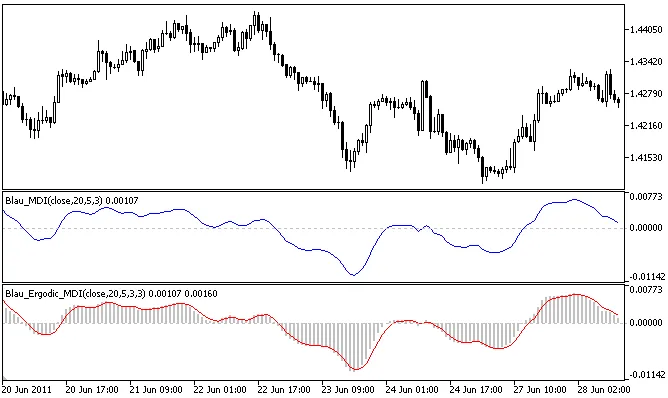
Author: Andrey N. Bolkonsky The Ergodic Mean Deviation Index (MDI) Oscillator, developed by William Blau, is a powerful tool for traders, drawing insights from the Mean Deviation Index. For a deeper dive into this concept, check out Momentum, Direction, and Divergence: Applying the Latest Momentum Indicators for Technical Analysis. How to Get Started To use the Ergodic MDI Oscillator, you'll need to set up a couple of files in your MetaTrader 5 environment: Place WilliamBlau.mqh in terminal_data_folder\MQL5\Include\ Put Blau_Ergodic_MDI.mq5 in terminal_data_folder\MQL5\Indicators\ Ergodic MDI-Indicator by William Blau Understanding the Calculation The Ergodic Mean Deviation Oscillator is calculated using the following formulas: Ergodic_MDI(price,r,s,u) = MDI(price,r,s,u)SignalLine(price,r,s,u,ul) = EMA( Ergodic_MDI(price,r,s,u) ,ul) Here's a breakdown of the components: Ergodic_MDI() - The primary function calculating the Ergodic MDI; SignalLine() - This is the Signal Line, which represents the exponentially smoothed moving average of a specified period, applied to the Ergodic MDI; ul - The period for the EMA of the Signal Line. Input Parameters Graphic Plot #0 - Ergodic (Mean Deviation Indicator): r - Period of the first EMA applied to price (default is r=20); s - Period of the second EMA applied to mean deviation (default is s=5); u - Period of the third EMA applied to the result of the second smoothing (default is u=3); Graphic Plot #1 - Signal Line: ul - EMA period of the Signal Line applied to the Ergodic MDI (default is ul=3); AppliedPrice - Type of price used (default is AppliedPrice=PRICE_CLOSE). Important Notes Ensure that r > 1; s > 0 and u > 0. If r, s, or u = 1, no smoothing is applied; ul > 0. If ul = 1, the Signal Line and Mean Deviation Index will be identical; Minimum rates must equal (r + s + u + ul - 4 + 1).

2011.06.29
Understanding the Mean Deviation Index (MDI) for MetaTrader 5
MetaTrader5
Understanding the Mean Deviation Index (MDI) for MetaTrader 5

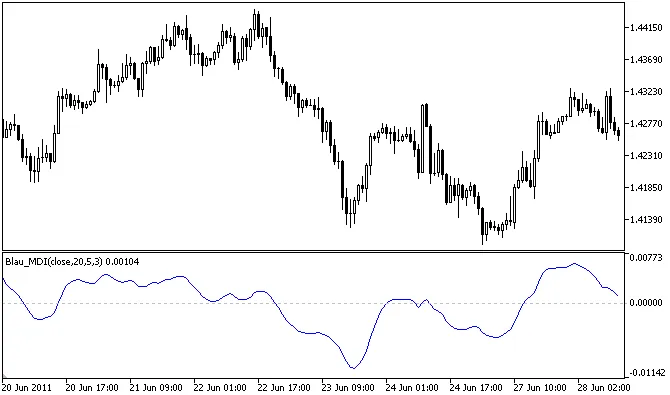
Author: Andrey N. Bolkonsky The Mean Deviation Index (MDI), also known as the Ergodic MDI, is a powerful tool for traders using MetaTrader 5. This double-smoothed indicator helps you gauge price momentum and trends by measuring the distance between the closing price and a smoothed moving average. Essentially, the mean deviation gives you an insight into how much the price deviates from the average, allowing you to make more informed trading decisions. The smoothing process does introduce some lag, which becomes apparent at price reversal points. The mean deviation value reflects the distance between the current price and the r-period moving average. The sign of the mean deviation indicates the price's position relative to the r-period moving average: it’s positive when the price is below the moving average and negative when it’s above. How to Use the MDI Ensure that WilliamBlau.mqh is placed in terminal_data_folder\MQL5\Include\ Put Blau_MDI.mq5 in terminal_data_folder\MQL5\Indicators\ Mean Deviation Index by William Blau Calculation of the MDI: The mean deviation is calculated with the following formula: md(price,r) = price - EMA(price,r) Where: price - closing price; EMA(price,r) - the exponentially smoothed moving average over period r. The Mean Deviation Index itself is derived from the formula: MDI(price,r,s,u) = EMA(EMA(md(price,r),s),u) = EMA(EMA(price-EMA(price,r),s),u) Where: price - closing price; EMA(price,r) - first EMA smoothing of period r; md(price,r) - mean deviation calculation; EMA(md(price,r),s) - second smoothing applied to mean deviation; EMA(EMA(md(price,r),s),u) - third smoothing applied to the result of the first smoothing. Input Parameters r - period of the first EMA applied to price (default is r=20); s - period of the second EMA applied to mean deviation (default is s=5); u - period of the third EMA applied to the result of the smoothing (default is u=3); AppliedPrice - type of price used (default is PRICE_CLOSE). Important Notes Ensure r&gt;1; s&gt;0 and u&gt;0. If r, s, or u =1, smoothing is not applied; Minimum rates = (r + s + u - 3 + 1). Understanding and utilizing the Mean Deviation Index can significantly enhance your trading strategy. By keeping an eye on price deviations, you can better navigate market trends and make more educated trading decisions.

2011.06.29
First Previous 323 324 325 326 327 328 329 330 331 332 333 Next Last