
If you're looking to enhance your intraday trading strategies, the VGridLine_Intraday X3 indicator is a must-have for your MetaTrader 5 toolkit. It provides a clear vertical time grid, marking every three hours on charts with intraday timeframes up to H3. Just a heads up, you won't see this indicator on H2 charts.
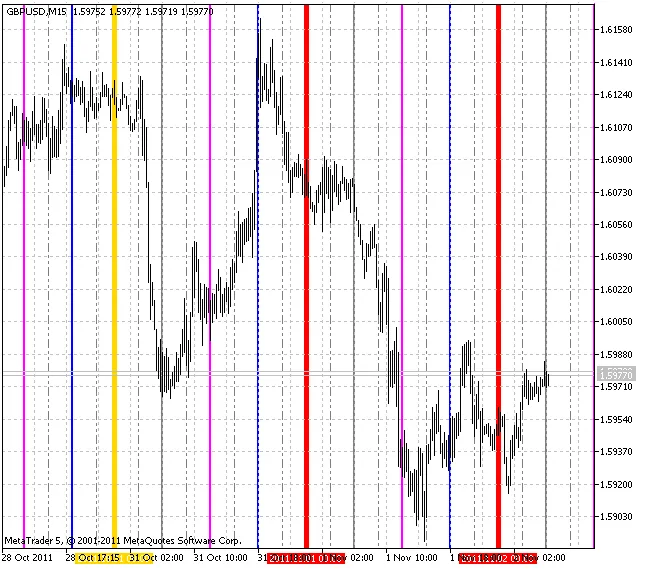
Key Features & Input Parameters
- Indicator Name: VGridLine_Intraday_X3
- Weekly History: Display up to 4 weeks of data
- Future Lines: Set for 1 future line
Customizing Your Indicator
Here’s how you can tweak the settings to fit your trading style:
// General settings
input string LinesSirname="VGridLine_Intraday_X3"; // Line name
input uint WeeklyTotal=4; // Weeks of history
input uint FutureTotal=1; // Future lines

// Week bar settings
input color Line_Color_W=Gold; // Color
input STYLE Line_Style_W=SOLID_; // Style
input ENUM_WIDTH Line_Width_W=w_5; // Width
input bool SetBackground_W=true; // Background

// Day bar settings
input color Line_Color_D=Red; // Color
input STYLE Line_Style_D=SOLID_; // Style
input ENUM_WIDTH Line_Width_D=w_5; // Width
input bool SetBackground_D=true; // Background

// 3 Hours Bar Settings
input color Line_Color_D1=Gray; // Color
input STYLE Line_Style_D1=DASHDOTDOT_; // Style
input ENUM_WIDTH Line_Width_D1=w_1; // Width
input bool SetBackground_D1=true; // Background
These are just a few of the settings you can customize. Adjusting the colors and styles can really help you visualize your trades better.
Conclusion
The VGridLine_Intraday X3 is a fantastic tool for traders who want to stay organized and make informed decisions quickly. By using it effectively, you can gain an edge in the fast-paced world of intraday trading. Happy trading!
Related Posts
- Introducing iMAX3: The Fast Trend Detector for Smart Traders
- Unlocking MetaCOT 2: Your Ultimate CFTC Indicator Toolkit for MT4
- Unlocking the Power of Master Tools for MetaTrader 4
- Visualize Current Trends Across All Time Frames with This MetaTrader 4 Indicator
- Unlock Market Cycles with the PGC Indicator for MetaTrader 5