
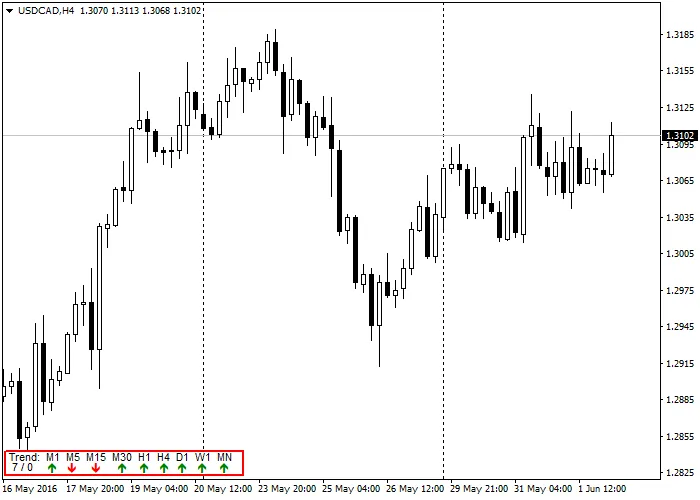
Hey traders! Today, I’m excited to introduce a graphical indicator that simplifies your trading analysis by displaying the current trend for all time frames in one neat panel. This is based on the well-known slope-direction-trend indicator, but I've made some tweaks to enhance its functionality.
While there have been various versions of this indicator floating around, none have managed to showcase every time frame in a single graphical panel on your screen. If you want to explore different options, you can check out this page for numerous results.
What I’ve done is take the original indicator and create a unified graphical panel that allows you to select your preferred method for the second moving average used for smoothing. The original code relied solely on Linear Weighted, which can lead to overly sensitive readings and potentially misleading trend signals. By offering the choice of a Simple averaging method for the second calculation, you’ll get a trend that more accurately reflects price movements.
Another exciting feature is that this indicator not only indicates the trend direction (up, down, or flat) but also provides its actual value. Stay tuned for my upcoming article where I’ll delve into how to use a double SlopeDirection indicator to create a trading system!
Now, let’s take a closer look at the code behind this indicator. The first step is to define all the object names we’ll be using. This is essential because it helps manage memory efficiently by allocating space for each object name only once.
// Define trend directions#define UPTREND 1#define DOWNTREND -1#define FLATTREND 0// Define Objects#define TrendPanel "TrendPanel"#define InfoLine1 "InfoLine1"#define InfoLine2 "InfoLine2"#define TrendLabel "Trend: M1 M5 M15 M30 H1 H4 D1 W1 MN"#define TrendUp "\233"#define TrendDown "\234"#define TrendFlat "\232"#define TrendUnknown "\251"#define StatObjectError "%s(%d) Failed to create '%s'. Error = %d"
Next, we define two arrays: one for the pixel positions of the nine time frames and another for the time frames themselves, both of which will be global variables.
// Define global variablesint      TrendPosition[] = { 44, 64, 88, 114, 136, 156, 174, 194, 216 };
int      TrendPeriods[] = { PERIOD_M1, PERIOD_M5, PERIOD_M15, PERIOD_M30, PERIOD_H1, PERIOD_H4, PERIOD_D1, PERIOD_W1, PERIOD_MN1 };
The OnInit() function initializes the panel and its objects. It also checks the number of bars used to calculate the trend, as anything less than three isn’t very useful.
//+------------------------------------------------------------------+//| Custom indicator initialization function                         |//+------------------------------------------------------------------+int   OnInit()
{
   // Go create objects for indicator panel
   if(Create_Panel() && BarCount >= 3)
      return(INIT_SUCCEEDED);
   else
      return(INIT_FAILED);
}
Without diving too deep into the GetTrend() function (since there’s already solid documentation available), let’s focus on the graphical display in the DisplayTrend() function.
//+------------------------------------------------------------------+//| Display the current trend for all timeframes//+------------------------------------------------------------------+void  DisplayTrend(void)
{
   int      i, cntr, Trend, LastTrend;
   string   str;

   for(i=1; i<10; i++)
   {
      str = "Trend" + DoubleToStr(i, 0);
      Trend = (int)GetTrend(TrendPeriods[i-1], BarCount, Method);
      if(Trend == FLATTREND)
      {
         // I'm flat, find the last trend direction
         cntr = 1;
         do
         {
            LastTrend = (int)GetTrend(TrendPeriods[i-1], BarCount, Method, false, cntr++);
         } while(LastTrend == Trend);
         ObjectSetText(str, TrendFlat, 8, "WingDings", (LastTrend == UPTREND ? Green : Red));
         ObjectSetInteger(0, str, OBJPROP_YDISTANCE, 6);
      }
      else
      {
         ObjectSetText(str, (Trend == UPTREND ? TrendUp : TrendDown), 8, "WingDings", (Trend == UPTREND ? Green : Red));
         ObjectSetInteger(0, str, OBJPROP_YDISTANCE, 5 + (Trend == UPTREND ? 1 : -1));
      }
   }
}
In this function, we loop through the TrendPeriods[] array to retrieve the trend direction for each time frame. If the trend is flat, we look for the last known direction to display the arrow accordingly, all while ensuring the color reflects that direction.
The Create_Panel() function is responsible for positioning the indicator objects in the bottom left corner of the screen using the TrendPosition[] array.
//+------------------------------------------------------------------+//| Create the trend panel in the bottom left of the screen//+------------------------------------------------------------------+bool Create_Panel(void) { int i; string str; // Create the trend indicator window if(ObjectCreate(TrendPanel, OBJ_RECTANGLE_LABEL, 0, 0, 0)) { ObjectSetInteger(0, TrendPanel, OBJPROP_XDISTANCE, 1); ObjectSetInteger(0, TrendPanel, OBJPROP_YDISTANCE, 29); ObjectSetInteger(0, TrendPanel, OBJPROP_XSIZE, 240); ObjectSetInteger(0, TrendPanel, OBJPROP_YSIZE, 26); ObjectSetInteger(0, TrendPanel, OBJPROP_BGCOLOR, White); ObjectSetInteger(0, TrendPanel, OBJPROP_BORDER_TYPE, 0); ObjectSetInteger(0, TrendPanel, OBJPROP_CORNER, CORNER_LEFT_LOWER); ObjectSetInteger(0, TrendPanel, OBJPROP_COLOR, Red); ObjectSetInteger(0, TrendPanel, OBJPROP_STYLE, STYLE_SOLID); ObjectSetInteger(0, TrendPanel, OBJPROP_WIDTH, 2); ObjectSetInteger(0, TrendPanel, OBJPROP_BACK, false); ObjectSetInteger(0, TrendPanel, OBJPROP_SELECTABLE, false); ObjectSetInteger(0, TrendPanel, OBJPROP_SELECTED, false); ObjectSetInteger(0, TrendPanel, OBJPROP_HIDDEN, true); ObjectSetString(0, TrendPanel, OBJPROP_TOOLTIP, "\n"); } else { PrintFormat(StatObjectError, __FUNCTION__, __LINE__, TrendPanel, GetLastError()); return(false); } if(ObjectCreate(InfoLine1, OBJ_LABEL, 0, 0, 0)) { ObjectSet(InfoLine1, OBJPROP_CORNER, CORNER_LEFT_LOWER); ObjectSet(InfoLine1, OBJPROP_XDISTANCE, 6); ObjectSet(InfoLine1, OBJPROP_YDISTANCE, 15); ObjectSetInteger(0, InfoLine1,OBJPROP_SELECTABLE, false); ObjectSetInteger(0, InfoLine1, OBJPROP_HIDDEN, true); ObjectSetString(0, InfoLine1, OBJPROP_TOOLTIP, "\n"); ObjectSetText(InfoLine1, TrendLabel, 8, "Arial", Black); } else { PrintFormat(StatObjectError, __FUNCTION__, __LINE__, InfoLine1, GetLastError()); return(false); } if(ObjectCreate(InfoLine2, OBJ_LABEL, 0, 0, 0)) { ObjectSet(InfoLine2, OBJPROP_CORNER, CORNER_LEFT_LOWER); ObjectSet(InfoLine2, OBJPROP_XDISTANCE, 6); ObjectSet(InfoLine2, OBJPROP_YDISTANCE, 5); ObjectSetInteger( 0, InfoLine2, OBJPROP_SELECTABLE, false); ObjectSetInteger( 0, InfoLine2, OBJPROP_HIDDEN, true); ObjectSetString( 0, InfoLine2, OBJPROP_TOOLTIP, "\n"); ObjectSetText(InfoLine2, " " + DoubleToStr(BarCount, 0) + " / " + DoubleToStr(Method, 0), 8, "Arial", Black); } else { PrintFormat(StatObjectError, __FUNCTION__, __LINE__, InfoLine2, GetLastError()); return( false); } // Create trend object and display current trend for(i=1; i<10; i++) { str = "Trend" + DoubleToStr(i, 0); if( ObjectCreate(str, OBJ_LABEL, 0, 0, 0)) { ObjectSet(str, OBJPROP_CORNER, CORNER_LEFT_LOWER); ObjectSet(str, OBJPROP_XDISTANCE, TrendPosition[i- 1]); ObjectSet(str, OBJPROP_YDISTANCE, 5); ObjectSetInteger( 0, str, OBJPROP_SELECTABLE, false); ObjectSetInteger( 0, str, OBJPROP_HIDDEN, true); ObjectSetString( 0, str, OBJPROP_TOOLTIP, "\n"); } else { PrintFormat(StatObjectError, __FUNCTION__, __LINE__, str, GetLastError()); return( false); } } // Go display current trend DisplayTrend(); // All good return( true); }
This function returns TRUE if all objects are created successfully or FALSE if there’s an error. The indicator will also notify you in the EXPERT tab of the console about any issues, including error codes and the corresponding line numbers.
To keep your trend indicator updated with each new tick, we call DisplayTrend() in the start() function.
//+------------------------------------------------------------------+//| Custom indicator iteration function |//+------------------------------------------------------------------+int start() {// Display current trend for all timeframes DisplayTrend(); return( 0); }
Finally, when you close the indicator, it’s vital to clean up by deleting all created objects.
//+------------------------------------------------------------------+//| Deinitialization function |//+------------------------------------------------------------------+void OnDeinit( const int reason) { // Delete indicator's objects if( ObjectFind(TrendPanel) >= 0) ObjectDelete(TrendPanel); if( ObjectFind(InfoLine1) >= 0) ObjectDelete(InfoLine1); if( ObjectFind(InfoLine2) >= 0) ObjectDelete(InfoLine2); for( int i= 1; i< 10; i++) if( ObjectFind( "Trend"+ DoubleToStr(i, 0)) >= 0) ObjectDelete( "Trend"+ DoubleToStr(i, 0)); }
And that’s a wrap! You now have a handy trend indicator panel that provides you with real-time insights across all time frames right in the lower left corner of your screen. Happy trading!




Comments 0