System Trading

Mastering the 3SMA EA for MetaTrader 5: Your Guide to Smarter Trading
MetaTrader5
Mastering the 3SMA EA for MetaTrader 5: Your Guide to Smarter Trading

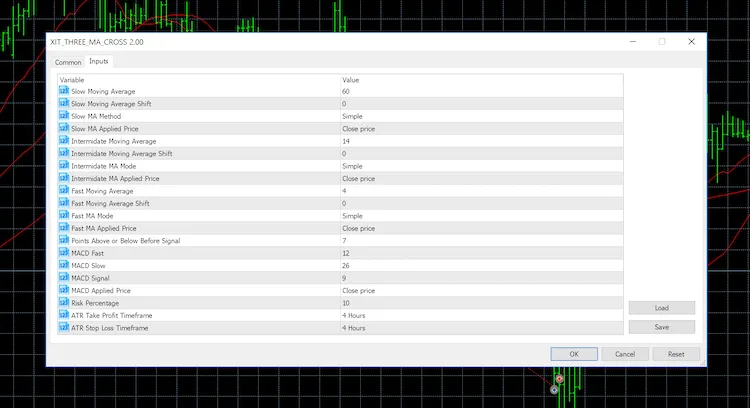
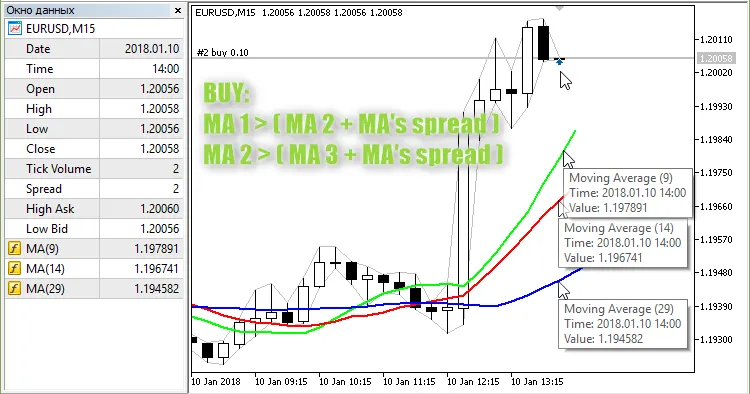
The creator of this strategy: Scriptor MQL5 code author: barabashkakvn This Expert Advisor (EA) utilizes three Simple Moving Averages (SMAs) calculated with the MODE_SMA method. It operates on every tick, ensuring you’re always in the loop with market movements. When to Open a BUY Position For a BUY signal, we look at the values of "MA 1", "MA 2", and "MA 3" from the most recent bar (#0). Specifically, "MA 1" needs to be above "MA 2" by a certain number of MA's spread points, while "MA 2" must be above "MA 3" by the same MA's spread points: When to Open a SELL Position For a SELL signal, we again take the values of "MA 1", "MA 2", and "MA 3" from bar #0. This time, "MA 1" should be below "MA 2" by the MA's spread, and "MA 2" must be below "MA 3" by the same MA's spread: Limitations on Position Opening Keep in mind that if there are any BUY positions currently open by this EA, the BUY signal will be disregarded. The same applies to the SELL signal. How to Close Positions To close positions, we again reference the values of "MA 1" and "MA 2" from the current bar (#0). If "MA 1" is lower than "MA 2" by half of the MA's spread, it’s time to close your BUY position. If "MA 1" is higher than "MA 2" by half of the MA's spread, close your SELL position. By mastering the use of the 3SMA EA in MetaTrader 5, you can enhance your trading strategies and make more informed decisions in the market!

2018.08.23
Mastering the Return Strategy for MetaTrader 5: Your Guide to Profitable Trading
MetaTrader5
Mastering the Return Strategy for MetaTrader 5: Your Guide to Profitable Trading

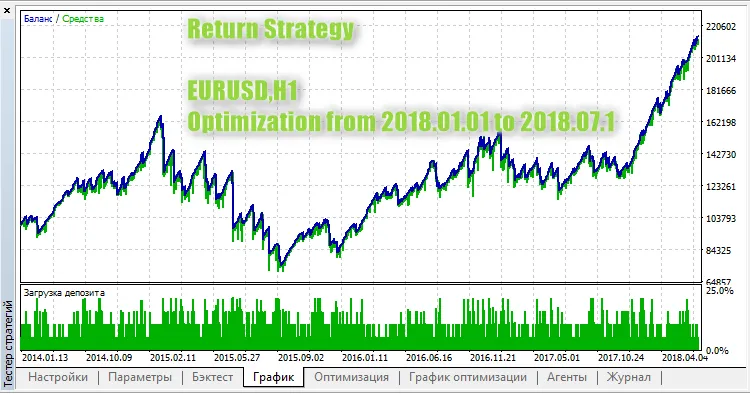
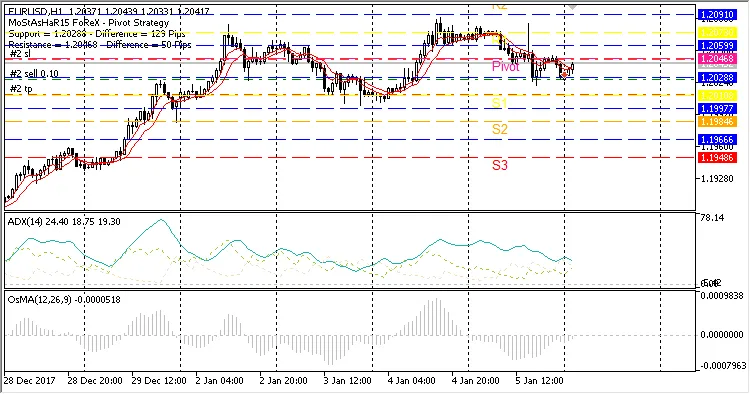
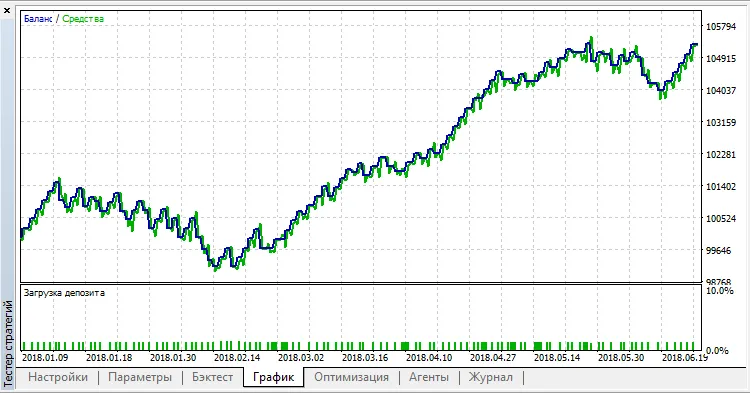
Strategy Author: Andrey Kornishkin MQL5 Code Author: barabashkakvn This strategy leverages pending limit orders to maximize trading opportunities. Understanding the Core Concept At the Start Hour, we initiate a grid of pending orders, comprising Number of Pending Orders for both Buy Limit and Sell Limit types. Once these orders are activated, we anticipate a price reversal back to the opening price of the bar where the orders were placed. For instance, if we set our Start Hour to 19:00 and place four (Number of Pending Orders = 4) Buy Limit and four Sell Limit orders, we expect the price to return to the opening price of the 19:00 bar after one or more orders are triggered. Important: Make sure there are no pending orders in your trading account at the Start Hour. Setting Up Your Grid Distance (from current price) + N * Step (gap between pending orders) The expiration time for pending orders is defined in hours. Make sure to keep track of this to avoid missed opportunities! Managing Positions and Orders When your total profit across all positions hits the defined Total Profit points, all positions will close, and pending orders will be removed. Additionally, at the specified End Hour, any remaining pending orders will be automatically removed. Input Parameters Stop Loss (in pips) - Sets your stop loss; Start Hour - Time to place pending orders (in hours); End Hour - Time to remove pending orders (in hours); Total Profit (in pips) - The profit threshold to close all positions and remove pending orders; Trailing Stop (in pips) - Enables trailing stop (set to "0" to disable); Trailing Step (in pips) - Defines the step for trailing; Distance - Distance from the current price to the first pending order; Step - Distance between pending orders; Number of Pending Orders - Number of orders per type; Expiration (in hours) - Lifetime of pending orders; Lots - Fixed volume for pending orders; Risk - Dynamic volume based on risk % per trade; Magic Number - Unique identifier for your EA. Optimization tests were conducted from January 1, 2018, to July 12, 2018, using EURUSD on the H1 timeframe:

2018.08.23
Discover the Ang_Zad_C Trading System for MetaTrader 5
MetaTrader5
Discover the Ang_Zad_C Trading System for MetaTrader 5

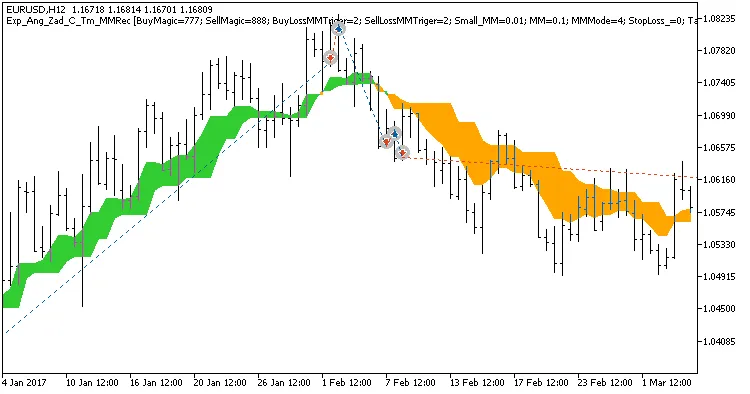
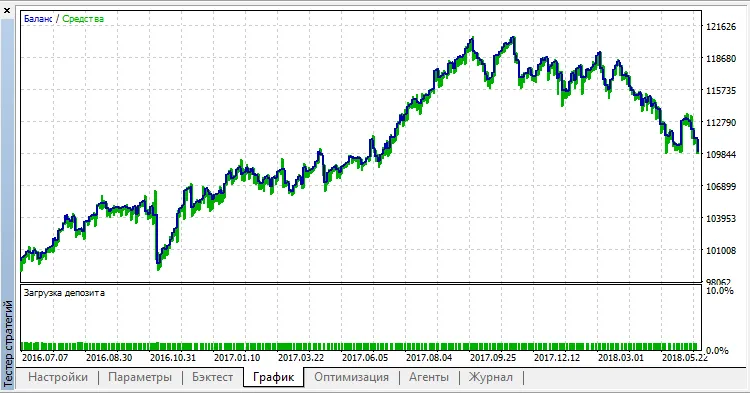
If you're diving into the world of trading, you're probably on the lookout for effective systems to enhance your strategies. One such system is the Ang_Zad_C trend-following indicator, which allows you to set specific trading intervals and adjust the volume of your trades based on your previous performance. So, how does it work? The system triggers trade decisions when the indicator cloud changes color, offering a clear signal for action. Setting Your Trading Time You can easily customize your trading hours using the input parameters. Here’s how: input bool TimeTrade=true; //Permission to trade by time interval input HOURS StartH=ENUM_HOUR_0; //Trading start (hours) input MINUTS StartM=ENUM_MINUT_0; //Trading start (minutes) input HOURS EndH=ENUM_HOUR_23; //Trading end (hours) input MINUTS EndM=ENUM_MINUT_59; //Trading end (minutes) With two variables for start and end times, you have complete control over your trading schedule. By default, this Expert Advisor (EA) is set to trade from midnight until 23:59. If your start time exceeds your end time, the EA will close any open positions the following day at the specified time. Managing Trade Volumes The EA also allows you to manage the volume of your trades based on recent performance. Here are the key input parameters: input uint BuyLossMMTriger=2; //Number of loss-making Buy trades to decrease MM input uint SellLossMMTriger=2; //Number of loss-making Sell trades to decrease MM input double Small_MM=0.01; //Financial resources used in trades after losses input double MM=0.1; //Financial resources for normal trades input MarginMode MMMode=LOT;//Lot size calculation method With these settings, if the last two trades in a direction are losses, the EA will open the next trade in that direction with a volume of 0.01 lots. If at least one of the last two trades is profitable, the volume increases to 0.1 lots. To use this Expert Advisor, you'll need the compiled indicator file Ang_Zad.ex5. Make sure to place it in your <terminal_data_folder>\MQL5\Indicators. During testing, the default input parameters were utilized, with no Stop Loss or Take Profit settings applied. Check out the results: Fig. 1. Examples of deals on the chart. Trading only in the time intervals set in the inputs is disabled Here are the testing results for 2017 on the EURUSD H12: Fig. 2. Test results chart Fig. 3. Examples of deals on the chart. Trading only in the time intervals set in the inputs is enabled

2018.08.23
Mastering the AbsolutelyNoLagLWMA EA: A Comprehensive Guide for Traders
MetaTrader5
Mastering the AbsolutelyNoLagLWMA EA: A Comprehensive Guide for Traders

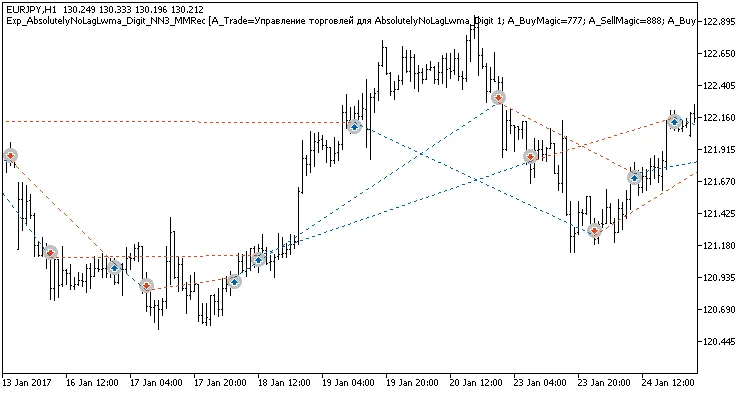
If you're looking to up your trading game, the AbsolutelyNoLagLwma_Digit EA could be just what you need. This expert advisor combines three independent trading systems, using the AbsolutelyNoLagLWMA indicators, to help manage your trades effectively. One standout feature is its ability to adjust trade volumes based on the outcomes of previous trades, allowing for a more strategic approach. Here's how it works: trading signals are generated when a bar closes, indicating a trend change, which is marked by a color shift in one of the three indicators. Managing Trade Volumes The EA comes equipped with customizable input variables to help you manage the volumes of your open positions. For instance, in the first system, you might set: input uint    A_BuyLossMMTriger=2;  // Number of loss-making Buy trades to decrease MM input uint    A_SellLossMMTriger=2;// Number of loss-making Sell trades to decrease MM input double A_SmallMM=0.01      // Share of funds from the deposit for trades in case of losses input double A_MM=0.1             // Share of funds from the deposit for normal trading With these settings, if the last two trades in one direction resulted in losses, the EA will open the next trade in that same direction with a volume of 0.01 lots. Conversely, if at least one of the last two trades was profitable, the position volume increases to 0.1 lots. Customizing Your Trading Systems The second trading system uses similar input settings: input uint    B_BuyLossMMTriger=2  // B number of loss-making Buy trades to decrease MM input uint    B_SellLossMMTriger=2;// B number of loss-making Sell trades to decrease MM input double B_SmallMM=0.01      // B Share of funds from the deposit for trades in case of losses input double B_MM=0.1             // B Share of funds from the deposit for normal trading For the third system, you’ll notice the inputs are prefixed with C_. Optimizing Your EA Setup To get the most out of your EA, it's best to configure it for each trading system separately, disabling the other two systems using the appropriate settings: input bool    B_BuyPosOpen=true    // Permission to enter long positions input bool    B_SellPosOpen=true   // Permission to enter short positions Simply set them to false for the systems you wish to disable. Additionally, for the EA to work smoothly, make sure you have the compiled AbsolutelyNoLagLwma_Digit.ex5 indicator file saved in the <terminal_data_directory>\MQL5\Indicators folder. Testing and Results In our tests, we used the default input parameters with stops, as showcased in the images below: Fig. 1. Examples of trades on the chart Testing results for 2017 on EURJPY H2, H4, and H12 demonstrate the EA's potential. Fig. 2. Test results chart

2018.08.23

Unlocking OverHedgeV2: Your Go-To EA for MetaTrader 5
MetaTrader5
Unlocking OverHedgeV2: Your Go-To EA for MetaTrader 5

Idea Creator - Scriptor. Code Author - barabashkakvn. Closing Positions This EA sets a target for the total profit of all positions (opened by the EA) in points through the parameter named Total Profit Target. Importantly, every profitable position must have a profit that is equal to or greater than the Minimal Profit Target. This means you can establish a minimum profit threshold in points for your positions, leading to a more refined profitability graph compared to simply closing positions based on monetary profit. Defining a Trend When the Short Moving Average is ABOVE the Long Moving Average at the Minimum distance between MA's to determine the trend, it indicates an upward trend. When the Short Moving Average is BELOW the Long Moving Average at the Minimum distance between MA's to determine the trend, it indicates a downward trend. Inputs Start Lots - the initial lot size Base (Lot=Start Lots * MathPow(Base, Number of open positions)) - the basis for calculating position volume Shutdown Grid - a feature to force close all positions and stop the EA's operation Tunnel Width (in pips) Total Profit Target (in pips) Minimal Profit Target (in pips) MA Short: averaging period MA Long: averaging period Minimum distance between MA's to determine the trend (in pips) - the minimum distance between indicators for defining a trend Magic Number - a unique identifier for the EA Here’s a test example for EURUSD on the M5 timeframe:

2018.08.23
Master Your Trading with the ColorX2MA_Digit EA for MetaTrader 5
MetaTrader5
Master Your Trading with the ColorX2MA_Digit EA for MetaTrader 5

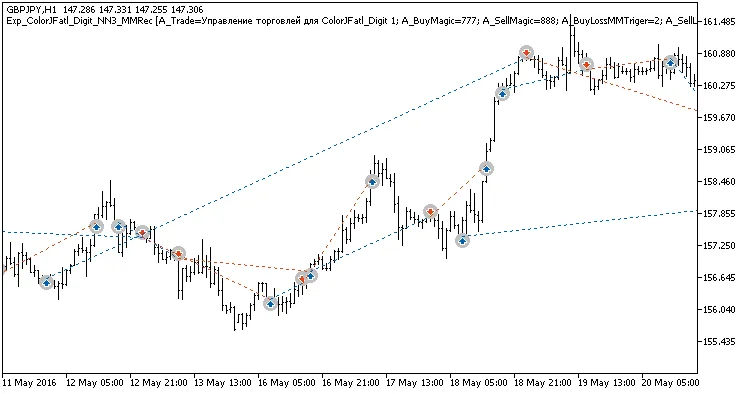
Unlocking the Power of the ColorX2MA_Digit EA If you're looking to elevate your trading game, the ColorX2MA_Digit Expert Advisor is a fantastic tool that integrates three independent trading systems into one seamless EA. This setup allows you to adjust the trade volume based on the outcomes of your previous trades, making it a smart choice for any trader aiming to optimize their strategy. How It Works Trading signals are generated when a bar closes, especially if a trend has shifted, which is indicated by a color change in any of the three indicators. This feature helps you stay on top of market movements without missing a beat. Volume Management The EA is equipped with customizable input variables that let you manage the volume of your open positions. Here’s a quick look at the settings for the first trading system: input uint    A_BuyLossMMTriger=2;  // Number of losing Buy trades to decrease volume input uint    A_SellLossMMTriger=2;// Number of losing Sell trades to decrease volume input double  A_SmallMM=0.01      // Percentage of account balance used in losing trades input double  A_MM=0.1            // Percentage of account balance used in normal trades With these settings, if the last two trades in one direction were losers, the EA will open the next trade in that direction at 0.01 lots. If at least one of the last two trades was profitable, the position size jumps to 0.1 lots. Customizing for Each System The second trading system has similar input parameters: input uint    B_BuyLossMMTriger=2  // Number of losing Buy trades to decrease volume input uint    B_SellLossMMTriger=2;// Number of losing Sell trades to decrease volume input double  B_SmallMM=0.01      // Percentage of account balance used in losing trades input double  B_MM=0.1            // Percentage of account balance used in normal trades For the third system, you'll notice the C_ prefix for its inputs. Setting Up Your EA To achieve the best results, it's recommended to configure each EA for the respective trading system while disabling the others. You can do this using the following parameters: input bool    B_BuyPosOpen=true    // Allow long positions input bool    B_SellPosOpen=true  // Allow short positions Setting these to false will disable the respective positions. Final Touches For the EA to run smoothly, make sure that the compiled ColorX2MA_Digit.ex5 indicator file is placed in the <terminal_data_directory>\MQL5\Indicators folder. Test Results We conducted tests using the default input parameters with stops, and the results are promising. Check out the trade examples in the chart below: Fig. 1. Examples of trades on the chart The tests were conducted on GBPJPY using H3, H6, and H12 timeframes over the year 2016. Fig. 2. Test results chart

2018.08.23
Unlocking Profits with ColorJFatl_Digit: A Comprehensive Guide to Your New Trading EA
MetaTrader5
Unlocking Profits with ColorJFatl_Digit: A Comprehensive Guide to Your New Trading EA

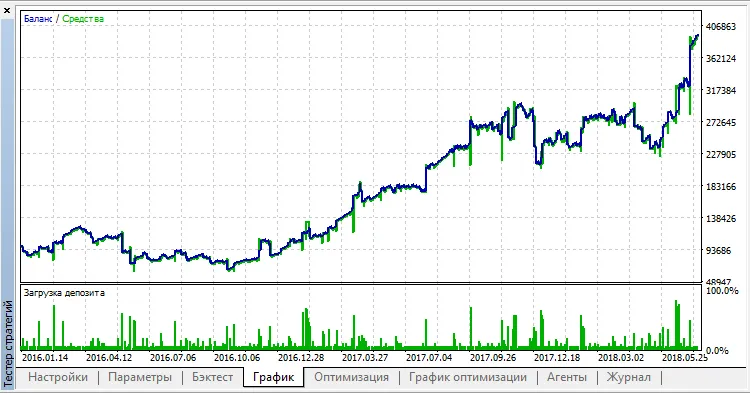
Enhance Your Trading with ColorJFatl_Digit EA If you're looking to level up your trading game, the ColorJFatl_Digit EA is a fantastic tool to consider. This powerful trading system combines three independent strategies into one seamless Expert Advisor (EA), allowing you to adjust your trade volume based on past performance. What’s even better? It provides signals based on trend changes indicated by the color shifts of the three indicators. Customizing Your Volume Management One of the standout features of this EA is its flexible volume management. You can easily customize input variables to manage the volumes of open positions. For instance, let’s take a look at the first trading system: input uint    A_BuyLossMMTriger=2;  // Number of losing Buy trades to decrease MM input uint    A_SellLossMMTriger=2;// Number of losing Sell trades to decrease MM input double  A_SmallMM=0.01       // Portion of deposit used in trades during losses input double  A_MM=0.1             // Portion of deposit used in trades during normal conditions With these settings, if the last two trades were losers, the EA will open the next trade in the same direction at a volume of 0.01 lots. If either of the last two trades was a winner, the position volume increases to 0.1 lots. Setting Up the Second Trading System Similar volume management inputs are available for the second trading system: input uint    B_BuyLossMMTriger=2  // B number of losing Buy trades to decrease MM input uint    B_SellLossMMTriger=2;// B number of losing Sell trades to decrease MM input double  B_SmallMM=0.01       // B Portion of deposit used in trades during losses input double  B_MM=0.1             // B Portion of deposit used in trades The same logic applies here, ensuring you're always optimizing your position sizes based on prior trades. Third System Configuration The third system uses inputs with a C_ prefix to distinguish its settings. The best practice is to configure each EA individually by disabling the other two systems using the following parameters: input bool    B_BuyPosOpen=true    // Allow long positions input bool    B_SellPosOpen=true   // Allow short positions Simply set these to false when you want to disable a particular system. Ensuring Proper Functionality To ensure your EA operates smoothly, make sure the compiled ColorJFatl_Digit.ex5 indicator file is located in the <terminal_data_directory>\MQL5\Indicators folder. The default input parameters used in the tests below have shown promising results. Fig. 1. Examples of trades on the chart Here are the test results for GBPJPY across H3, H8, and Daily charts for the year 2016. Fig. 2. Test results chart

2018.08.23
Mastering Urdala_Trol: Your Go-To EA for MetaTrader 5
MetaTrader5
Mastering Urdala_Trol: Your Go-To EA for MetaTrader 5

The Brain Behind It: Sergey Rashevskiy. Code Wizard: barabashkakvn. How the Strategy Works When there are no open trades initiated by the EA, it opens two opposing positions with an initial lot size of Lots. A stop loss is set at Stop Loss, while take profit is not utilized. The stop loss will trail the market using the Trailing Stop and Trailing Step parameters. Trailing Explained The first modification of a position's stop loss ensures that it moves to breakeven or even into profit. Subsequent updates to the stop loss boost your guaranteed profit. Afterward, there are two scenarios for stop loss activation: 1. If a position closes at a loss: 1.1. Here, we assume the trend has reversed. Open a new position with a larger lot size (add Number of minimum lots to the remaining position's volume) in the opposite direction. For example, if a losing BUY position has been closed, then a SELL position should be opened with an increased lot size. This results in two positions in the same direction. 1.2. Moving forward, we only trade in the established direction: wait until the price moves away from the least loss-making position by Step points in the direction of the loss, and then open a position with an increased lot size (add Number of minimum lots to the least loss-making position) in the direction of the current positions. 2. If a position closes with a profit (having been modified at least once): 2.1. We consider this a minor pullback rather than a trend reversal. Open a new position with a larger lot size in the direction of the closed profitable position. For example, if a profitable BUY position has been closed, we’ll open another BUY order with an increased lot size. This means we now have two positions in the same direction. 2.2. We aim to apply trailing next. Regardless, one of the stop losses will trigger, leading us back to either scenario 1 or scenario 2. The EA calculates the BUY and SELL positions, the total profit for each, and identifies the least loss-making BUY and SELL positions all in one go through the CalculateAllPositions function. Inputs Lots - initial trade volume Number of minimum lots - the increment by which position volume changes Stop Loss (in pips) Trailing Stop (in pips) Trailing Step (in pips) Step - initial distance between opposing positions Minimum nearest (in pips) - minimum spacing in a series of positions Magic number - unique identifier for the EA

2018.08.23
Unlocking Trading Potential: The Exp_BrainTrend2 and AbsolutelyNoLagLWMA EA Guide
MetaTrader5
Unlocking Trading Potential: The Exp_BrainTrend2 and AbsolutelyNoLagLWMA EA Guide

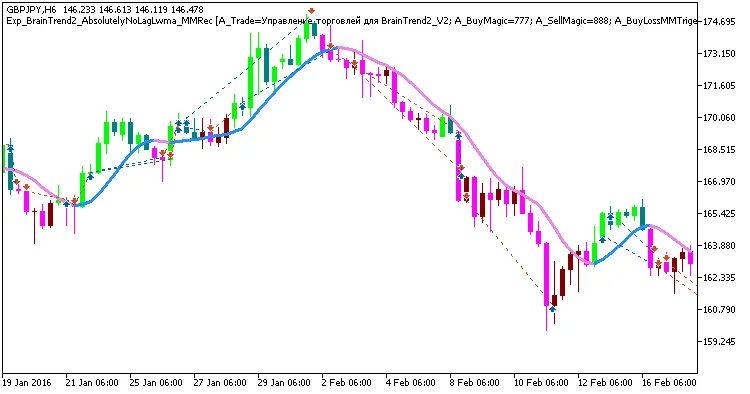
Hey there, fellow traders! Today, I’m excited to share insights about a powerful duo: the BrainTrend2 and AbsolutelyNoLagLWMA indicators. These two systems are combined into one Expert Advisor (EA), designed to help you maximize your trading efficiency. So how does it work? This EA operates on a clear premise: it opens trades based on signals generated when a bar closes, indicating a trend change. You’ll notice this through the color shifts of either indicator, giving you a heads-up when to jump in. Now, let’s talk about managing trade sizes. The EA comes equipped with adjustable input settings that allow you to fine-tune your money management. Here’s a sneak peek into how you can set it up: input uint    A_BuyLossMMTriger=2;  // Number of losing Buy positions to reduce MM input uint    A_SellLossMMTriger=2;  // Number of losing Sell positions to reduce MM input double  A_SmallMM=0.01       // Share of the deposit in a deal when losing input double  A_MM=0.1             // Share of the deposit in a deal for normal trading With these settings, if you’ve had two consecutive trades in the same direction, this EA will open the next trade with a minimal lot size of 0.01. However, if at least one of those trades is a winner, the position size jumps to 0.1—pretty neat, right? For the AbsolutelyNoLagLWMA system, the inputs are almost identical: input uint    B_BuyLossMMTriger=2;  // Number of losing Buy positions to reduce MM input uint    B_SellLossMMTriger=2;  // Number of losing Sell positions to reduce MM input double  B_SmallMM=0.01       // Share of the deposit in a deal when losing input double  B_MM=0.01       // Share of the deposit in a deal for normal trading To make sure your EA runs smoothly, you’ll need the compiled files for BrainTrend2_V2.ex5 and AbsolutelyNoLagLWMA.ex5 placed in the <terminal_data_directory>\MQL5\Indicators folder. Simple as that! Check out the test results below which utilized the default settings with stop-losses in place: Fig 1. Exemplary trades in the chart Here are the testing results for GBPJPY on the H6 timeframe throughout 2016: Fig. 2. Testing results chart

2018.07.14
Mastering Virtual Trailing Stops for MetaTrader 5: A Trader's Guide
MetaTrader5
Mastering Virtual Trailing Stops for MetaTrader 5: A Trader's Guide

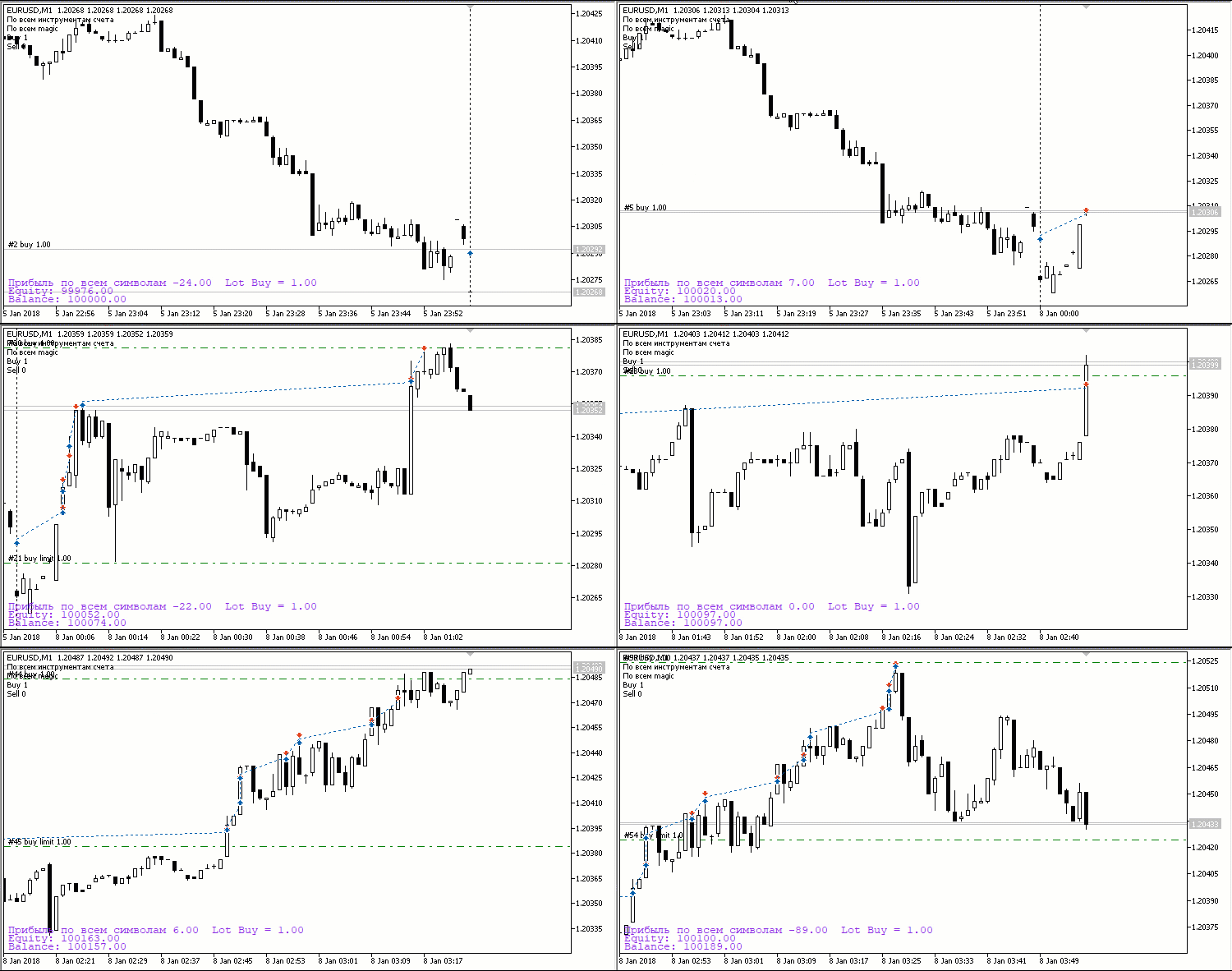
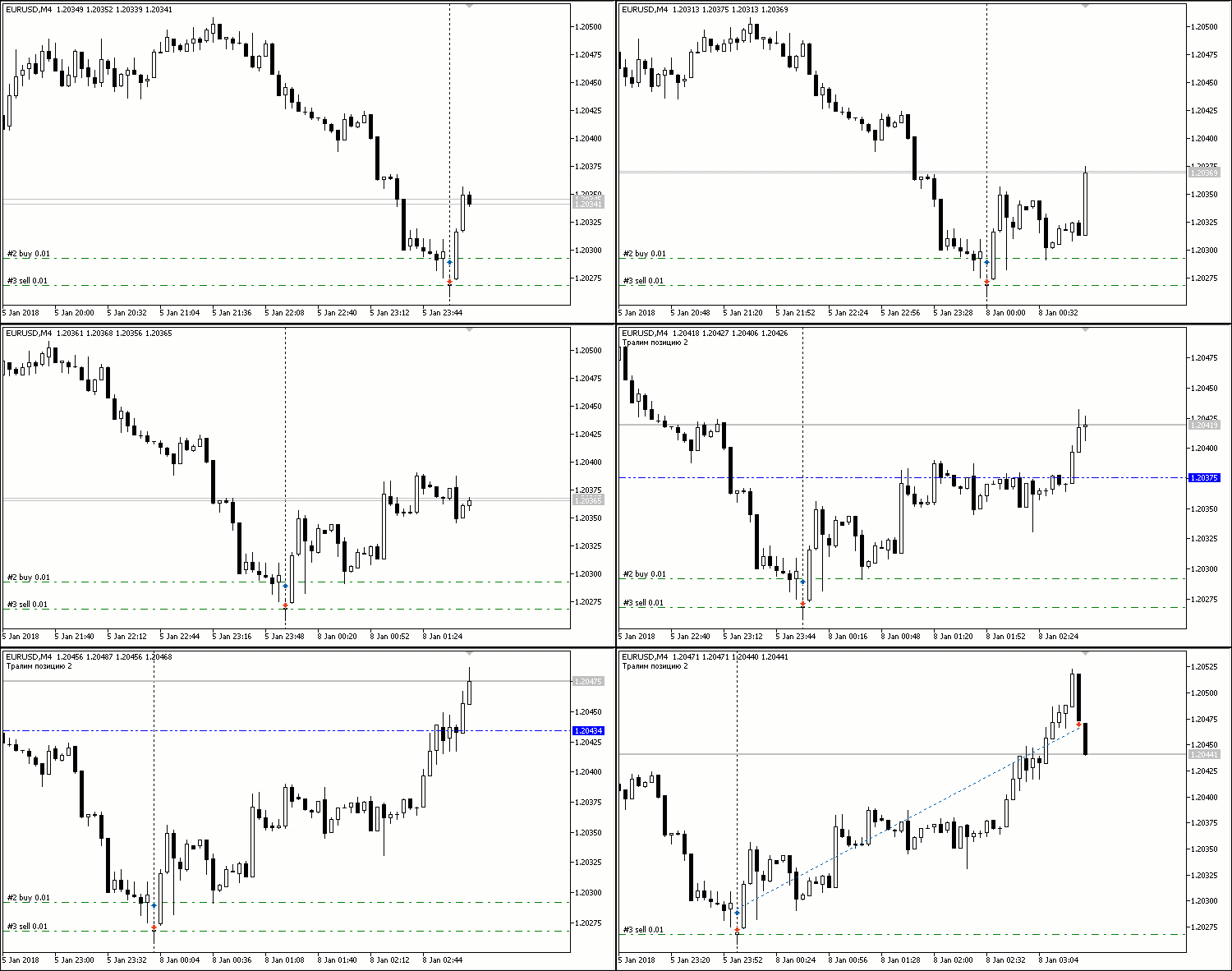
Idea by: Vladimir Khlystov. MQL5 Code by: barabashkakvn. If you’re looking to enhance your trading strategy, the Virtual Trailing Stop is a game-changer for MetaTrader 5 users. This nifty feature allows you to set up stop loss and take profit levels that remain invisible to your broker—meaning your trading plans are kept strictly between you and your PC. But that’s not all; this approach also helps you dodge the pitfalls associated with brokers that have wide spreads and specific stop order levels. With the Virtual Trailing Stop, you can ignore those levels entirely, giving you more control over your trades. Let’s dive into how the trailing works, as it’s essential for maximizing your profits while minimizing potential losses. How Trailing Stops Work The Virtual Trailing Stop relies on three main parameters: Trailing Length Minimum Profit to Activate Tailing Step Here’s a quick breakdown of each: Trailing Length: This defines the distance behind the current price at which your stop loss will follow. Minimum Profit: This is the profit level you need to hit before the virtual stop loss starts kicking in. Tailing Step: This interval dictates how often the virtual stop loss will adjust to follow the price. Let’s say you set your parameters to 5, 2, and 3, respectively. Here’s how it works: Once your position hits a profit of 7 points, your virtual stop loss will move up to your entry price plus the minimum profit of 2 points. Then, as the price climbs another 3 points in your favor, the stop loss will adjust up by 5 points. This process continues, trailing the price by 3 points. If the market takes a dip and hits your stop level, your position will be closed automatically. The trailing stop will be displayed as dashed lines on your chart, making it easy to visualize where your stops are set. For a better understanding of how the EA operates, I recommend installing it in the tester. You can watch it in action in visualization mode, which makes it easier to grasp its mechanics:

2018.07.14
Harnessing Dual Trading Systems: SilverTrend and ColorJFatl_Digit for MetaTrader 5
MetaTrader5
Harnessing Dual Trading Systems: SilverTrend and ColorJFatl_Digit for MetaTrader 5

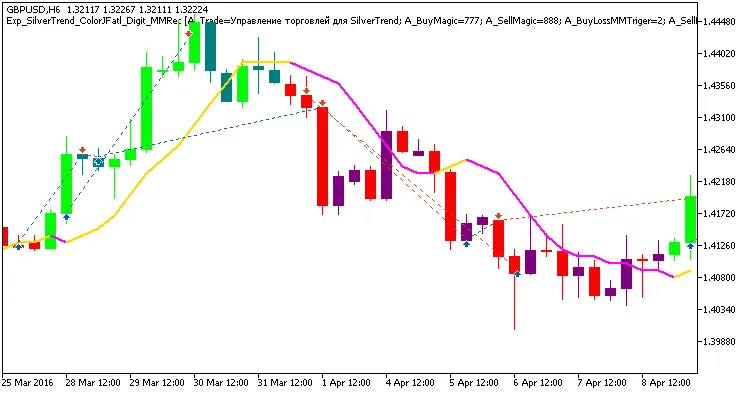
Hey fellow traders! Today, I want to dive into a powerful Expert Advisor (EA) that combines two independent trading systems: SilverTrend_V2 and ColorJFatl_Digit. This EA is designed to adjust the size of future trades based on the outcomes of previous ones, allowing for smarter trading decisions. The signals for opening trades are generated as a bar closes, especially when there's a trend change indicated by a shift in the color of either of these indicators. Managing Trade Volumes To help manage position sizes, we’ve included adjustable settings in the EA. For instance, when using the SilverTrend indicator: input uint    A_BuyLossMMTriger=2;  // Number of losing Buy positions to reduce MM input uint    A_SellLossMMTriger=2;// Number of losing Sell positions to reduce MM input double  A_SmallMM=0.01      // Share of the deposit in a deal when losing input double  A_MM=0.1            // Share of the deposit in a deal for normal trading With these settings, if the last two trades were in the same direction, the EA will open the next trade in that direction with a lot size as low as 0.01. If at least one of those trades is profitable, the position volume will increase to 0.1. Identical Settings for ColorJFatl_Digit The inputs for the trading system utilizing ColorJFatl_Digit are set up similarly: input uint    B_BuyLossMMTriger=2  // Number of losing Buy positions to reduce MM input uint    B_SellLossMMTriger=2;// Number of losing Sell positions to reduce MM input double  B_SmallMM=0.01      // Share of the deposit in a deal when losing input double  B_MM=0.01      // Share of the deposit in a deal when losing For the EA to function properly, make sure that the compiled files SilverTrend.ex5 and ColorJFatl_Digit.ex5 are located in your <terminal_data_directory>\MQL5\Indicators folder. Testing Insights In the tests shown below, we used the EA's default inputs along with stop-losses. Fig 1. Exemplary trades in the chart Here are the testing results for GBPUSD on H6 for the year 2016: Fig. 2. Testing results chart

2018.07.14
Harnessing BykovTrend and ColorX2MA: A Comprehensive Guide for MetaTrader 5
MetaTrader5
Harnessing BykovTrend and ColorX2MA: A Comprehensive Guide for MetaTrader 5

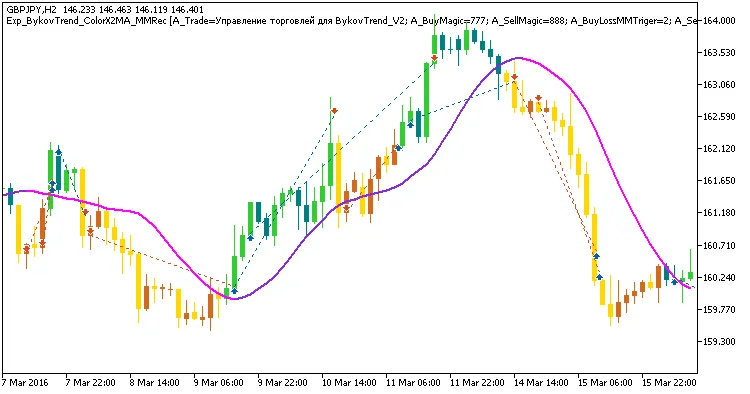
If you're on the lookout for a powerful trading tool, you might want to check out the BykovTrend and ColorX2MA indicators. This nifty EA (Expert Advisor) combines both systems, giving you the flexibility to adjust your trade sizes based on previous outcomes. The signals to open trades are generated right at the bar's close, signaling a trend change when the colors of either indicator switch up. Let’s dive into how you can manage your trading volumes effectively. The EA comes packed with adjustable input settings. For instance, in the BykovTrend system, you have inputs like: input uint    A_BuyLossMMTriger=2;  // Number of losing Buy positions to adjust MM input uint    A_SellLossMMTriger=2; // Number of losing Sell positions to adjust MM input double  A_SmallMM=0.01       // Deposit share in a deal when losing input double  A_MM=0.1             // Deposit share for normal trading With these settings, if the last two trades were in the same direction, the EA will jump in with a trade size as low as 0.01. If at least one of those trades was a winner, the lot size will bump up to 0.1. Pretty straightforward, right? The input settings for the ColorX2MA system mirror those of BykovTrend: input uint    B_BuyLossMMTriger=2  // B number of losing Buy positions to adjust MM input uint    B_SellLossMMTriger=2; // B number of losing Sell positions to adjust MM input double  B_SmallMM=0.01       // B Deposit share in a deal when losing input double  B_MM=0.01        // B Deposit share for normal trading To ensure everything runs smoothly, make sure the compiled files of both indicators, BykovTrend_V2.ex5 and ColorX2MA.ex5, are located in the <terminal_data_directory>\MQL5\Indicators folder. This is crucial for the EA to function properly. In the tests shown below, I used the EA's default inputs complete with stop-loss settings. Fig 1. Exemplary trades in the chart Looking at the test results for GBPJPY on the H2 timeframe throughout 2016:Fig. 2. Testing results chart

2018.07.14
First Previous 13 14 15 16 17 18 19 20 21 22 23 Next Last