
If you're on the lookout for a powerful trading tool, you might want to check out the BykovTrend and ColorX2MA indicators. This nifty EA (Expert Advisor) combines both systems, giving you the flexibility to adjust your trade sizes based on previous outcomes. The signals to open trades are generated right at the bar's close, signaling a trend change when the colors of either indicator switch up.
Let’s dive into how you can manage your trading volumes effectively. The EA comes packed with adjustable input settings. For instance, in the BykovTrend system, you have inputs like:
inputuint A_BuyLossMMTriger=2; // Number of losing Buy positions to adjust MMinputuint A_SellLossMMTriger=2; // Number of losing Sell positions to adjust MMinputdouble A_SmallMM=0.01 // Deposit share in a deal when losinginputdouble A_MM=0.1 // Deposit share for normal trading
With these settings, if the last two trades were in the same direction, the EA will jump in with a trade size as low as 0.01. If at least one of those trades was a winner, the lot size will bump up to 0.1. Pretty straightforward, right?
The input settings for the ColorX2MA system mirror those of BykovTrend:
inputuint B_BuyLossMMTriger=2 // B number of losing Buy positions to adjust MMinputuint B_SellLossMMTriger=2; // B number of losing Sell positions to adjust MMinputdouble B_SmallMM=0.01 // B Deposit share in a deal when losinginputdouble B_MM=0.01 // B Deposit share for normal trading
To ensure everything runs smoothly, make sure the compiled files of both indicators, BykovTrend_V2.ex5 and ColorX2MA.ex5, are located in the <terminal_data_directory>\MQL5\Indicators folder. This is crucial for the EA to function properly.
In the tests shown below, I used the EA's default inputs complete with stop-loss settings.
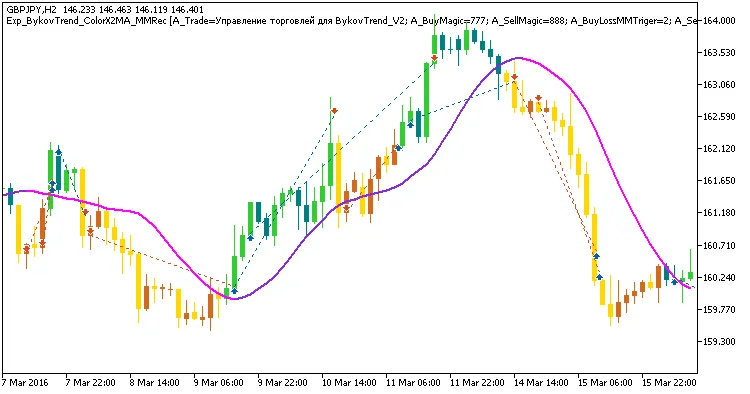
Fig 1. Exemplary trades in the chart
Looking at the test results for GBPJPY on the H2 timeframe throughout 2016:
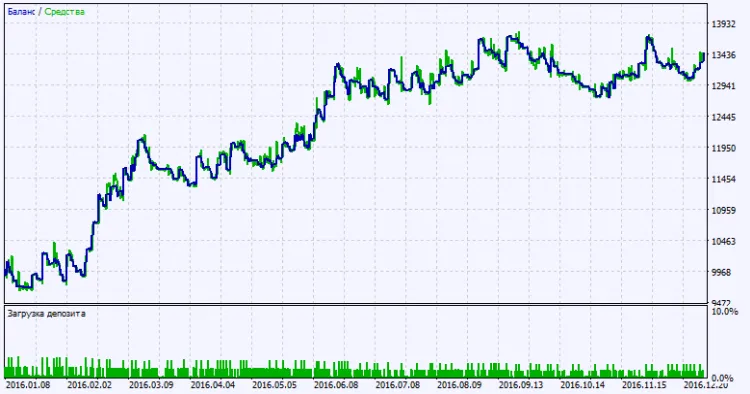
Fig. 2. Testing results chart




Comments 0