
Enhance Your Trading with ColorJFatl_Digit EA
If you're looking to level up your trading game, the ColorJFatl_Digit EA is a fantastic tool to consider. This powerful trading system combines three independent strategies into one seamless Expert Advisor (EA), allowing you to adjust your trade volume based on past performance. What’s even better? It provides signals based on trend changes indicated by the color shifts of the three indicators.
Customizing Your Volume Management
One of the standout features of this EA is its flexible volume management. You can easily customize input variables to manage the volumes of open positions. For instance, let’s take a look at the first trading system:
inputuint A_BuyLossMMTriger=2; // Number of losing Buy trades to decrease MMinputuint A_SellLossMMTriger=2;// Number of losing Sell trades to decrease MMinputdouble A_SmallMM=0.01 // Portion of deposit used in trades during lossesinputdouble A_MM=0.1 // Portion of deposit used in trades during normal conditions
With these settings, if the last two trades were losers, the EA will open the next trade in the same direction at a volume of 0.01 lots. If either of the last two trades was a winner, the position volume increases to 0.1 lots.
Setting Up the Second Trading System
Similar volume management inputs are available for the second trading system:
inputuint B_BuyLossMMTriger=2 // B number of losing Buy trades to decrease MMinputuint B_SellLossMMTriger=2;// B number of losing Sell trades to decrease MMinputdouble B_SmallMM=0.01 // B Portion of deposit used in trades during lossesinputdouble B_MM=0.1 // B Portion of deposit used in trades
The same logic applies here, ensuring you're always optimizing your position sizes based on prior trades.
Third System Configuration
The third system uses inputs with a C_ prefix to distinguish its settings. The best practice is to configure each EA individually by disabling the other two systems using the following parameters:
inputbool B_BuyPosOpen=true // Allow long positionsinputbool B_SellPosOpen=true // Allow short positions
Simply set these to false when you want to disable a particular system.
Ensuring Proper Functionality
To ensure your EA operates smoothly, make sure the compiled ColorJFatl_Digit.ex5 indicator file is located in the <terminal_data_directory>\MQL5\Indicators folder.
The default input parameters used in the tests below have shown promising results.
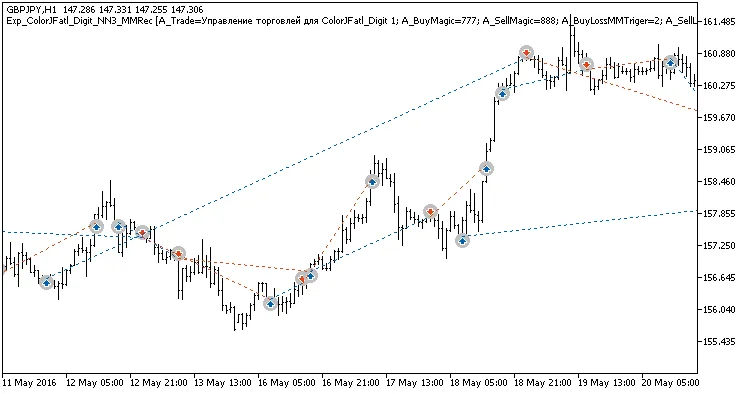
Fig. 1. Examples of trades on the chart
Here are the test results for GBPJPY across H3, H8, and Daily charts for the year 2016.
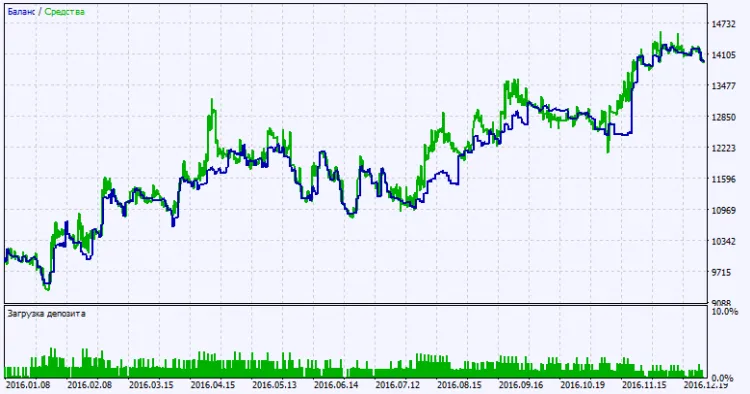
Fig. 2. Test results chart




Comments 0