
Hey there, fellow traders! Today, I’m excited to share insights about a powerful duo: the BrainTrend2 and AbsolutelyNoLagLWMA indicators. These two systems are combined into one Expert Advisor (EA), designed to help you maximize your trading efficiency.
So how does it work? This EA operates on a clear premise: it opens trades based on signals generated when a bar closes, indicating a trend change. You’ll notice this through the color shifts of either indicator, giving you a heads-up when to jump in.
Now, let’s talk about managing trade sizes. The EA comes equipped with adjustable input settings that allow you to fine-tune your money management. Here’s a sneak peek into how you can set it up:
inputuint A_BuyLossMMTriger=2; // Number of losing Buy positions to reduce MMinputuint A_SellLossMMTriger=2; // Number of losing Sell positions to reduce MMinputdouble A_SmallMM=0.01 // Share of the deposit in a deal when losinginputdouble A_MM=0.1 // Share of the deposit in a deal for normal trading
With these settings, if you’ve had two consecutive trades in the same direction, this EA will open the next trade with a minimal lot size of 0.01. However, if at least one of those trades is a winner, the position size jumps to 0.1—pretty neat, right?
For the AbsolutelyNoLagLWMA system, the inputs are almost identical:
inputuint B_BuyLossMMTriger=2; // Number of losing Buy positions to reduce MMinputuint B_SellLossMMTriger=2; // Number of losing Sell positions to reduce MMinputdouble B_SmallMM=0.01 // Share of the deposit in a deal when losinginputdouble B_MM=0.01 // Share of the deposit in a deal for normal trading
To make sure your EA runs smoothly, you’ll need the compiled files for BrainTrend2_V2.ex5 and AbsolutelyNoLagLWMA.ex5 placed in the <terminal_data_directory>\MQL5\Indicators folder. Simple as that!
Check out the test results below which utilized the default settings with stop-losses in place:
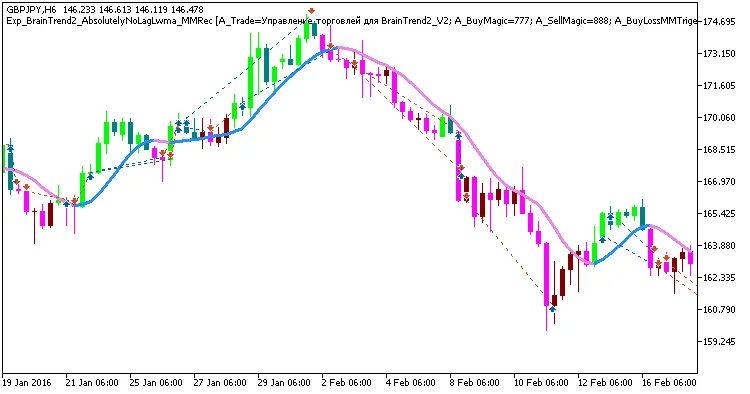
Fig 1. Exemplary trades in the chart
Here are the testing results for GBPJPY on the H6 timeframe throughout 2016:
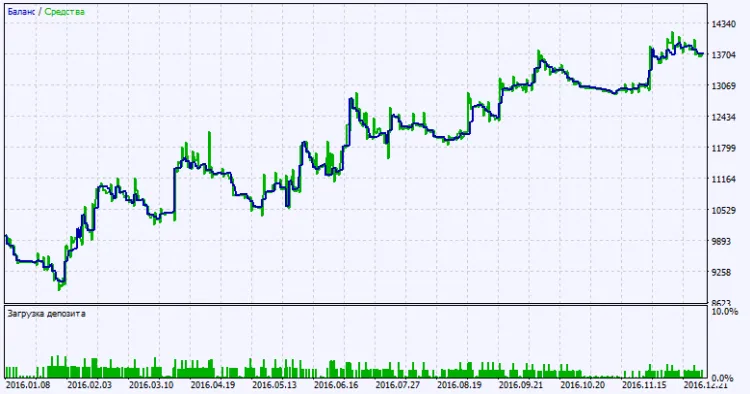
Fig. 2. Testing results chart




Comments 0