
The JMACandleTrend_HTF_Signal indicator is a powerful tool for traders using MetaTrader 5, designed to help you spot trend directions and generate trading signals right on your chart. It visually represents trend information with colored arrows and provides alerts or sound notifications to keep you in the loop when it's time to act.
When a trend continues at the selected bar, you’ll see a right arrow appear, colored to indicate the direction of the trend. If the trend changes, the indicator will display a flower object that corresponds to the direction of the trade you should consider.
Let’s break down the input parameters of this handy indicator:
- JMACandleTrend Inputs:
input ENUM_TIMEFRAMES Timeframe=PERIOD_H6;     // Timeframe for calculating the indicator
input Smooth_Method MA_Method1=MODE_JJMA;     // smoothing method
input int Length1=30;     // smoothing depth
input int Phase1=15;     // smoothing parameter
input uint Gap=10;     // not considered gap in points
- Visualization Parameters:
//---- indicator display settings
input uint SignalBar=0;     // Bar index for obtaining a signal
input string Symbols_Sirname=INDICATOR_NAME"_Label_";  // Indicator label name
input color UpSymbol_Color=clrDodgerBlue     // Growth label color
input color DnSymbol_Color=clrMagenta     // Fall label color
input uint Symbols_Size=60;     // Signal label size
input uint Font_Size=10;     // Indicator name font size
- Alert and Notification Settings:
//---- alert settings
input ENUM_ALERT_MODE alert_mode=OnlySound;     // Trigger indication option
input uint AlertCount=0;     // Number of alerts
input bool Push=true;     // Allow push notifications
If you're planning to use multiple JMACandleTrend_HTF_Signal indicators on the same chart, just remember that each one should have a unique value for the Symbols_Sirname string variable to avoid any confusion.
For everything to run smoothly, make sure you place the JMACandleTrend.ex5 file in the <terminal_data_directory>\MQL5\Indicators folder.
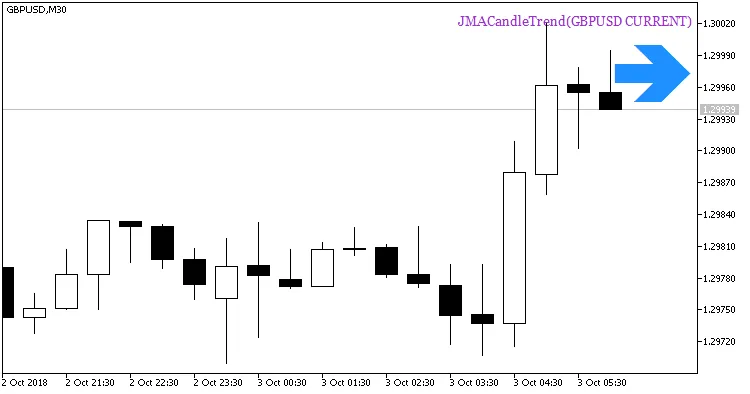
Fig. 1. A signal to open a position based on the data of JMACandleTrend indicator
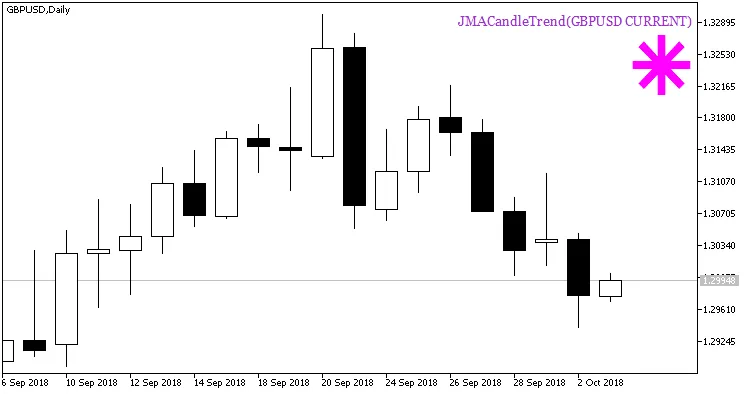
Fig. 2. A signal to open a position based on the data of JMACandleTrend indicator
Related Posts
- Unlocking MetaCOT 2: Your Ultimate CFTC Indicator Toolkit for MT4
- Visualize Current Trends Across All Time Frames with This MetaTrader 4 Indicator
- Unlocking the Power of Master Tools for MetaTrader 4
- Mastering the MACD Candle Indicator for MetaTrader 4
- How to Use the Change Chart Symbol Menu for MetaTrader 4