
Author: Antonuk Oleg
If you're looking to step up your trading game, the SignalTable_SAR_MFI_TEMA indicator for MetaTrader 5 could be your new best friend. This powerful tool displays Buy and Sell signals generated by three different indicators: the iSAR, iMFI, and iTEMA. It provides insights across nine timeframes, making it a versatile addition to any trading strategy.
Key Features of the Indicator
- Integrated signals from iSAR, iMFI, and iTEMA
- Available across nine different timeframes
- Fully customizable settings for tailored trading strategies
Indicator Input Parameters
//+----------------------------------------------+
//| Indicator input parameters                       |
//+----------------------------------------------+
input string Symbol_="";                              // Financial asset
input ENUM_TIMEFRAMES TimeFrame1=PERIOD_M1;           // Chart 1 period
input ENUM_TIMEFRAMES TimeFrame2=PERIOD_M5;           // Chart 2 period
input ENUM_TIMEFRAMES TimeFrame3=PERIOD_M15;          // Chart 3 period
input ENUM_TIMEFRAMES TimeFrame4=PERIOD_M30;          // Chart 4 period
input ENUM_TIMEFRAMES TimeFrame5=PERIOD_H1;           // Chart 5 period
input ENUM_TIMEFRAMES TimeFrame6=PERIOD_H4;           // Chart 6 period
input ENUM_TIMEFRAMES TimeFrame7=PERIOD_D1;           // Chart 7 period
input ENUM_TIMEFRAMES TimeFrame8=PERIOD_W1;           // Chart 8 period
input ENUM_TIMEFRAMES TimeFrame9=PERIOD_MN1;          // Chart 9 period
Understanding the Components
This indicator is equipped with various parameters that allow you to adjust it according to your trading style:
- iSAR Parameters: Customize the step and maximum values for the SAR to fine-tune your signals.
- Moving Average Parameters: Set fast and slow TEMA periods to identify trends more accurately.
- MFI Parameters: Adjust the MFI period and volume type to cater to your trading preferences.
Visual Display Settings
The visual aspect of the indicator is just as important. You can customize the text and trend colors, font size, and positioning on your chart to ensure clarity and ease of use.
For a deeper dive into how to set this up, refer to the GetFontName.mqh library, which needs to be added to your terminal data folder in the MQL5 Include directory.
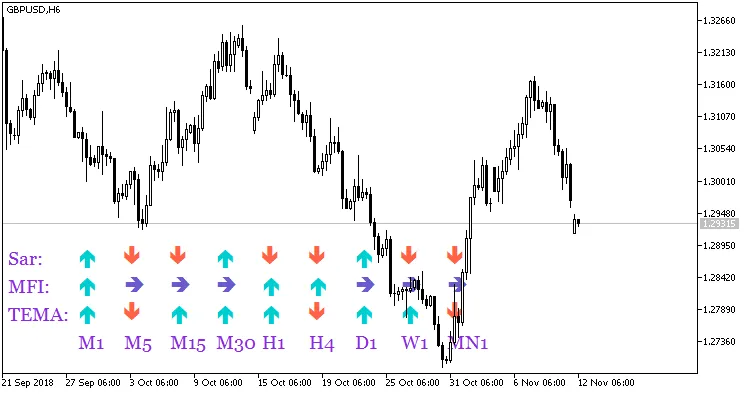
Fig.1 The SignalTable_SAR_MFI_TEMA indicator
Related Posts
- Mastering the Money Flow Index with the Ring Buffer in MetaTrader 5
- Mastering the Fibonacci ZigZag Indicator for MetaTrader 5
- Unlocking Trading Insights with the Delta MFI Indicator for MetaTrader 5
- Unlocking the Power of Master Tools for MetaTrader 4
- Unlocking MetaCOT 2: Your Ultimate CFTC Indicator Toolkit for MT4