
Getting Started with the Fibonacci ZigZag Indicator
To set up the Fibonacci ZigZag indicator in MetaTrader 5, you'll need the following components:
- 1 zigzag plot
- 2 data buffers for tracking highs and lows
- Input parameters for customization
- A set of system variables that reset during recalculations
Here’s a snippet of the code you’ll be working with:
#property indicator_buffers2#property indicator_plots1inputdouble retracement=23.6;// Retracement amountinputdouble minSizeInAtrUnits=0.0;// Minimum size of waves in ATR unitsinputint rollingAtrPeriod=14;// Rolling ATR periodinputcolor Color=clrDodgerBlue;// Wave colorinputint Width=3;// Wave widthinputENUM_LINE_STYLE Style=STYLE_SOLID;// Wave style//+------------------------------------------------------------------+
In this setup, the upWaves array will hold the highs, while the dwWaves array captures the lows.
Next, let's define our system variables. We need to track the last wave type, where it began and ended, and the bar distances from each point:
//--- Managing the zigzag
  //--- Wave types: [0] None, [1] Up, [2] Down
    int wave_type=0;
  //--- Starting price of the wave
    double wave_start_price=0.0;
  //--- Ending price of the wave
    double wave_end_price=0.0;
  //--- Distance in bars from starting price
    int wave_start_distance=0;
  //--- Distance in bars from ending price
    int wave_end_distance=0;
  //--- High price tracking
    double high_mem=0.0;
    int distance_from_high=0;
  //--- Low price tracking
    double low_mem=0.0;
    int distance_from_low=0;
  //--- Rolling ATR
    double rollingAtr=0.0;
       int rollingAtrs=0;
This sets up the rolling ATR unit and keeps track of how many have been calculated.
Next, we’ll create a system reset function to clear out old data:
void resetSystem(){
ArrayFill(upWaves,0,ArraySize(upWaves),0.0);
ArrayFill(dwWaves,0,ArraySize(dwWaves),0.0);
wave_type=0;
wave_start_price=0.0;
wave_end_price=0.0;
wave_start_distance=0;
wave_end_distance=0;
high_mem=0.0;
low_mem=0.0;
distance_from_high=0;
distance_from_low=0;
rollingAtr=0.0;
rollingAtrs=0;
}
Here we simply fill the arrays with zeroes and reset the system variables.
During initialization, we set up the buffers, the plot, and call reset for the first time:
  SetIndexBuffer(0,upWaves,INDICATOR_DATA);
  SetIndexBuffer(1,dwWaves,INDICATOR_DATA);
   PlotIndexSetDouble(0,PLOT_EMPTY_VALUE,0.0);
   PlotIndexSetInteger(0,PLOT_DRAW_TYPE,DRAW_ZIGZAG);
   PlotIndexSetInteger(0,PLOT_LINE_COLOR,0,Color);
   PlotIndexSetInteger(0,PLOT_LINE_WIDTH,Width);
   PlotIndexSetInteger(0,PLOT_LINE_STYLE,Style);
  resetSystem();
Now, let’s dive into the calculations. First on our list is managing the rolling ATR.
We won’t proceed until we have more bars than the ATR period:
- If we haven't collected enough bars, we keep adding the range of the found bars to a summation.
- Once we have enough bars, we perform our first division (averaging).
- After that, we clip one portion of the rolling ATR and add a new portion based on the current bar's range.
We do this first to minimize accessing multiple conditions.
     //--- Manage the ATR
       rollingAtrs++;
       if(rollingAtrs>rollingAtrPeriod){
       double new_portion=((high[i]-low[i])/_Point)/((double)rollingAtrPeriod);
       //--- Remove an old portion and add a new one
       rollingAtr=(rollingAtr)-(rollingAtr/((double)rollingAtrPeriod))+new_portion;
       }
       elseif(rollingAtrs<=rollingAtrPeriod){
         rollingAtr+=(high[i]-low[i])/_Point;
         if(rollingAtrs==rollingAtrPeriod){
           rollingAtr/=((double)rollingAtrs);
           //--- Initialize memory for highs and lows
             high_mem=high[i];
             low_mem=low[i];
             distance_from_high=0;
             distance_from_low=0;
         }
       }
Now, there's an important point to consider. For a retracement to take place, we need at least one wave. But how do we define that first wave? Here’s how:
- Once the ATR fills up (i.e., we’ve collected the period), we’ll capture the high and low in our system variables.
- Whichever side forms a wave with a valid size in ATR units, forming a new high (upwave) or a new low (downwave), is the winner!
This way, we avoid having a retracement as the initial wave, but it’s still a necessary step to kick things off.
Here’s how we handle things when there’s no wave yet:
   //--- If there's no wave type yet
     else{
       //--- If we break the high but not the low
         if(high[i]>high_mem&&low[i]>=low_mem){
           double new_wave_size_in_atr_units=((high[i]-low_mem)/_Point)/rollingAtr;
         //--- Check if the new wave size is valid
         if(new_wave_size_in_atr_units>=minSizeInAtrUnits){
             //--- Start a new up wave
               wave_type=1;
               wave_start_price=low_mem;
               wave_start_distance=distance_from_low;
               wave_end_price=high[i];
               wave_end_distance=0;
               //--- Draw the wave
               dwWaves[i-wave_start_distance]=low_mem;
               upWaves[i]=high[i];
               //--- Update the high
               high_mem=high[i];
               distance_from_high=0;
               //--- Update the low
               low_mem=low[i];
               distance_from_low=0;
           }
       }
       //--- If we break the low but not the high
         else if(low[i]<low_mem&&high[i]<=high_mem){
         double new_wave_size_in_atr_units=((high_mem-low[i])/_Point)/rollingAtr;
         //--- If the new wave size is valid
         if(new_wave_size_in_atr_units>=minSizeInAtrUnits){
           //--- Start a new down wave
             wave_type=-1;
             wave_start_price=high_mem;
             wave_start_distance=distance_from_high;
             wave_end_price=low[i];
             wave_end_distance=0;
             //--- Draw the wave
             upWaves[i-wave_start_distance]=high_mem;
             dwWaves[i]=low[i];
             //--- Update the high
             high_mem=high[i];
             distance_from_high=0;
             //--- Update the low
             low_mem=low[i];
             distance_from_low=0;
       }
       }
       //--- If we break both high and low
         else if(low[i]<low_mem&&high[i]>high_mem){
         //--- Update both values
         high_mem=high[i];
         low_mem=low[i];
         distance_from_high=0;
         distance_from_low=0;
       }
     }
Now, let’s wrap things up. If we have an upwave:
- If a new high is made, move the zigzag from the previous high position to the new one. This allows us to retain bar distances and capture the lowest low since the peak for potential retracement.
- If a new low is made, we calculate the distance from the peak to the low, divide it by the wave size, and scale it to match the input parameter. If the new wave size meets the ATR criteria, we start a new downwave, updating local highs and lows as well as distances.
Here’s the relevant code:
       //--- If we have an up wave
         if(wave_type==1){
           //--- If the wave expands upwards
             if(high[i]>wave_end_price){
               //--- Remove the previous end price from its array position (0.0=empty)
                upWaves[i-wave_end_distance]=0.0;
               //--- Place it on the new position
                upWaves[i]=high[i];
               wave_end_price=high[i];
               wave_end_distance=0;
               //--- Update the high
               high_mem=high[i];
               distance_from_high=0;
               //--- Update the low
               low_mem=low[i];
               distance_from_low=0;
         }
           //--- Check for retracement
             if(low[i]<low_mem||distance_from_low==0){
               low_mem=low[i];
               distance_from_low=0;
               double size_of_wave=(wave_end_price-wave_start_price)/_Point;
               double size_of_retracement=(wave_end_price-low_mem)/_Point;
               if(size_of_wave>0.0){
                 double retraced=(size_of_retracement/size_of_wave)*100.0;
                 double new_wave_size_in_atr_units=((wave_end_price-low_mem)/_Point)/rollingAtr;
               //--- If the new wave size is valid
               if(new_wave_size_in_atr_units>=minSizeInAtrUnits){
                 //--- If the retracement is significant, start a down wave
                  wave_type=-1;
                  wave_start_price=high[i-distance_from_high];
                  wave_start_distance=distance_from_high;
                  wave_end_price=low[i];
                  wave_end_distance=0;
                 //--- Draw the wave
                upWaves[i-wave_start_distance]=high_mem;
                dwWaves[i]=low[i];
                 //--- Update the high
                high_mem=high[i];
                distance_from_high=0;
                 //--- Update the low
                low_mem=low[i];
                distance_from_low=0;
         }
         }
       }
       }
       }
       }
We’ll do the opposite for a down wave.
And just like that, our retracement zigzag is set up and ready to roll!
Take a look at the zigzag with 23.6% retracement and 0.0 min size of waves in ATR units:

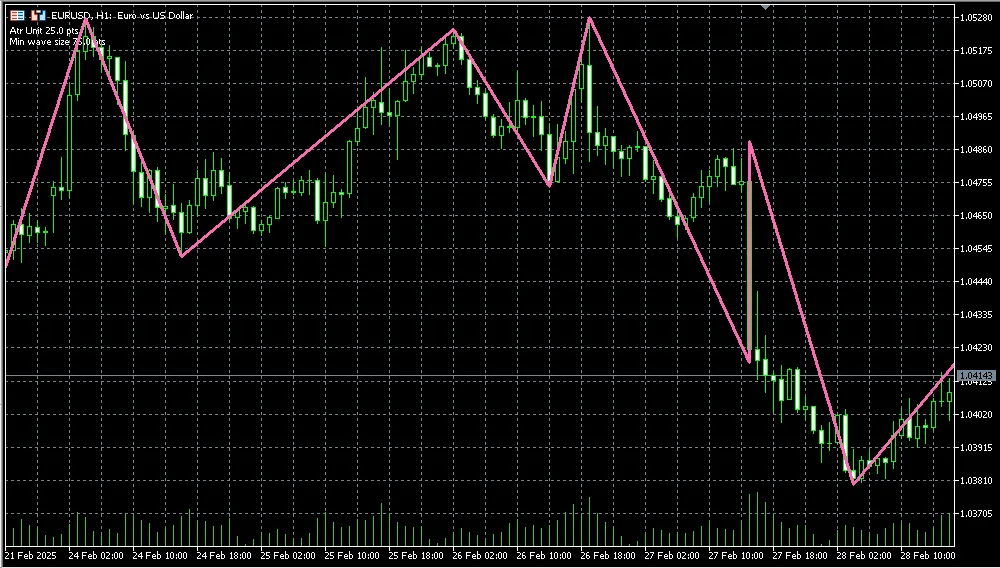
And here's the same zigzag with 3 min size of waves in ATR units:
Happy trading!




Comments 0