
Are you tired of the guesswork when it comes to evaluating your trading positions? Meet the Money-Meter, an essential indicator for MetaTrader 5 that takes the hassle out of managing your trades.
Why Do You Need the Money-Meter?
Traditional MetaTrader charts often only show points, making it tricky to quickly convert these into actual money. This can be a real headache when you're trying to figure out the value of your position lot.
Sure, You Could Do the Math, But...
Let's face it—mentally calculating your potential gains or losses isn’t always convenient. Many traders rely on a rule of thumb for setting their lots, which can lead to risky decisions. In fact, some might not even consider the risks associated with the volume they choose.
What Does the Money-Meter Do?
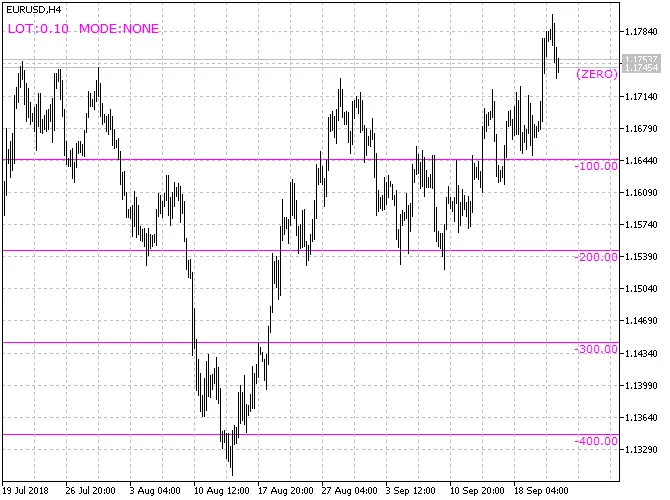
This nifty indicator displays cost levels above and below a selected zero level, so you can see exactly how much you stand to gain or lose.
What Are Cost Levels?
Cost levels represent the amount of funds you could either lose or gain if you open a position with a specified lot from the zero level.
What Is the Zero Level?
By default, the Money-Meter starts calculating from the current price. However, you can customize this by entering a different price in the zero_price parameter.
What Other Parameters Does the Indicator Have?
- grid_step_value – the grid step in your account's currency
- lot_size – the working lot for your virtual position
- lot_divider – the divisor for your lot volume calculations
- total_levels – the number of levels to display above and below
- zero_price – the price to set as your zero level
- progression – type of progression used (more on this below)
- multiplicator – a multiplier for the progression
- lines_color – color of the grid lines
- lines_width – width of the grid lines
- lines_style – style of the grid lines
- lines_prices – display grid level prices on the price scale
- text_shift_bars – shift captions left/right based on the number of bars
How to Use the Money-Meter?
Select your lot_size for future positions and set the grid step with grid_step_value. The Money-Meter will then display levels indicating your potential profit or loss (excluding swaps and commissions). Each grid level shows how much you stand to gain or lose if the price hits that mark.
What’s the Purpose of the Lot Divider?
Some brokers have non-standard contract sizes. For instance, one popular broker has a point price that is 100,000 times higher than it should be. This is where the lot_divider comes into play—it adjusts your calculations to ensure accuracy.
Why Use the Progression Parameter?
By default, the Money-Meter calculates profit or loss for one position based on a specified volume. The progression feature allows you to estimate gains or losses across multiple positions. This is especially useful for assessing the total impact of averaging down or pyramiding strategies.
What Types of Progressions Are Available?
- none – no progression
- equal – equal volume positions
- linear – volume increases linearly
- fibo – volumes grow according to Fibonacci numbers
- martin – geometric progression using the multiplicator
What Signals Does the Indicator Provide?
The Money-Meter doesn’t generate buy or sell signals. Instead, it’s a handy tool for quickly assessing risk before entering a trade.
How to Assess Risks for Open Positions?
If you’re looking to evaluate risks on existing trades, consider using a different indicator: the Smart-Calculator.
How Does It Look?
Related Posts
- Unlocking MetaCOT 2: Your Ultimate CFTC Indicator Toolkit for MT4
- Unlocking the Power of Master Tools for MetaTrader 4
- Visualize Current Trends Across All Time Frames with This MetaTrader 4 Indicator
- Mastering the Open Range Breakout Indicator for MetaTrader 5
- Mastering the Fibonacci ZigZag Indicator for MetaTrader 5