
Hey there, fellow traders! Today, let's dive into a handy tool that can take your trading game to the next level: the Trend Strength Indicator for MetaTrader 4.
This nifty indicator is based on a 5-period simple moving average and is designed to help you spot trends with ease. Here’s how it works:
- If the market is trending upwards, you’ll see green bars.
- If it’s trending down, expect to see red bars.
- If the trend is weak, it’ll show you yellow bars.
So, how does it detect these trends? The magic lies in comparing the current moving average value with the previous one. If the current value is greater than 1, you’re in an uptrend. If it’s less than 1, then you’re looking at a downtrend.
But what about those flat trends? You’ll spot them when the absolute difference between 1 and this ratio is smaller than the tolerance you set in the input levels. To really fine-tune this indicator and boost its performance, you can play around with the tolerance settings, the type of moving average, and its period.
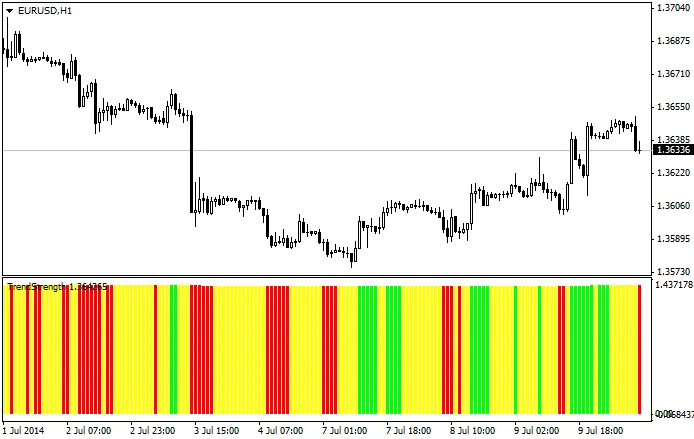
So, give the Trend Strength Indicator a shot and see how it can help you make smarter trading decisions. Happy trading!
Related Posts
- Unlocking MetaCOT 2: Your Ultimate CFTC Indicator Toolkit for MT4
- Unlocking the Power of Master Tools for MetaTrader 4
- Mastering the Open Range Breakout Indicator for MetaTrader 5
- Visualize Current Trends Across All Time Frames with This MetaTrader 4 Indicator
- How to Use the Change Chart Symbol Menu for MetaTrader 4