
If you're looking to enhance your trading strategy, the SlopeDirectionLine_HTF_Signal indicator for MetaTrader 5 is a must-have. This nifty tool visually represents trend directions by showcasing data from the SlopeDirectionLine indicator through three distinct graphical elements. The color coding of these elements clearly indicates the prevailing trend direction.
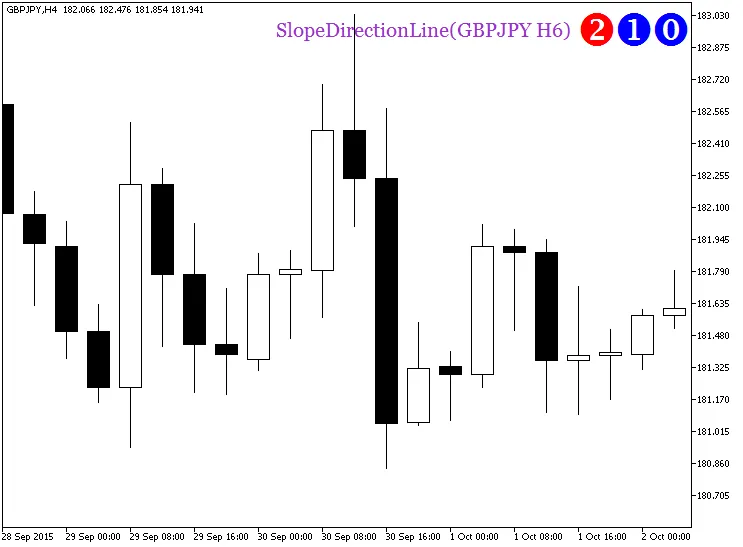
Indicator Input Parameters:
When customizing this indicator, you can easily adjust the timeframe and the financial asset for analysis through the input parameters. If you leave the Symbol_ parameter blank, the indicator will default to the current chart symbol.
//+-----------------------------------+
//| Indicator Input Parameters         |
//+-----------------------------------+
input string Symbol_="";         // Financial asset
input ENUM_TIMEFRAMES Timeframe=PERIOD_H6; // Indicator timeframe for calculation
All input parameters can be categorized into two main groups:
- Details about the input parameters for the SlopeDirectionLine indicator can be found in its description.
- For the visualization of the SlopeDirectionLine_HTF_Signal indicator, you'll need to set the following parameters:
//--- Indicator Display Settings
input string Symbols_Sirname="SlopeDirectionLine_Label_"; // Indicator labels name
input color UpSymbol_Color=clrBlue;         // Uptrend symbol color
input color DnSymbol_Color=clrRed;         // Downtrend symbol color
input color IndName_Color=clrDarkOrchid;   // Indicator name color
input uint Symbols_Size=34;                // Signal symbols size
input uint Font_Size=15;                   // Indicator name font size
input int X_3=120;                         // Horizontal name offset
input int Y_3=10;                          // Vertical name offset
input bool ShowIndName=true;               // Indicator name display
input ENUM_BASE_CORNER  WhatCorner=CORNER_RIGHT_UPPER; // Display corner
input uint X_=0;                           // Horizontal offset
input uint Y_=0;                           // Vertical offset
It's important to note that if you're using multiple SlopeDirectionLine_HTF_Signal indicators on a single chart, each one needs its own unique Symbols_Sirname to avoid any overlap.
This indicator relies on the compiled SlopeDirectionLine indicator file. Make sure to place it in your <terminal_data_folder>/MQL5/Indicators/ directory.
Additionally, the indicator utilizes classes from the SmoothAlgorithms.mqh library, which must be copied to your terminal_data_folder/MQL5/Include folder. For a deeper understanding of how to use these classes, check out the article "Averaging Price Series for Intermediate Calculations Without Using Additional Buffers".
Related Posts
- Unlocking MetaCOT 2: Your Ultimate CFTC Indicator Toolkit for MT4
- Mastering the MACD Candle Indicator for MetaTrader 4
- Understanding the Slow-Stoch_HTF_Signal Indicator for MetaTrader 5
- Visualize Current Trends Across All Time Frames with This MetaTrader 4 Indicator
- Mastering the Fibonacci ZigZag Indicator for MetaTrader 5