
If you’re looking to enhance your trading strategy, the Fractal Weight Oscillator is a powerful tool to consider. This indicator comes with a timeframe selection option that you can easily tweak in the input parameters.
input ENUM_TIMEFRAMES TimeFrame=PERIOD_H4; // Indicator chart period (timeframe)
To get started with the Fractal Weight Oscillator HTF repeater indicator, you’ll need to have the custom indicator file Fractal_WeightOscillator.mq5 compiled and ready. Simply place it in <terminal_data_folder>\MQL5\Indicators.
Once you compile the indicator, the Fractal_WeightOscillator_HTF.ex5 file will be generated, which includes the Fractal_WeightOscillator.ex5 as a resource. This means you won’t need to keep the original indicator in your terminal folder for it to function properly. The indicator code has been designed to include the Weight Oscillator indicator within the executable file itself.
This executable file has the necessary resources added at a global scope:
#resource \\Indicators\\Fractal_WeightOscillator.ex5
Additionally, the path to the indicator used as a resource is updated in the OnInit() function:
Ind_Handle=iCustom(Symbol_,TimeFrame,"::Indicators\\Fractal_WeightOscillator",e_period,normal_speed,RSIWeight,RSIPrice,MFIWeight,MFIPrice,MFIVolumeType,
WPRWeight,DeMarkerWeight,bMA_Method,bLength,bPhase,HighLevel,LowLevel);
The source file for Fractal_WeightOscillator.ex5 also includes other indicators as resources, allowing you to use the compiled version of the repeater indicator independently across different trading terminals.
Here’s the order to follow when compiling the files:
- Fractal_RSI.mq5, Fractal_MFI.mq5, Fractal_WPR.mq5, and Fractal_DeMarker.mq5;
- Fractal_WeightOscillator.mq5;
- Fractal_WeightOscillator_HTF.mq5.
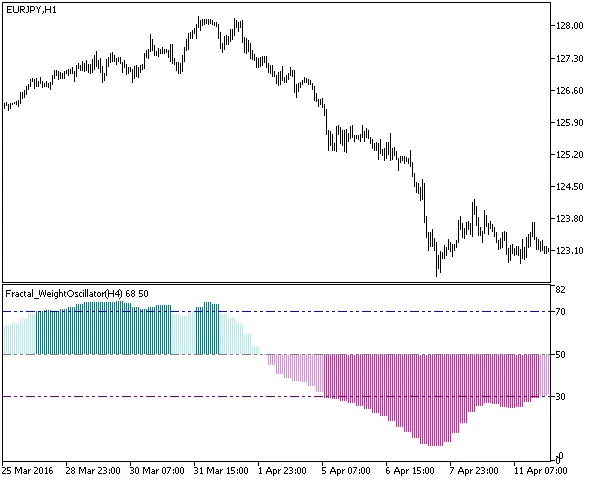
Fig1. The Fractal Weight Oscillator HTF Indicator
Related Posts
- Unlocking MetaCOT 2: Your Ultimate CFTC Indicator Toolkit for MT4
- Unlock Trading Insights with Volume Profile + Range v6.0 for MetaTrader 5
- Mastering the Fibonacci ZigZag Indicator for MetaTrader 5
- Unlocking the Power of Master Tools for MetaTrader 4
- Visualize Current Trends Across All Time Frames with This MetaTrader 4 Indicator