
If you're looking to step up your trading game, the Asymmetric Trend Pressure indicator for MetaTrader 5 is worth a look. This tool not only highlights the trend direction but also gauges its strength, giving you a clearer picture of market movements.
Unlike the Advance Trend Pressure indicator, the Asymmetric version focuses solely on Open and Close prices over specific periods to determine the trend direction. What sets it apart is the ability to select different calculation periods for the bullish and bearish components, making it a flexible choice for traders.
Here’s a quick rundown of the four input parameters you'll be working with:
- Period Up - This sets the calculation period for the bullish trend component.
- Period Down - This sets the calculation period for the bearish trend component.
- Period - This is the overall indicator calculation period.
- Show lines Up and Down - This option lets you display the bullish and bearish component lines.
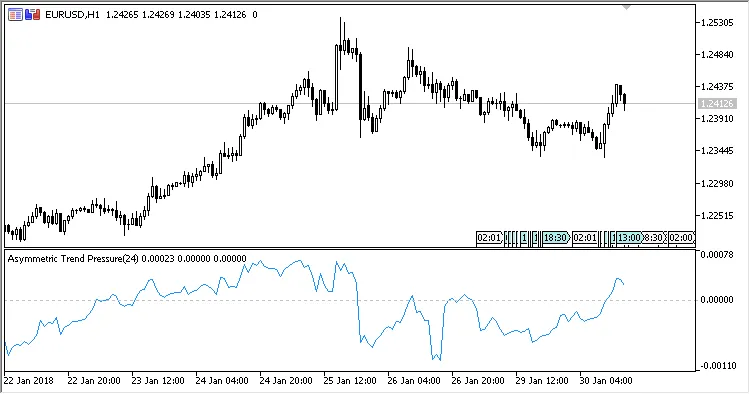
Fig.1 Trend direction and strength line.

Fig.2 Trend direction and strength line with the bullish and bearish component lines.
Related Posts
- Unlocking MetaCOT 2: Your Ultimate CFTC Indicator Toolkit for MT4
- How to Use the Change Chart Symbol Menu for MetaTrader 4
- Visualize Current Trends Across All Time Frames with This MetaTrader 4 Indicator
- Unlocking the Power of Master Tools for MetaTrader 4
- Unlock the Power of SymbolSynthesizer: An Essential MT4 Indicator for Traders