
Author: Bookkeeper
If you’re looking to navigate the market’s twists and turns, the SnakeInBorders indicator for MetaTrader 5 is a tool you won't want to overlook. This nifty indicator calculates a filtered market channel, bounded by the BorderTopBuffer and BorderBotBuffer. It also generates a useful signal referred to as MartBuffer.
Key Features of SnakeInBorders
- Smoothing Method: Choose your preferred smoothing technique with
Smooth_Method(default isXMA_Method=MODE_LWMA_). - Snake Range: Set the half-period for Snake calculations with
SnakeRange=2. - X Phase: Control the first averaging parameter with
XPhase=15. This affects the quality of transitions. - Filter Period: Use a filtering period defined by
FilterPeriod=24to enhance your signals. - Market Filtering Ratio: Adjust
MartFiltr=2for a narrower market channel—just right for your strategy. - Indicator Shift: Fine-tune the indicator's position using
Shift=0for horizontal andPriceShift=0for vertical adjustments. - Color Customization: Set your channel colors with
Upper_color=clrMediumSeaGreenandLower_color=clrRed.
Understanding Mart Signal Behavior:
The Mart signal behaves interestingly within the channel. When the market trends upward, the signal line moves away from the lower boundary, crosses the channel, and aligns with the upper border. The reverse happens when the market trends downward.
In a directional market, the signal line tends to stick to the respective channel border. When the channel widens, it indicates a strong movement, while a narrowing channel suggests fluctuations. As the channel tightens, the signal line will oscillate between the borders. Once it hits the opposite border, the channel begins to expand again.
SnakeInBorders can function as a standalone tool, allowing you to analyze signal line movements across various timeframes. You can also use it to build other indicators, substituting Mart for bar prices. For indicators like MA, OA, or AC, set HardCalc=true. For those like ZigZag or Channel, use HardCalc=false, and adjust MartFiltr to a range of 3 to 5. This helps differentiate between genuine and false peaks; if a peak is intermediate, the Mart signal line won't align with the border.
This indicator leverages the SmoothAlgorithms.mqh library classes, which you’ll need to copy to your <terminal_data_folder>/MQL5/Include directory. For more detailed insights, check out the article "Averaging Price Series for Intermediate Calculations Without Using Additional Buffers".
Originally developed in MQL4, this indicator made its debut in CodeBase back on December 19, 2006.
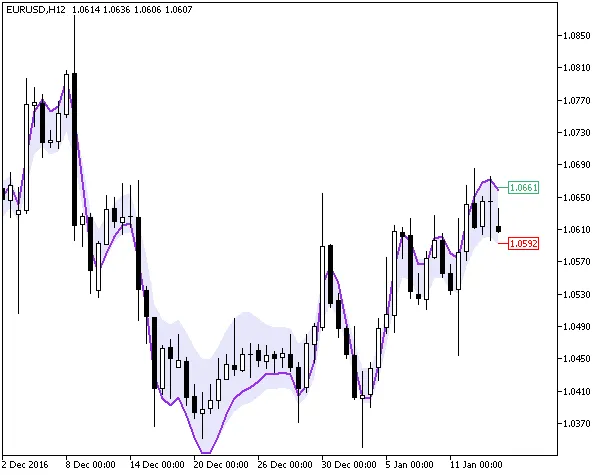
Fig1. The SnakeInBorders indicator
Related Posts
- Mastering the FE Fibonacci Expansion Indicator for MetaTrader 4
- Mastering the Fibonacci ZigZag Indicator for MetaTrader 5
- Unlocking the Power of Master Tools for MetaTrader 4
- Visualize Current Trends Across All Time Frames with This MetaTrader 4 Indicator
- Unlocking the Power of ColorJFatl_Digit_Alert: Your Go-To MT5 Indicator