
Understanding AutoDayFibs
Hey there, fellow traders! Today, let's dive into the fascinating world of AutoDayFibs and how it can enhance your trading strategy. This handy tool helps you keep your Fibonacci levels up-to-date with the latest market movements. Here’s a breakdown of the key features that you should know:
Key Settings for AutoDayFibs
- AutomaticallyAdjustToToday (true/false)
This setting determines whether the indicator will adjust itself to reflect today’s prices automatically. - TimeToAdjust (in 24-hour format 0-23)
If you set AutomaticallyAdjustToToday to 'true', you can specify the exact hour when the Fibonacci lines will switch to today’s prices rather than yesterday’s. Just a heads-up: this only works for whole hours! - DaysBackForHigh and DaysBackForLow
If you prefer to set AutomaticallyAdjustToToday to 'false', you can customize how many days back the indicator will look to determine the high and low prices.
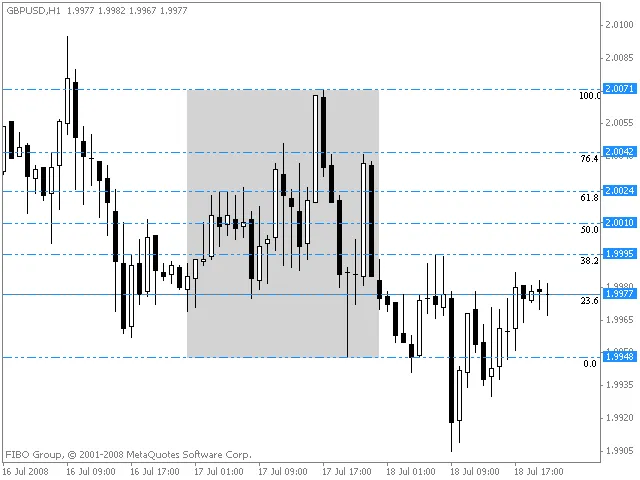
In the image below, you’ll see a grey square that highlights where the indicator is drawing its readings from on this particular chart. This visual cue can really help you understand how the AutoDayFibs is functioning!
Related Posts
- Mastering the FE Fibonacci Expansion Indicator for MetaTrader 4
- Unlocking the Power of Master Tools for MetaTrader 4
- Mastering the Fibonacci ZigZag Indicator for MetaTrader 5
- Unlocking the Power of ColorJFatl_Digit_Alert: Your Go-To MT5 Indicator
- Visualize Current Trends Across All Time Frames with This MetaTrader 4 Indicator