
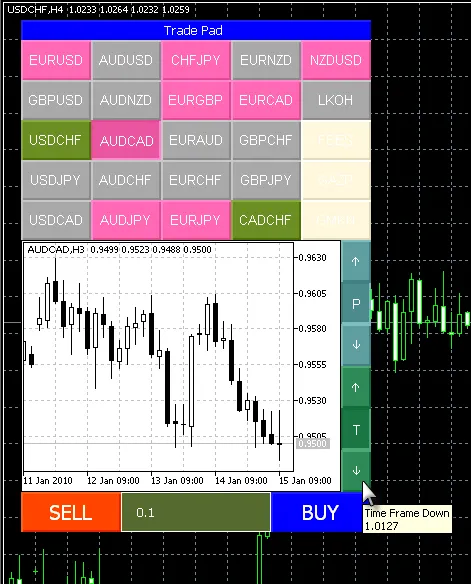
Let’s dive into how to effectively utilize TradePad for MetaTrader 5. This tool allows you to create a table of trading symbols that can really enhance your trading experience. When you click on a symbol from the graphic object Chart (OBJ_CHART), it loads the price data for that specific symbol. Each symbol panel is color-coded to reflect the current trend of the specified timeframe. Here’s what those colors mean:
- Red: Downtrend (Stochastic value > 80);
- Green: Uptrend (Stochastic value
- Grey: Flat (Stochastic value between 20 and 80);
- Sand: No price data available for the symbol.
Currently, the trading functions for the Buy and Sell buttons aren't included, but feel free to implement these as needed. You can also customize the GetColorOfSymbol() function to suit your preferences. Keep in mind that the original code may not be fully optimized, especially regarding access to indicator and price data. Ensure that you place all the necessary classes in the same folder as your TradePad_Sample.mq5 expert.




Comments 0