
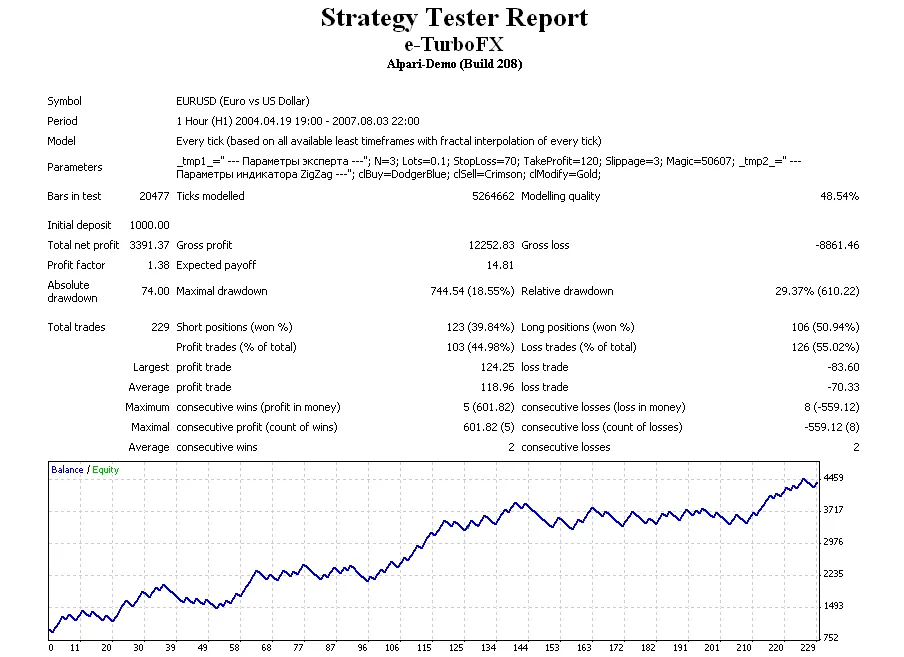
If you’re looking to step up your trading game, e-TurboFx is the way to go! This expert advisor tailored for MetaTrader 4 can really help you streamline your trading process. Let’s break down some of the key parameters that you need to know.
Essential Trade Parameters
- Trade Parameters: Keep an eye on your trading setup with this string:
extern string _tmp1_ = " --- Trade parameters ---"; - Number of Bars to Check: Set the number of bars to analyze with
extern int N = 3; - Lots Value: Define your lot size with
extern double Lots = 0.1; - Stop Loss: Protect your trades with a stop loss set to
extern int StopLoss = 70;(in points). - Take Profit: Aim for profits by setting your take profit level at
extern int TakeProfit = 120;(in points). - Slippage: Manage your trade execution with a maximum allowable slippage of
extern int Slippage = 3;. - Magic Number: Use a unique identifier for your expert's orders with
extern int Magic = 50607;.
With these settings, you can customize e-TurboFx to fit your trading style and risk profile. Whether you're a seasoned trader or just starting out, having the right tools in your arsenal is essential for success!




Comments 0