
Are you looking to enhance your trading strategy? The "Wedge Pattern" Expert Advisor (EA) for MetaTrader 4 might just be the tool you need. This EA employs a unique approach by drawing two mini trend lines using fractals on your chart, allowing you to trade effectively with the wedge pattern strategy. Plus, it comes equipped with a trailing stop loss and take profit feature, making it versatile enough for all time frames across major forex pairs and NASDAQ stocks.
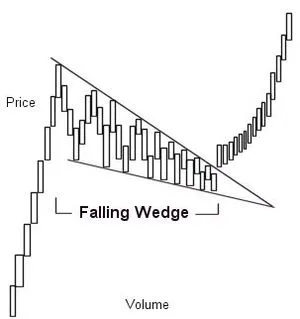
The Concept Behind This Price Action EA:
- In a falling wedge, both boundary lines slant downward from left to right.
- The upper line descends at a steeper angle compared to the lower line.
- As the pattern develops, volume diminishes, and trading activity slows due to the narrowing price range.
- The breakout point will signal a shift in trading activity.

Getting Started with the Wedge Pattern EA:
- Always try it out on a demo account first.
- This EA trades solely based on the price of the open candle!
- If you prefer not to increase lot sizes after a losing trade, set IncreaseFactor=0.
Combining Moving Averages and Trend Lines:
- This EA blends together simple moving averages with a trend line.
- Note that the trend line feature does not function in test mode.
- Optimization tests can only be performed with moving averages.
- In live trading, both the trend line and moving averages will work in tandem.
- During tests, the EA will only display the trend line visually and won’t use it for trade creation.
- Think of the trend line as a filter; it can improve your win rate!
Input Settings for the EA:
- Use_TP_In_Money: Enable take profit in fixed monetary values (true/false).
- TP_In_Money: Set take profit in money (values: 10-100).
- Use_TP_In_Percent: Enable take profit in percentage terms (true/false).
- TP_In_Percent: Set take profit in percentage (values: 10-100).
- Enable_Trailing: Enable trailing stop (true/false).
- Take Profit In Money: Specify take profit in currency (values: 25-300).
- Stop Loss In Money: Specify stop loss in currency (values: 1-20).
- Exit: Close trades if the trend goes against you (true/false).
- Lots: Set lot size (values: 0.01-1).
- IncreaseFactor: Specify how much to increase lots after a losing trade (values: 0.001-0.1).
- MagicNumber: Input a magic number to identify trades (values: 1-100000).
- TakeProfit: Set your take profit (values: 50-200).
- FastMA: Fast moving average settings (values: 1-20).
- SlowMA: Slow moving average settings (values: 50-200).
- Mom_Sell: Momentum sell trigger (values: 0.1-0.9).
- Mom_Buy: Momentum buy trigger (values: 0.1-0.9).
- UseEquityStop: Enable equity stop (true).
- TotalEquityRisk: Set total equity risk (values: 0.01-20).
- Max_Trades: Maximum number of trades allowed (1-12).
- FractalNum: Number of high and low fractals (values: 1-10).
Note: Optimize this EA every few months using the same input values. You can use it as a hedging grid EA or a single trade EA. For guidance on backtesting, check out this backtesting guide.





Comments 0