
The SelfLearningExperts Expert Advisor has been expertly rewritten from MQL4 by lsv. For more details, you can check out the source here.
How It Works
This Expert Advisor operates on ticks regardless of the timeframe you choose. By averaging current market price patterns, it constructs several patterns with varying parameters. The number of patterns is managed through the Nidelt variable. For the initial pattern, the dstop parameter is utilized, for the second it’s dstop * 2, and so on up to dstop * N, where N represents the total number of patterns. As the price changes to the value of dstop * N, a new pattern point is recorded, while the oldest point is discarded, keeping the pattern’s length consistent at Nidelt points. The more settings a pattern has, the deeper it analyzes historical data, allowing the market to be examined across various historical depths.
When a pattern shifts due to market changes, a virtual position is triggered. This process connects the position to a specific market situation by converting the price value sequence of the pattern into binary code: if a current point exceeds the previous one, it’s marked as 1; otherwise, it’s 0. From this binary sequence, a unique pattern number is derived (essentially converting binary to decimal).
The EA can open between one to three virtual positions, each with its own Stop Loss and Take Profit values, which are identical across positions. The Stop Loss/Take Profit levels are determined by the dstop parameter. For one position, it uses dstop * 1, for another dstop * 2, and so forth. If the price moves upward towards the Stop Loss/Take Profit threshold, it increases the potential gain for that pattern; if it moves downward, it raises the likelihood of loss. Each of the three patterns operates with unique combinations of parameters, numbers, and Stop Loss/Take Profit calculations, where the probability of upward or downward movement is also factored in.
Once a minimum of ten virtual trades is generated based on any combination of three parameters (parameter, number, Stop Loss/Take Profit), the EA can automatically identify the same market situation in the future. This allows for position openings in a direction determined by the previously calculated probability based on historical statistics.
Gathering this data can be time-consuming, as the author notes it may take several weeks. However, you can speed up the process using the tester. Just keep in mind that tick price movements in the tester can greatly differ from real market conditions. The recommended approach is to train the EA in the tester and then run it on a demo account for about a week. If it performs well, you can consider applying it to a live account.
Setting Up Your Expert Advisor
The first step in preparing your EA for action involves optimizing its parameters: Nidelt, Nstop, dstop, forg, Probab, NN, and delta. During this stage, optimization should be done with ReadHistory and SaveHistory parameters turned off. Once you find a suitable parameter combination, run a test with SaveHistory=true. After that, run the EA on an account with ReadHistory=true. This way, the EA will start operating immediately, having gathered enough data during testing. It’s also advisable to turn on SaveHistory while working on the account to automatically save data, especially if the EA needs to restart.
When using SaveHistory in the tester, the learning results are saved in a file named FD_[Symbol]. For instance, if testing on EURUSD, the file will be FD_EURUSD, and if on GBPUSD, it will be FD_GBPUSD, etc. These files are located in the Files folder, which serves as the common data repository for all terminals. You can locate the General Data Folder via the main menu of MetaEditor.
In addition to saving teaching results, the EA generates two files essential for trading: FDlast_buy[Symbol][TimeFrame] and FDlast_sell[Symbol][TimeFrame]. Don’t worry too much about these files.
The EA’s performance is influenced by the timeframe mainly in terms of data saving frequency and the minimum time interval between virtual trades, which is set to two bars. Thus, you may notice variations in the EA’s performance across different timeframes.
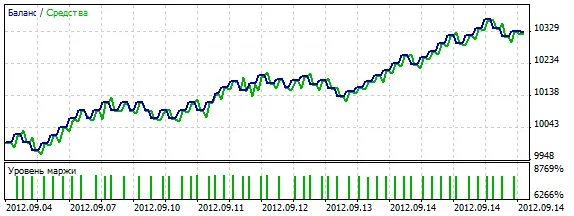
The image below showcases the learning results of the EA on the EURUSD M15 chart with default settings.
Key Parameters
- ReadHistory: Reads the saved history of learning.
- SaveHistory: Saves the learning history. During testing, the history is saved until the test ends, while in live trading, it saves regularly as it continues learning.
- Lots: Determines the volume of each position.
- Nidelt: The number of patterns must not exceed 30.
- Nstop: Defines the number of virtual position parameters (Stop Loss and Take Profit values, which are equal), ranging from 1 to 3.
- dstop: Sets the step changes for virtual position parameters (Stop Loss and Take Profit).
- forg: The forgetting rate for learning results, typically just above 1.
- Probab: The probability level derived from learning results that guides position openings.
- NN: The maximum pattern size, which should not exceed 12.
- delta: The step change for pattern parameters.
- ReplaceStops: Modifies Stop Loss/Take Profit based on new signals; this adjustment only occurs in the direction of the position.
- Trailing: The level for trailing stops; when set to 0, the trailing stop is disabled.




Comments 0