
The MQL5 Wizard empowers traders to craft ready-made Expert Advisors (EAs) utilizing the Standard Library classes that come with the MetaTrader 5 client terminal. This tool is a game-changer for quickly testing your trading ideas; all you need to do is build your own trading signals class. For a deeper dive, check out the article MQL5 Wizard: How to Create a Module of Trading Signals.
The core concept is straightforward: your trading signals class should derive from CExpertSignal. Next, you’ll need to override the LongCondition() and ShortCondition() virtual methods with your custom logic.
There's a great resource titled "Strategies of Best Traders" (in Russian) that discusses numerous trading strategies, particularly focusing on reversal candlestick patterns confirmed by indicators like Stochastic, CCI, MFI, and RSI oscillators.
It’s best to create a dedicated class, derived from CExpertSignal, for recognizing candlestick patterns. To confirm the trade signals generated by these patterns, simply derive a class from CCandlePattern and incorporate the necessary features (like oscillator confirmations).
In this post, we’ll focus on the "Bullish Engulfing" and "Bearish Engulfing" reversal patterns, confirmed by the RSI indicator. Our trading signals module will utilize the CCandlePattern class, demonstrating its effectiveness in generating trade signals based on candlestick patterns.
1. Understanding "Bullish Engulfing" and "Bearish Engulfing" Patterns
1.1. Bullish Engulfing
The "Bullish Engulfing" reversal pattern appears in a downtrend when a small black candlestick is followed by a larger white candlestick that completely engulfs the previous day's candle. The shadows of the smaller candle are short, allowing the body of the larger candle to cover the entire previous day's body.
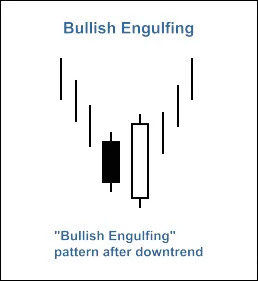
Fig. 1. Bullish Engulfing Candlestick Pattern
The identification of the "Bullish Engulfing" pattern is carried out in the CheckPatternBullishEngulfing() method of the CCandlePattern class:
//+------------------------------------------------------------------+//| Checks formation of "Bullish Engulfing" candlestick pattern       |//+------------------------------------------------------------------+bool CCandlePattern::CheckPatternBullishEngulfing()
  {
//--- Bullish Engulfing
   if((Open(2)>Close(2))
             &&  // previous candle is bearish
      (Close(1)-Open(1)>AvgBody(1))  &&  // body of the bullish candle is higher than average value of the body
      (Close(1)>Open(2))             &&  // close price of the bullish candle is higher than open price of the bearish candle
      (MidOpenClose(2)<CloseAvg(2))  &&  // downtrend
      (Open(1)<Close(2)))                // open price of the bullish candle is lower than close price of the bearish
      return(true);
//---
   return(false);
  }
The CheckCandlestickPattern(CANDLE_PATTERN_BULLISH_ENGULFING) method of CCandlePattern class checks for the formation of the "Bullish Engulfing" candlestick pattern.
1.2. Bearish Engulfing
The "Bearish Engulfing" reversal pattern appears in an uptrend when a small white candlestick is followed by a larger black candlestick that completely engulfs the previous day's candle. Again, the shadows of the smaller candle are short, allowing the larger candle's body to cover the previous day's body.
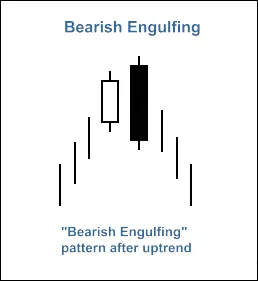
Fig. 2. Bearish Engulfing Candlestick Pattern
The recognition of the "Bearish Engulfing" pattern is done in the CheckPatternBearishEngulfing() method of the CCandlePattern class:
//+------------------------------------------------------------------+//| Checks formation of "Bearish Engulfing" candlestick pattern       |//+------------------------------------------------------------------+bool CCandlePattern::CheckPatternBearishEngulfing()
  {
//--- Bearish Engulfing
   if((Open(2)<Close(2))
             &&  // previous candle is bullish
      (Open(1)-Close(1)>AvgBody(1)) &&  // body of the candle is higher than average value of the body
      (Close(1)<Open(2))             &&  // close price of the bearish candle is lower than open price of the bullish candle
      (MidOpenClose(2)>CloseAvg(2)) &&  // uptrend
      (Open(1)>Close(2)))               // Open price of the bearish candle is higher than close price of the bullish candle
      return(true);
//---
   return(false);
  }
The CheckCandlestickPattern(CANDLE_PATTERN_BEARISH_ENGULFING) method of CCandlePattern class checks for the formation of the "Bearish Engulfing" candlestick pattern.
2. Trade Signals Confirmed by the RSI Indicator
For both long and short positions, our trading signals must be confirmed by the RSI indicator. Specifically, the RSI value should be below 40 for a long position and above 60 for a short position.
Closing an open position also depends on the RSI values. This can occur in two scenarios:
- If the RSI reaches the critical opposite levels (70 for long positions and 30 for short positions)
- If the reverse signal isn't confirmed (for the RSI levels at 30 for long positions and 70 for short positions)

Fig. 3. Bullish Engulfing Pattern Confirmed by RSI Indicator
- int CBE_BE_RSI::LongCondition() - checks conditions to open a long position (returns 80) and to close a short position (returns 40);
- int CBE_BE_RSI::ShortCondition() - checks conditions to open a short position (returns 80) and to close a long position (returns 40).
2.1. Opening Long Position / Closing Short Position
The formation of the "Bullish Engulfing" pattern must be confirmed by the RSI indicator: RSI(1) < 40 (the RSI value of the last completed bar must be less than 40).
The short position should be closed if the RSI indicator crosses above the critical levels of 70 or 30.
//+------------------------------------------------------------------+//| Checks conditions for entry and exit from market                  |//| 1) Market entry (open long position, result=80)                  |//| 2) Market exit (close short position, result=40)                 |//+------------------------------------------------------------------+int CBE_BE_RSI::LongCondition()
  {
   int result=0;
//--- idx can be used to determine Expert Advisor work mode//--- idx=0 - in this case EA checks trade conditions at each tick//--- idx=1 - in this case EA checks trade condition only at news bars
  int idx = StartIndex();
//--- checking of conditions to open long position//--- formation of Bullish Engulfing pattern and RSI<30
  if(CheckCandlestickPattern(CANDLE_PATTERN_BULLISH_ENGULFING) && (RSI(1)<40))
     result=80;
//--- checking of conditions to close short position//--- signal line crossover of overbought/oversold levels (upward 30, upward 70)
  if(((RSI(1)>30) && (RSI(2)<30)) || ((RSI(1)>70) && (RSI(2)<70)))
     result=40;
//--- return result
   return(result);
  }
2.2. Opening Short Position / Closing Long Position
The formation of the "Bearish Engulfing" pattern must be confirmed by the RSI indicator: RSI(1) > 60 (the value of the RSI indicator of the last completed bar must be greater than 60).
The long position should be closed if the RSI indicator crosses below the critical levels of 70 or 30.
//+------------------------------------------------------------------+//| Checks conditions for entry and exit from market                  |//| 1) Market entry (open short position, result=80)                 |//| 2) Market exit (close long position, result=40)                  |//+------------------------------------------------------------------+int CBE_BE_RSI::ShortCondition()
  {
   int result=0;
//--- idx can be used to determine Expert Advisor work mode//--- idx=0 - in this case EA checks trade conditions at each tick//--- idx=1 - in this case EA checks trade condition only at news bars
  int idx = StartIndex();
//--- checking of conditions to open short position//--- formation of Bearish Engulfing pattern and RSI>60
  if(CheckCandlestickPattern(CANDLE_PATTERN_BEARISH_ENGULFING) && (RSI(1)>60))
     result=80;
//--- checking of conditions to close long position//--- signal line crossover of overbought/oversold levels (downward 70, downward 30)
   if(((RSI(1)<70) && (RSI(2)>70)) || ((RSI(1)<30) && (RSI(2)>30)))
     result=40;
//--- return result
   return(result);
  }
2.3. Creating an Expert Advisor Using MQL5 Wizard
The CBE_BE_RSI class is not part of the Standard Library classes. To utilize it, you'll need to download the acml_rsi.mqh file (see attachments) and save it to the client_terminal_data\folder\MQL5\Include\Expert\Signal\MySignals. You should do the same with the acandlepatterns.mqh file. After saving, you can use these files in MQL5 Wizard by restarting the MetaEditor.
To create an Expert Advisor, launch MQL5 Wizard:
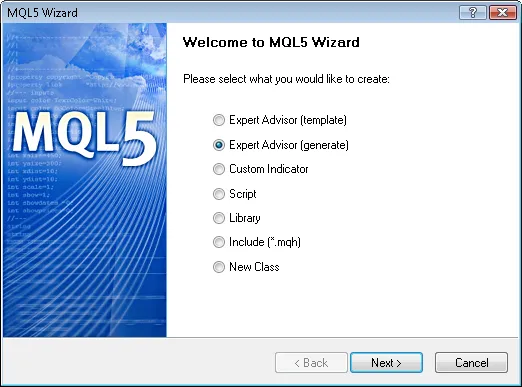
Fig. 4. Creating Expert Advisor Using MQL5 Wizard
Let’s specify the name of the Expert Advisor:

Fig. 5. General Properties of the Expert Advisor
Next, we need to select the modules of trade signals we want to use.

Fig. 6. Signal Properties of the Expert Advisor
In our case, we're using just one module of trade signals.
Add the "Signals Based on Bullish Engulfing/Bearish Engulfing Confirmed by RSI" module of trading signals:

Fig. 7. Signal Properties of the Expert Advisor
The module of trade signals has been added:

Fig. 8. Signal Properties of the Expert Advisor
You can select any trailing properties, but we'll go with "Trailing Stop not used":
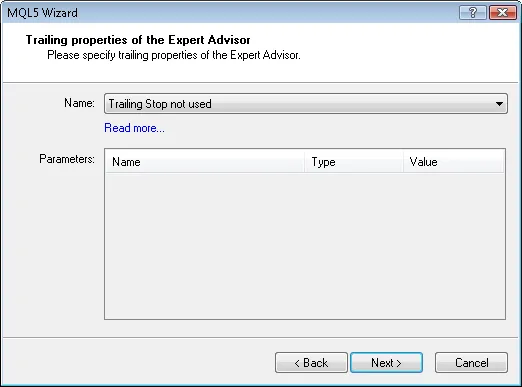
Fig. 9. Trailing Properties of the Expert Advisor
Regarding money management properties, we'll use "Trading with fixed trade volume":
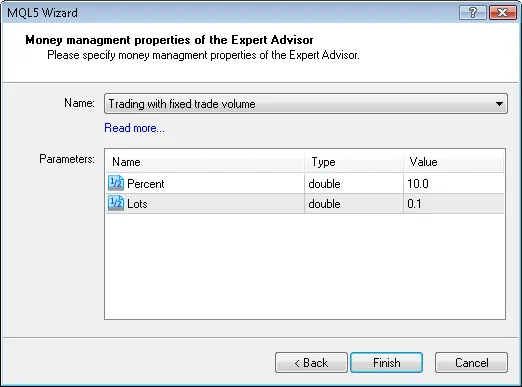
Fig. 10. Money Management Properties of the Expert Advisor
By pressing the "Finish" button, you'll receive the code for the generated Expert Advisor, which will be located in Expert_ABE_BE_RSI.mq5, saved in terminal_data_folder\MQL5\Experts\.
The default input parameters of the generated Expert Advisor are:
//--- inputs for main signalinputint Signal_ThresholdOpen =10; // Signal threshold value to open [0...100]inputint Signal_ThresholdClose =10; // Signal threshold value to close [0...100]inputdouble Signal_PriceLevel =0.0 // Price level to execute a dealinputdouble Signal_StopLevel =50.0 // Stop Loss level (in points)inputdouble Signal_TakeLevel =50.0 // Take Profit level (in points)
These values should be replaced with:
//--- inputs for main signalinputint Signal_ThresholdOpen =40; // Signal threshold value to open [0...100]inputint Signal_ThresholdClose =20; // Signal threshold value to close [0...100]inputdouble Signal_PriceLevel =0.0 // Price level to execute a dealinputdouble Signal_StopLevel =0.0 // Stop Loss level (in points)inputdouble Signal_TakeLevel =0.0 // Take Profit level (in points)
The Signal_ThresholdOpen/Signal_ThresholdClose input parameters allow you to specify threshold levels for opening and closing positions.
In the code for the LongCondition() and ShortCondition() methods of the trade signals class, we've set fixed threshold values:
- Open position: 80;
- Close position: 40.
The Expert Advisor generated by MQL5 Wizard opens and closes positions based on




Comments 0