
FX Multi-Meter
Hey traders! If you’re tired of cluttered charts and want something that packs a punch, let’s talk about the FX Multi-Meter. This all-in-one indicator is a game changer, drawing inspiration from the !x-meter (big shoutout to Robert Hill for the original code). But don’t be fooled; it’s a whole new beast that delivers a wealth of information without the usual screen chaos. Designed for precision in both entries and exits, it gives you a clear snapshot of currency pair movements. The Multi-Meter plays nice with any currency and timeframe, displaying key insights right in the bottom corner of your chart.
- A graph of Stochastic Oscillators for timeframes ranging from M1 to D1.
- An EMA-based market trend indication on the same timeframes.
- The MACD direction on your current chart, along with signal and zero line crossovers.
- Fast 3-period LWMA crossing a 5-period SMA to show market direction (customizable periods, of course).
- Direction of the Parabolic SAR on your current chart for exit signals and entry confirmation.
- A swiftly oscillating graph of the Williams % Range indicator for spotting Overbought/Oversold conditions.
- A Bar % Increase/Decrease meter for a quick visual gauge of price movement compared to the last four bars—if it’s over 100%, the price is speeding up; below 100%, it’s slowing down. Strong price movements flash in vibrant red or green, depending on their intensity.
- Overall recommended trade signals based on various indicators.
- And last but not least, a clear view of the currency spread in big, easy-to-read numbers.
------------------------------------------------------------------------------------------------------------
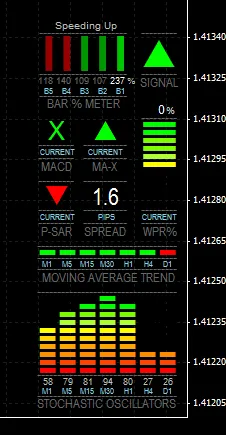
FX Multi-Meter on EUR-USD M1 Chart
Example Interpretation - EUR/USD - M1 Chart
- The Bar % Meter shows that price movement is accelerating upwards (237% above the previous four-bar average).
- The MACD is crossing upwards above its signal line.
- The MA-X indicates that the fast 3-period Linear Weighted MA has climbed above the slower 5-period Simple MA.
- The P-SAR is still moving downwards and hasn’t flipped yet.
- The WPR% is peaking at a high level, suggesting a strong upward movement or an Overbought condition. In this case, we're looking at the beginning of the movement, not a peak.
- All MAs, except for the D1 timeframe, are trending upwards.
- The Stochastic Oscillator on the M30 chart is peaking, hinting at a possible Overbought condition for that timeframe, while the M1 Stochastic is at 58% and climbing.
- The current spread is 1.6 pips.
- Overall Signal = Buy
------------------------------------------------------------------------------------------------------------
This is a new tool, and while it hasn’t been extensively tested yet, it’s showing promise on both live and demo accounts. It’s great for boosting trading confidence—especially when you see those positive results! Watching it react on an M1 chart is a treat—it’s responsive, although it might take a moment to switch between charts. I’m curious about its performance on a 4-digit account, as it was designed for 5 digits, but I encourage you to give it a whirl and share your feedback. I’d love to hear about your experiences and any tweaks you think could enhance the overall signal, which is currently set at...
e.g., Signal Buy
(Current MACD > Previous MACD & 3-period LWMA > 5-period SMA & WPR% > -50 & Current 14-period EMA > Previous 14-period EMA & Current 14-period Stochastic > Previous 14-period Stochastic & Current Close price > Previous Close price)
------------------------------------------------------------------------------------------------------------
Installation: Simply place the mq4 file in your Experts folder and compile it in MetaEditor. Drag and drop onto any chart, and remember to install the included fonts to C:/WINDOWS/FONTS/.
------------------------------------------------------------------------------------------------------------
Note: I’ve got a small wishlist of modifications for this indicator, especially an Elliot Wave signal. If anyone has EA-friendly code for this, I’d love to connect! Since I’m more familiar with writing EAs than indicators in mql4, the Multi-Meter was developed as an EA, just like the original !x-meter, which is now a more efficient indicator (x-meter2). While it doesn’t trade like an EA and won’t work in Tester, you can test it to see all the standard indicators used in Multi-Meter, which can be saved as a template. If you’re interested in converting the Multi-Meter to an mql4 indicator, get in touch for more details!
Happy trading!
Joshua