
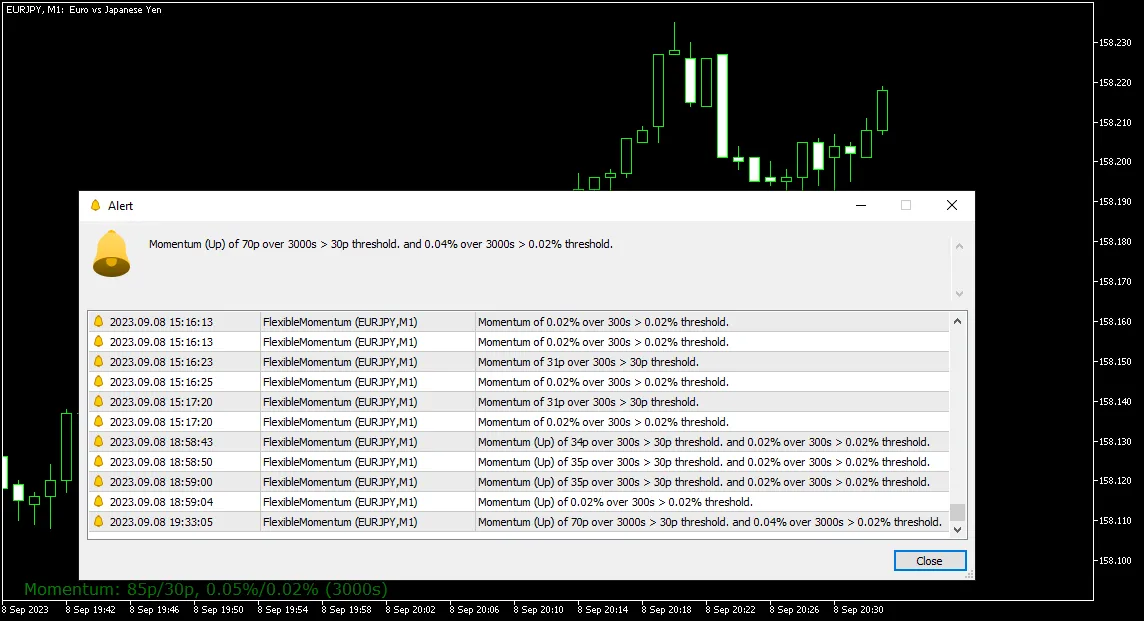
Flexible Momentum (MT5 Indicator) is a powerful tool designed for traders using MetaTrader 5. It calculates the change in a currency rate over a specified time period (in seconds) and displays the results as both points and percentages right on your main chart. What’s great about this indicator is its customizable alerts that notify you when maximum momentum thresholds are reached, whether in points or percentage. Just a heads up, since it uses tick history for calculating momentum, it’s exclusive to MT5.
The primary goal of the Flexible Momentum indicator is to alert you to significant price movements in a short timeframe. This can be invaluable when deciding to hop into a new trade or when contemplating the exit strategy for an ongoing one.
Input Parameters
Main Settings
- Seconds (default = 10) — Sets the time frame (in seconds) for calculating price changes.
- ThresholdPoints (default = 30) — The point threshold that triggers alerts, based on your configuration.
- ThresholdPercentage (default = 0.02) — The percentage threshold for triggering alerts, also configurable.
- DiscardIfOlder (default = 1) — Discards calculations if the ticks used are older than the specified number of seconds.
- PriceToUse (default = Bid) — Choose the type of price for calculations: Bid, Ask, or Midprice.
Alert Options
- AlertBehavior (default = No alerts) — Determines the response when a threshold is breached:
- No alerts — No action is taken.
- Single alert until next breach — Receives an alert until momentum dips below the threshold. This works separately for points and percentage thresholds.
- Continuous alerts whenever condition is met — Alerts will be issued for every tick if momentum exceeds the threshold.
- Alert on condition with time limit for next alert — Alerts are sent at intervals defined by the next parameter if momentum stays above the threshold.
- AlertTimeLimitForRestricted (default = 5) — Sets a pause in seconds for the next alert, applicable only if AlertBehavior is set to the time-limited option.
- EnableNativeAlerts (default = false) — If true, a native MetaTrader popup alert will trigger when the alert condition is met.
- EnableEmailAlerts (default = false) — If true, an email notification will be sent when the alert condition is met. Ensure your email is set up correctly in MetaTrader via Tools->Options->Email.
- EnablePushAlerts (default = false) — If true, you’ll receive a push notification when the alert condition is met. Make sure notifications are configured in MetaTrader via Tools->Options->Notifications.
Display Settings
- Font Size (default = 8) — Adjusts the font size for the displayed text.
- Up Color (default = clrGreen) — The text color for positive price changes.
- Down Color (default = clrRed) — The text color for negative price changes.
- No Change Color (default = clrBlue) — The text color when there’s no change in price or not enough ticks.
- X Distance for Text (default = 21) — Horizontal distance (in pixels) from the selected screen corner to the text.
- Y Distance for Text (default = 20) — Vertical distance (in pixels) from the selected screen corner to the text.
- Text Corner (default = CORNER_LEFT_LOWER) — The corner of the chart where the text will be displayed.
- Text Object Name (default = "FM_Text") — The object name for the text showing the momentum value.




Comments 0