
Author: dm34@mail.ru
Hey there, fellow traders! Today, let’s dive into the UltraCCI indicator, a fantastic tool for MetaTrader 5 that leverages the Commodity Channel Index (CCI) to analyze trend directions effectively. This will help you make more informed trading decisions!
The UltraCCI indicator is built on the principles of CCI, where we analyze multiple signal lines to determine market trends. Here’s a quick breakdown of the key input parameters you’ll be working with:
- StartLength: The initial value for the first signal line.
- Step: This defines how much the period changes with each step.
- StepsTotal: The total number of period changes you want to analyze.
The calculation for any period from the signal lines uses an arithmetic progression:
SignalPeriod(Number) = StartLength + Number * Step
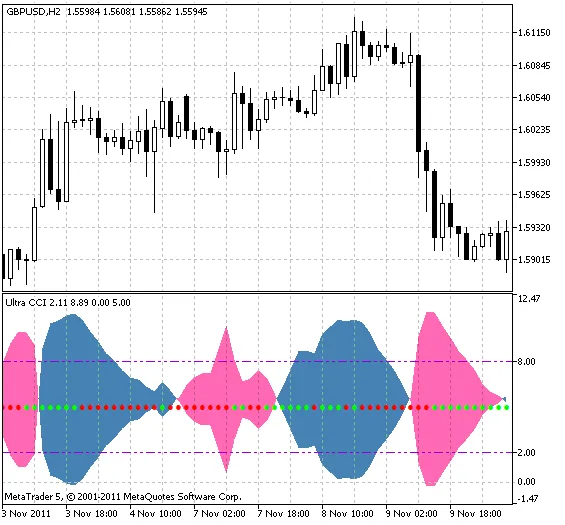
Here, the variable Number ranges from zero to StepsTotal. Once we have these period values, they’re compiled into an array, which is used to derive smoothed RSI values. Next, we calculate the trend direction for each smoothing and tally the positive and negative trends across all CCI smoothed values. The results are then smoothed again to create the indicator lines that form a color cloud, displayed using the DRAW_FILLING style.
The direction of the trend is depicted by the cloud's color, while the strength of that trend is indicated by the cloud's width. You can also set overbought (UpLevel) and oversold (DnLevel) levels as a percentage of the indicator's maximum amplitude.
Additionally, this indicator allows you to gauge the speed of trend power changes, represented by color dots. If the trend power is increasing, these dots will match the cloud's color; otherwise, they’ll display in the opposite color.
There are ten different smoothing algorithms available for you to choose from:
- SMA (Simple Moving Average)
- EMA (Exponential Moving Average)
- SMMA (Smoothed Moving Average)
- LWMA (Linear Weighted Moving Average)
- JJMA (JMA Adaptive Average)
- JurX (Ultralinear Smoothing)
- ParMA (Parabolic Smoothing)
- T3 (Tillson's Multiple Exponential Smoothing)
- VIDYA (Tushar Chande's Algorithm)
- AMA (Perry Kaufman's Algorithm)
It's important to note that the phase parameters for different smoothing algorithms carry distinct meanings. For example, in JMA, the phase variable ranges from -100 to +100, whereas for T3, it’s a smoothing ratio multiplied by 100 for better visualization. For AMA, the fast EMA period is set at a default value of 2.
The UltraCCI indicator utilizes the SmoothAlgorithms.mqh library classes, which you'll need to copy to your terminal's data_folder/MQL5/Include. You can find a detailed explanation of these classes in the article "Averaging Price Series for Intermediate Calculations Without Using Additional Buffers".
Here are the input parameters for the indicator:
//+----------------------------------------------+
//| Indicator input parameters                   |
//+----------------------------------------------+
input int CCI_Period=13;  // CCI indicator period
input ENUM_APPLIED_PRICE Applied_price=PRICE_CLOSE; // Applied price
//----
input Smooth_Method W_Method=MODE_JJMA;  // Smoothing method
input int StartLength=3;  // Initial smoothing period
input int WPhase=100;  // Smoothing parameter
//----
input uint Step=5;  // Period change step
input uint StepsTotal=10;  // Number of period changes
//----
input Smooth_Method SmoothMethod=MODE_JJMA;  // Smoothing method
input int SmoothLength=3;  // Smoothing depth
input int SmoothPhase=100;  // Smoothing parameter
//----
input uint UpLevel=80;  // Overbought level, %%
input uint DnLevel=20;  // Oversold level, %%
input color UpLevelsColor=DarkViolet;  // Overbought level color
input color DnLevelsColor=DarkViolet;  // Oversold level color
input STYLE Levelstyle=DASHDOTDOT_;  // Levels style
input WIDTH LevelsWidth=Width_1;  // Levels width
//+----------------------------------------------+
Related Posts
- Unlocking MetaCOT 2: Your Ultimate CFTC Indicator Toolkit for MT4
- Unlocking the Power of Master Tools for MetaTrader 4
- Visualize Current Trends Across All Time Frames with This MetaTrader 4 Indicator
- Unlock Trading Insights with Volume Profile + Range v6.0 for MetaTrader 5
- Mastering the MACD Candle Indicator for MetaTrader 4