
If you're looking to enhance your trading strategy, the Linear Regression Indicator is a tool worth considering. This indicator functions similarly to the LSMA Color published in CodeBase, but here's the kicker: it operates much faster.
Key Parameters to Understand
Before diving in, let’s go over the essential parameters you need to tweak:
- Period: Set this to
extern int period=34;to determine the regression calculating period. - Price: Use
extern int price=0;to select the price type for calculations. Options include 0 for Close, 1 for Open, 2 for High, and 3 for Low. - Shift: Adjust
extern int Shift=0;to control the chart shift when drawing. - Sound Alert: Enable
extern bool bPlaySound=true;to hear a sound when the color changes. - Sound File: Specify the sound file with
extern string SoundName="alert.wav";. - Check Bar: Use
extern int CheckBar=0;to choose the bar for monitoring color changes.
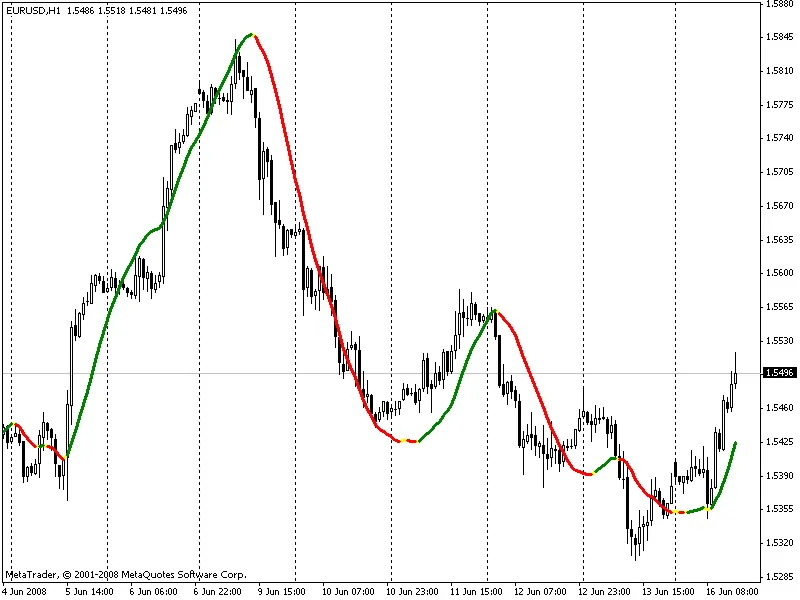
Incorporating the Linear Regression Indicator into your trading toolkit can provide valuable insights. Whether you’re a seasoned trader or just starting, understanding these parameters will help you make the most out of this indicator. Happy trading!
Related Posts
- Unlocking the Power of Master Tools for MetaTrader 4
- Unlocking MetaCOT 2: Your Ultimate CFTC Indicator Toolkit for MT4
- Mastering the Open Range Breakout Indicator for MetaTrader 5
- Visualize Current Trends Across All Time Frames with This MetaTrader 4 Indicator
- Unlock Trading Insights with Volume Profile + Range v6.0 for MetaTrader 5