
Hello fellow traders! Today, I’m excited to introduce you to the latest and greatest version of an essential tool for your trading arsenal - the Harmonic Pattern Finder V3. This updated indicator is designed to help you effortlessly identify harmonic patterns on your charts, making your trading experience smoother and more efficient.
For those who are new to harmonic patterns, let me break it down for you. These patterns are rooted in Fibonacci ratios and serve as a key component in technical analysis. They can be as distinct as triangles or double tops but come with precise measurements that make automated tools a trader's best friend. If you’re keen on honing your skills, you might want to check out earlier versions of this indicator: V1 and V2.
So, what’s new in V3? Here are some highlights:
- Enhanced customizability to reduce screen clutter, allowing you to choose what to display.
- Now, a double click on any part of a pattern will highlight it and provide detailed analytical insights, including harmonic reversal ratios and timing information.
- The indicator has simplified its zigzag selection process, now utilizing a single embedded ATR ZigZag to avoid installation headaches.
- Statistical data collection lets you track how well a pattern has performed historically.
- Corrections have been made to the ratios for "anti-patterns," ensuring accuracy.
Getting started is a breeze! The interface is intuitive, but I do recommend using a black background for optimal visibility. If you need any technical details, keep reading after the image. And as always, feel free to drop your questions in the forum or shoot me a PM!
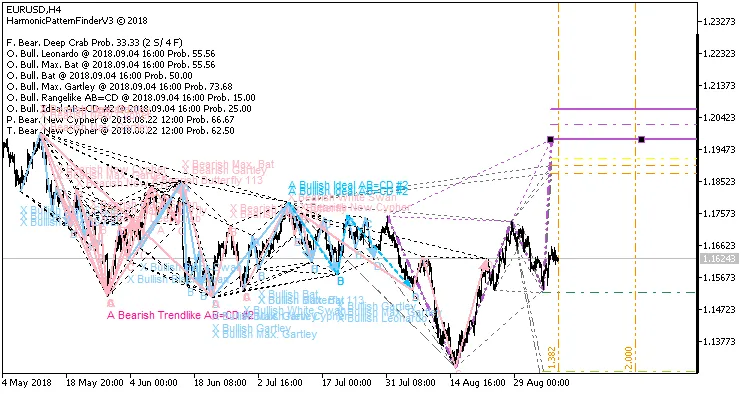
Double-clicking a pattern highlights it and reveals detailed stats, timing, and PRZ info—essential for assessing trade potential.
Reducing Screen Clutter
One of the key improvements is the ability to manage what you see. In the settings, you can:
- Choose to fill patterns visually or just display line segments.
- Toggle pattern descriptions on or off (enabled by default).
- Show emerging patterns (enabled by default) to spot future trade opportunities.
- Display old patterns, which is enabled but may not always be necessary.
- Enable "one-ahead" projections for a more responsive indicator.
- Choose soft projections that minimize clutter using background-friendly colors.
- Show the comment box for statistical insights in the upper left corner.
Advanced Pattern Filtration
Every trader has their own criteria for evaluating patterns. The Harmonic Pattern Finder employs a holistic matching approach, allowing for adjustable filters based on user feedback. You can now exclude patterns where the potential reversal zone is purely slack. Furthermore, an independent filtration method lets you filter out patterns that complete too early or too late based on the duration of specific segments.
Not finding exactly what you need? If you have coding skills, you can create custom filtration rules, as explained in the user guide below.
Statistical Insights
This indicator doesn’t just stop at identifying patterns; it tracks their success and failure rates in the Potential Reversal Zone (PRZ). You’ll find insightful messages in the comment box, such as "F. Bear. New Cypher Prob. 60.00 (6 S / 4 F)". This information helps you gauge the effectiveness of patterns based on historical data, but remember, past performance isn’t a guarantee of future results!
Customizing Your Indicator
The code has been extensively refactored to utilize MQL5's object-oriented features, making it easier to customize. If you're looking to create your own Expert Advisor (EA), you can implement your own "CHPFMatchProcessor" and integrate it with the matching algorithm. This will allow you to process zigzag arrays and optimize your trading decisions.
Need specific observation rules? It’s as simple as implementing the "CHPFObserver" interface to get alerts whenever a pattern matches your criteria.
Authors:
This project is a collaborative effort between Andre Enger and David Gadelha.
Updates
- 3.1: Fixed a syntax error for compatibility with MetaTrader build 1940 and above.
- 3.2: The tooltip on the line from X to D now displays the most relevant ratio for the specific pattern.
Happy trading, everyone! Don’t hesitate to reach out with your thoughts or questions!




Comments 0