
Hey fellow traders! Today, let's dive into a nifty tool that can enhance your trading game on MetaTrader 5: the Custom Pattern Indicator. This handy indicator allows you to search for specific candlestick patterns that you've set up in the settings, displaying them right on your chart.
Understanding Custom Patterns
To get started, you'll need to specify your desired pattern using a simple text code. Here's the breakdown:
- U stands for a bullish candlestick
- D represents a bearish candlestick
- N indicates a candlestick of any type
For instance:
- If you enter "UUD" into the indicator settings, it will identify and showcase all instances of the "Bullish-Bullish-Bearish" candlestick pattern.
- Similarly, if you input "UUD", it will find and display all "Bullish-any-Bearish" patterns.
You can only use the characters U, D, and N (or their lowercase variants u, d, and n) to define these patterns.
Features of the Indicator
This indicator doesn't just stop at displaying your specified patterns; it can also show mirror-mapped (reverse) patterns, which is pretty cool!
Here are the two main parameters you can adjust:
- Pattern (U - up, N - nothing, D - down) - this is where you specify your sequence of candlesticks.
- Show reverse pattern - toggle this option to display reverse patterns as well.
Visual Examples
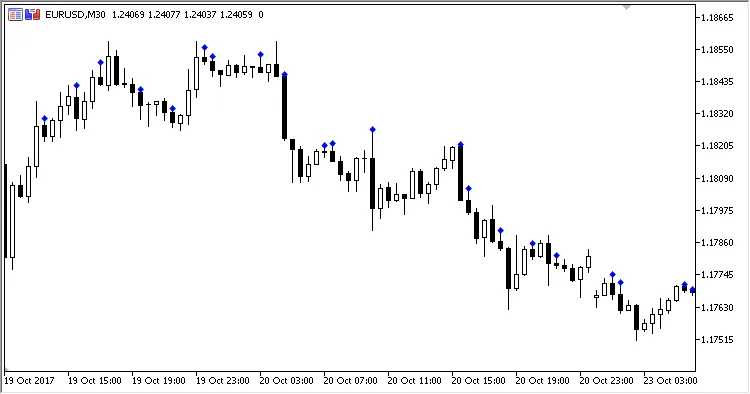
Fig.1 Pattern "UND" (Bullish-any-Bearish).
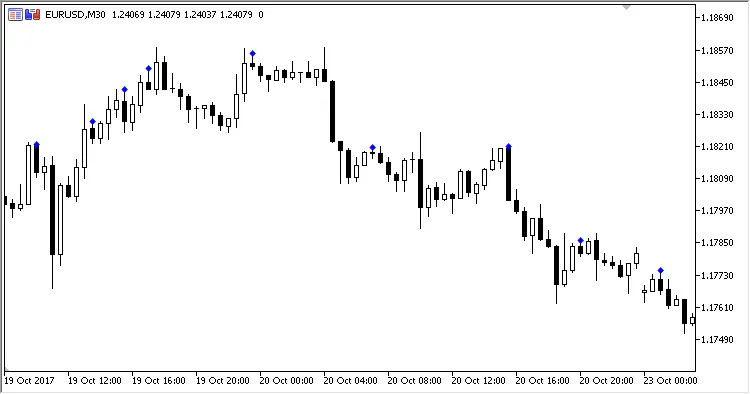
Fig.2 Pattern "UUD" (Bullish-Bullish-Bearish).
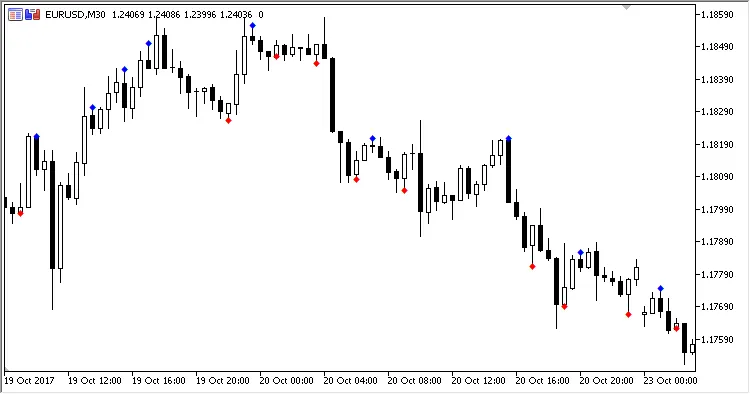
Fig.3 Pattern "UUD" (Bullish-Bullish-Bearish) with reverse patterns displayed.
So, there you have it! The Custom Pattern Indicator is a powerful tool that can help you visualize key candlestick formations in your trading strategy. Start experimenting with your own patterns and see how they can enhance your trading decisions. Happy trading!
Related Posts
- Unlocking the Power of Master Tools for MetaTrader 4
- Unlocking MetaCOT 2: Your Ultimate CFTC Indicator Toolkit for MT4
- Mastering the MACD Candle Indicator for MetaTrader 4
- Unlock Trading Insights with Volume Profile + Range v6.0 for MetaTrader 5
- Visualize Current Trends Across All Time Frames with This MetaTrader 4 Indicator