
Hey traders! Today, let’s dive into the PChannel3 indicator, a powerful tool that allows you to select different timeframes right from its input parameters. This feature is a game-changer for those looking to optimize their trading strategies.
input ENUM_TIMEFRAMES TimeFrame=PERIOD_H4; // Set your preferred indicator chart period (timeframe)
Before you get started, make sure you have the PChannel3.mq5 file. You’ll need to drop it into your <terminal_data_folder>\MQL5\Indicators directory. This is essential for the indicator to function properly.
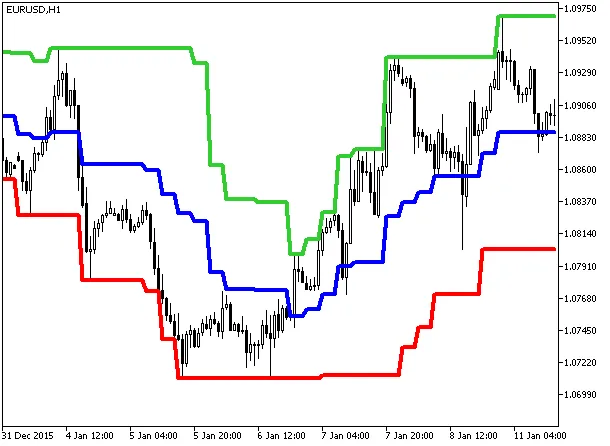
Fig.1. PChannel3_HTF
With the PChannel3_HTF indicator at your disposal, you can enhance your trading tactics by analyzing market trends across various timeframes. This flexibility not only gives you a broader perspective but also helps in making more informed trading decisions.
So, get that indicator set up and start exploring the various timeframes. Happy trading!
Related Posts
- Unlocking MetaCOT 2: Your Ultimate CFTC Indicator Toolkit for MT4
- Unlocking the Power of Master Tools for MetaTrader 4
- Mastering the PChannel3 Cloud Digit Grid Indicator for MetaTrader 5
- Visualize Current Trends Across All Time Frames with This MetaTrader 4 Indicator
- Understanding the PChannel3Cloud Indicator for MetaTrader 5