
Hey there, fellow traders! Today, we’re diving into the latest and greatest—the Bounce Strength Indicator (BSI) 2.0. This nifty tool not only measures the strength of bounces but also integrates Tango Line calculations to give you an edge in your trading.
While the core concept remains the same, I’ve given it a fresh twist. Instead of relying on the width of the range like a traditional oscillator, this version opts for the deviation from the center line. And guess what? That center line is based on the moving average of the Tango Line.
double ratio=0;
 //--- Bar Spread
 double sp=(high[k]-low[k]);
 //--- Not DownBar
 if(!(close[k-1]-sp*0.2>close[k]))
   {
    ratio=-1*(low[k]/TangoMaBuffer[k])+2;
    sumpos+=(close[k]-low[k])*ratio;
   }
 //--- Not UpBar
 if(!(close[k-1]+sp*0.2<close[k]))
   {
    ratio=-1*(high[k]/TangoMaBuffer[k])+2;
    sumneg+=(high[k]-close[k])*ratio;
   }
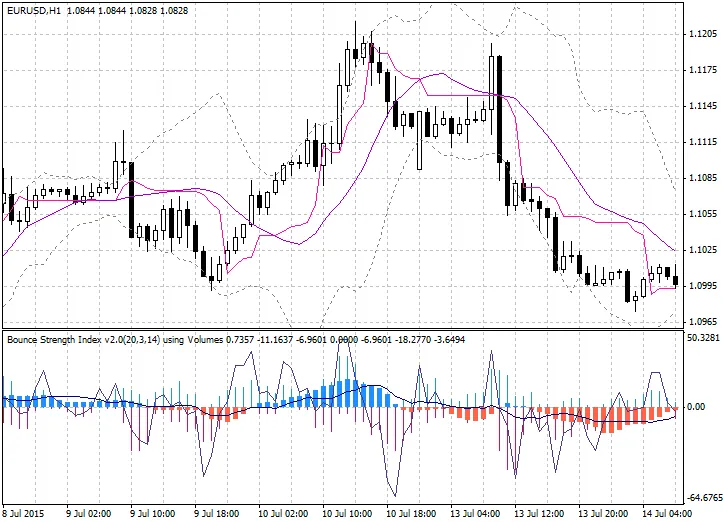
What’s on Display:
- Plus Histogram: Shows the bounce strength rising from the lows.
- Minus Histogram: Displays the bounce strength dropping from the highs.
- Signal Line: Represents the difference between plus and minus values calculated as [(plus - minus) * abs((plus-minus) / (plus+minus))].
- Blue Box: Indicates uptrend strength (average of Signal line).
- Red Box: Marks downtrend strength (average of Signal line).
- Slow Line: An average of the Signal line over a long span.
Check out the Tango Line chart window (version 1.1) for a visual aid!
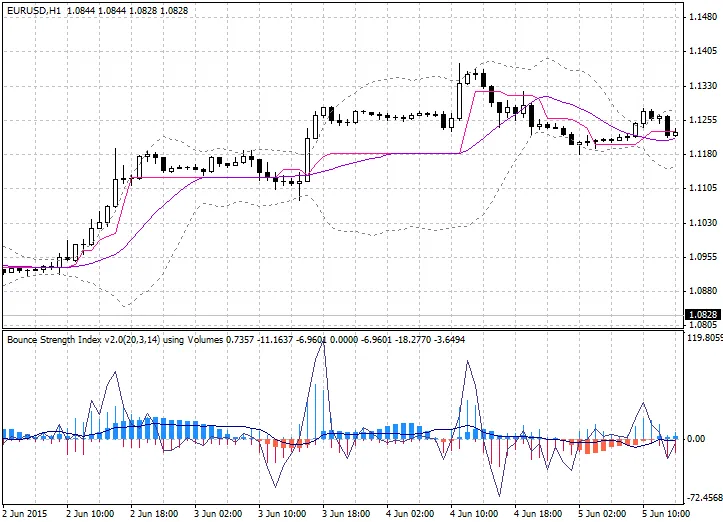
Trending charts can be a game-changer:
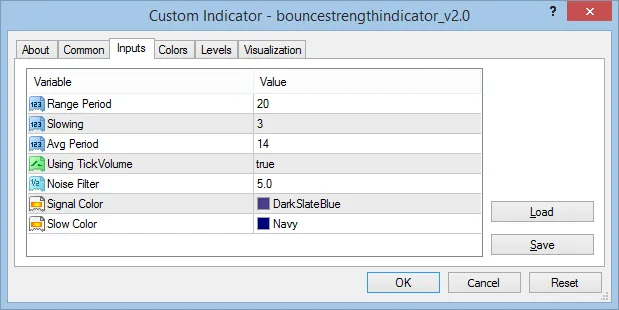
Settings to Tweak:
//--- input parameters
input int InpRangePeriod=20;            // Range Period
input int InpSlowing=3;                 // Slowing
input int InpAvgPeriod=14;              // Avg Period
input bool InpUsingVolumeWeight=true;   // Using TickVolume
input double InpReversalNoiseFilter=5;  // Noise Filter
input  color InpSigColor=DarkSlateBlue; // Signal Color
input  color InpSlowColor=Navy;         // Slow Color
Related Posts
- Unlocking MetaCOT 2: Your Ultimate CFTC Indicator Toolkit for MT4
- Mastering the Open Range Breakout Indicator for MetaTrader 5
- Unlocking the Power of Master Tools for MetaTrader 4
- Unlock Trading Insights with Volume Profile + Range v6.0 for MetaTrader 5
- How to Use the Change Chart Symbol Menu for MetaTrader 4