
Average Sentiment Oscillator
Are you looking for a way to better gauge market sentiment? The Average Sentiment Oscillator (ASO) is a momentum indicator that analyzes the average percentage of bullish versus bearish sentiment in the market.
This tool builds on the formula we developed for the sentiment meter within FX Multimeter III, making it a handy resource for traders. Whether you want to filter trends or find optimal entry and exit points, the ASO can be a valuable addition to your trading toolkit.
The ASO combines two algorithms that essentially perform the same task but in different ways. The first algorithm assesses the bullish or bearish sentiment of each bar using Open, High, Low, and Close (OHLC) prices, averaging the percentages across a specified number of bars (for instance, 10). The second algorithm treats the group of bars as a single unit and calculates the sentiment percentage based on the OHLC points of that group. While the first method is a bit noisy, it offers a more accurate intra-bar sentiment reading. In contrast, the second method provides a smoother result, weighing the overall price movement range. You can choose to use them separately as Mode 1 and Mode 2, or combine them for a balanced approach in Mode 0.
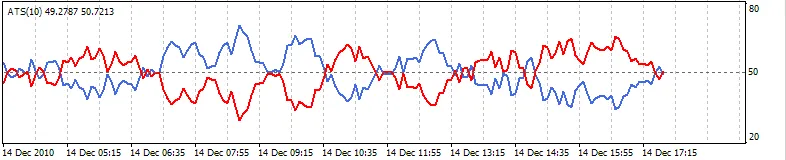
Mode 1 - Intra-bar algorithm only - Leading
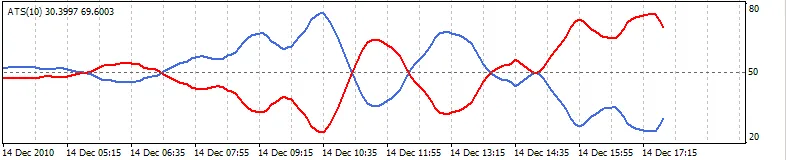
Mode 2 - Group algorithm only - Lagging
When combining both algorithms, you get the default Mode 0 setup:
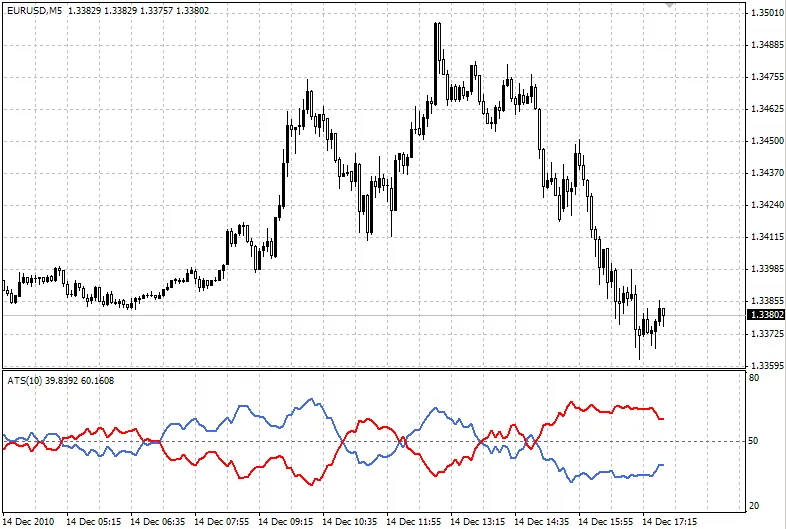
Mode 0 - Both algorithms - Balanced
How to Use the Average Sentiment Oscillator:
The blue line represents the percentage of bulls, while the red line indicates the bears. Because both lines are percentages of 100, they mirror each other. The higher line signifies the prevailing sentiment. When the lines cross the 50% centerline, it marks a shift in power between bulls and bears, often signaling a good moment to enter or exit trades. For instance, if the blue line closes above 50% on the last bar, consider buying or exiting a sell position. Conversely, if the red line closes above 50%, it might be time to sell or exit a buy position. These signals tend to be more reliable when average trading volume is high.
You can also assess the strength of trends; for example, if the blue peaks are higher than preceding red peaks, that indicates bullish strength. A divergence in the oscillator can show a weakening trend, even when prices are rising. By setting levels at 70% and 30%, you can use the oscillator for identifying overbought or oversold conditions, similar to Stochastic or RSI indicators. As with most indicators, using a shorter period generates more leading signals, while a longer period reduces false signals.
If you want to increase the oscillator's range, consider adjusting the fixed minimum and maximum values to 20 and 80, respectively. You can also hide either of the lines within the settings if desired.
Check out our website for more tools: www.fxtools.info
UPDATE: We fixed a code error in the initial upload. Thank you for your patience!
Related Posts
- Unlocking MetaCOT 2: Your Ultimate CFTC Indicator Toolkit for MT4
- Unlocking the Power of Master Tools for MetaTrader 4
- Mastering the Open Range Breakout Indicator for MetaTrader 5
- Unlock Trading Insights with Volume Profile + Range v6.0 for MetaTrader 5
- Visualize Current Trends Across All Time Frames with This MetaTrader 4 Indicator