
Welcome to the world of trading! Today, we're diving into the Xaos Patterns Explorer, an indicator that many traders swear by. The saying goes, "if you understand it, you’ll become rich!" So, let’s break it down.
Key Parameters to Get You Started
To make the most out of the Xaos Patterns Explorer, you’ll want to familiarize yourself with its core parameters:
- Separation: This is set to
15. It defines how closely the indicator analyzes price movements. - AlarmOn: Currently set to
false. You can toggle this on if you want alerts for certain signals. - Show Signals: This parameter is set to
true, which means you’ll see all the signals generated by the indicator. - Indicator Level 1: Set at
1.0010. Experimenting with this value can help enhance the visibility of patterns. - Indicator Level 2: Currently at
0.999. Adjusting this can also make patterns pop or fade.
Visual Reference
Check out the visual representation of the Xaos Patterns Explorer below:
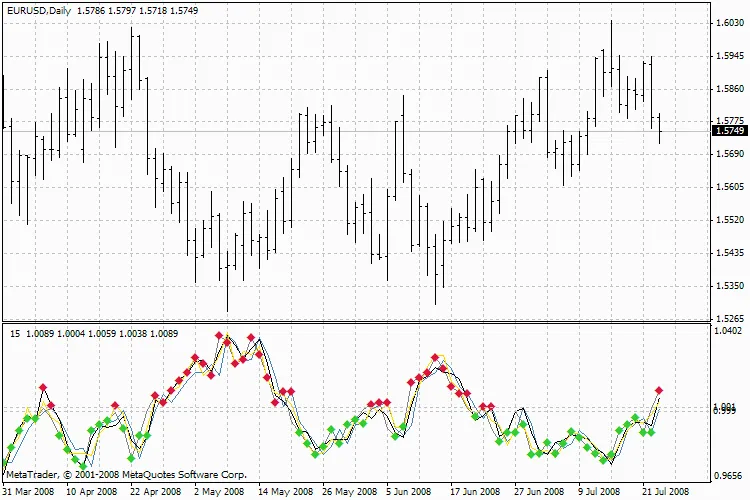
Xaos Patterns Explorer
With the Xaos Patterns Explorer in your toolbox, you're well on your way to spotting lucrative trading opportunities. Remember, the key is to understand how to tweak and utilize its parameters effectively. Happy trading!
Related Posts
- Unlocking the Power of Master Tools for MetaTrader 4
- Unlocking MetaCOT 2: Your Ultimate CFTC Indicator Toolkit for MT4
- Unlock Trading Insights with Volume Profile + Range v6.0 for MetaTrader 5
- Visualize Current Trends Across All Time Frames with This MetaTrader 4 Indicator
- Mastering the Open Range Breakout Indicator for MetaTrader 5