
The METRO DeMarker HTF Signal is a powerful tool designed for traders using METRO DeMarker Sign on MetaTrader 5. It provides a clear visual representation of market trends and signals for potential trades, along with alerts to keep you informed of any crucial entry moments.
When a trend is on the move at your selected bar, you’ll see a graphical indication in the form of a steering wheel. The color of this symbol will reflect the direction of the trend. Conversely, if the trend reverses, a diagonal arrow will appear, indicating the new trade direction.
Here’s a breakdown of the input parameters you’ll need to configure:
- Input Parameters for METRO DeMarker Sign:
//+------------------------------------------------+
//| Indicator Input Parameters                      |
//+------------------------------------------------+
input string Symbol_=""; // Financial asset
input ENUM_TIMEFRAMES Timeframe=PERIOD_H6; // Timeframe for calculations
input uint PeriodDeMarker=7; // Indicator period
input uint StepSizeFast=5; // Fast step
input uint StepSizeSlow=15; // Slow step
- Visualization Input Parameters:
//---- Display Settings
input uint SignalBar=0; // Bar for signal (0 - current bar)
input string Symbols_Sirname=INDICATOR_NAME"_Label_"; // Indicator label names
input color Upsymbol_Color=clrTeal; // Uptrend color
input color Dnsymbol_Color=clrMagenta; // Downtrend color
input color IndName_Color=clrDarkOrchid; // Indicator name color
input uint Symbols_Size=60; // Signal symbol size
input uint Font_Size=10; // Font size for indicator name
input int X_1=5; // Horizontal offset for name
input int Y_1=-15; // Vertical offset for name
input bool ShowIndName=true; // Display indicator name
input ENUM_BASE_CORNER WhatCorner=CORNER_RIGHT_UPPER; // Display corner
input uint X_=0; // Horizontal offset
input uint Y_=20; // Vertical offset
- Alert and Audio Signal Parameters:
//---- Alerts Settings
input ENUM_ALERT_MODE alert_mode=OnlySound; // Alert options
input uint AlertCount=0; // Number of alerts
If you plan to use multiple METRO DeMarker HTF Signal indicators on a single chart, make sure each one has a unique Symbols_Sirname value for the labels.
Don't forget, this indicator relies on the compiled file METRO DeMarker.mq5. Make sure to place it in your <terminal_data_folder>\MQL5\Indicators\.
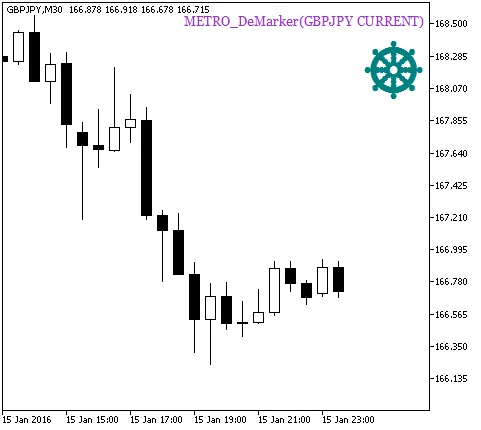
Figure 1. The METRO DeMarker HTF Signal indicator A signal of trend continuation
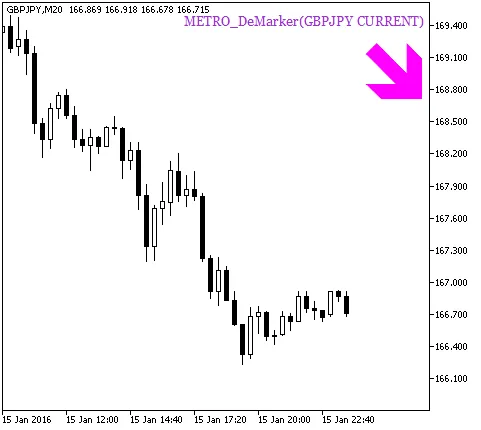
Fig. 2. The METRO DeMarker HTF Signal indicator Signal for trade
Related Posts
- Unlocking MetaCOT 2: Your Ultimate CFTC Indicator Toolkit for MT4
- Unlocking the Power of Master Tools for MetaTrader 4
- Visualize Current Trends Across All Time Frames with This MetaTrader 4 Indicator
- Unlock Trading Insights with Volume Profile + Range v6.0 for MetaTrader 5
- Mastering the Open Range Breakout Indicator for MetaTrader 5