
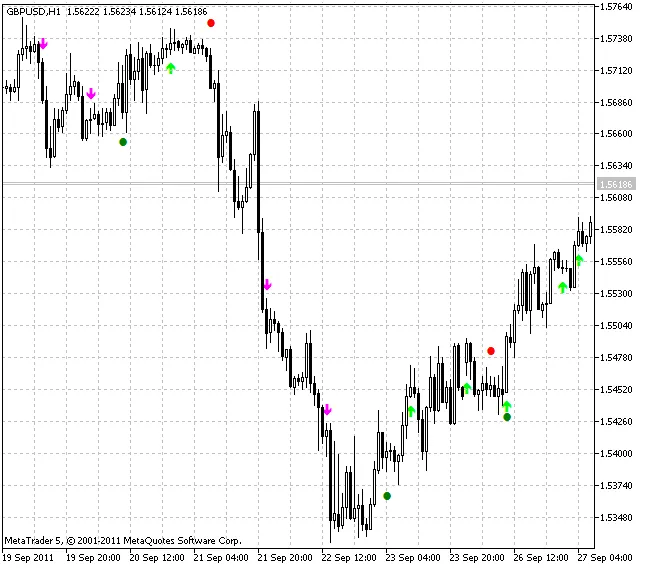
If you’re on the hunt for a powerful trading tool, the XMA JJRSX System might just be what you need. This nifty indicator gives you alerts and signals using vibrant colored dots and arrows right on your chart, making it easier than ever to spot trading opportunities.
At its core, this system works by comparing signals from the JJRSX oscillator and the XMA moving average, each operating on different timeframes: the current chart timeframe and higher ones. So, you can effectively get the best of both worlds!
The colored arrows signal entries based on higher timeframe trends, while the JJRSX oscillator provides trend reversal signals from the current timeframe. The colored dots, on the other hand, help you identify exit points. In layman’s terms, think of the arrows as go signals and the dots as stop signs.
For instance, if you see a lime-colored up arrow, it’s time to open a long position. Conversely, when a red dot pops up, it’s time to close that position. For short positions, keep an eye out for the magenta arrow and green dot. You can also use the signals from the colored dots to open and close positions while the arrows can guide you to add to existing trades.
Another great feature of this system is the ability to customize the smoothing algorithm for the XMA moving average:
- SMA - Simple Moving Average;
- EMA - Exponential Moving Average;
- SMMA - Smoothed Moving Average;
- LWMA - Linear Weighted Moving Average;
- JJMA - JMA Adaptive Average;
- JurX - Ultralinear Smoothing;
- ParMA - Parabolic Smoothing;
- T3 - Tillson's Multiple Exponential Smoothing;
- VIDYA - Tushar Chande's Smoothing Algorithm;
- AMA - Perry Kaufman's Smoothing Algorithm.
It’s important to note that the Phase parameter varies across different smoothing algorithms. For example, in JMA, it changes from -100 to +100, while in T3, it’s a smoothing ratio multiplied by 100 for better visualization. Other algorithms have their own unique parameters, so be sure to keep an eye on those!
To get started, make sure to place the compiled files for the XMA and JJRSX indicators in the terminal_data_folder\MQL5\Indicators\. You’ll also need to copy the SmoothAlgorithms.mqh library classes to terminal_data_folder\MQL5\Include. For a detailed guide on using these classes, check out the article "Averaging Price Series for Intermediate Calculations Without Using Additional Buffers".
Indicator Input Parameters:
//+-------------------------------------+
//|  Indicator Input Parameters         |
//+-------------------------------------+
input uint SignalLableShift=100;              // Entries vertical shift
input uint StopLableShift=300;                // Stops vertical shift
input uint AlertCount=0;                      // Number of submitted alerts
input uint SignalBar=1;                     // Signal bar index, 0 is a current bar
//+-------------------------------------+
//|  XMA Indicator Input Parameters     |
//+-------------------------------------+
input ENUM_TIMEFRAMES TimeFrame_XMA=PERIOD_H4;// XMA chart period
input Smooth_Method MA_Method_XMA=MODE_T3;    // XMA averaging method
input int Length_XMA=12;                      // XMA smoothing depth
input int Phase_XMA=15;                       // XMA smoothing parameter [-100...+100]
input ENUM_APPLIED_PRICE Applied_price_ IPC_XMA=PRICE_CLOSE;     // XMA applied price
//+-------------------------------------+
//|  JJRSX Indicator Input Parameters   |
//+-------------------------------------+
input int Length_JJRSX=8;                     // JJRSX smoothing depth
input int Smooth_JJRSX = 8;                   // JJRSX averaging JJMA depth
input int Phase_JJRSX = 100;                  // JJRSX averaging JJMA parameter [-100..+100]
input ENUM_APPLIED_PRICE Applied_price_ IPC_JJRSX=PRICE_CLOSE_;  // JJRSX applied price
Related Posts
- Unlocking MetaCOT 2: Your Ultimate CFTC Indicator Toolkit for MT4
- Mastering the ColorSchaffJJRSXTrendCycle Indicator for MetaTrader 5
- Unlock Trading Success with the ColorZerolagJJRSX Indicator for MetaTrader 5
- Unlock Trading Insights with the MultiColorZerolagJJRSXTrend_x10 Indicator for MetaTrader 5
- Unlock Trading Insights with ColorZerolagJJRSXTrend_x10 for MetaTrader 5