
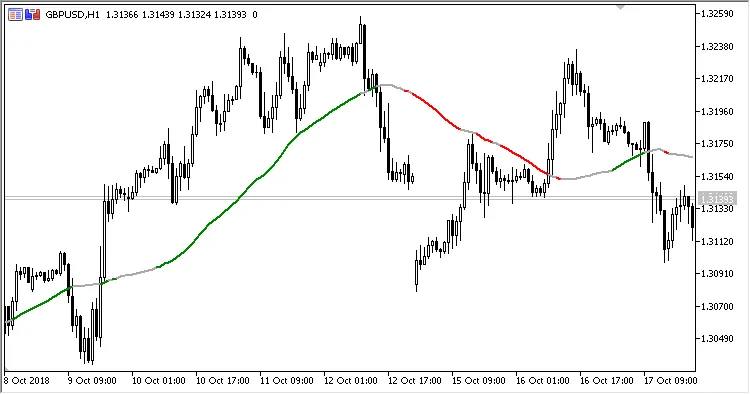
The MA Slope indicator provides traders with a visual representation of the slope of a Moving Average (MA) line. Essentially, it shows a colored Moving Average whose hue changes based on the slope's value between two specific points on the MA.
Here’s a quick breakdown of the five input parameters you can customize:
- Period - This defines the number of periods for the calculation.
- Method - Choose how you want the MA to be calculated (simple, exponential, etc.).
- Applied Price - The price used in your calculations (close, open, high, low).
- Slope - The threshold slope value in points at which the MA color will change.
- Slope Length - This indicates how far back from the current bar the first key point is, helping to determine the slope value (the difference between the two points).
How It’s Calculated:
MA = MovingAverage(Applied Price, Period, Method)
Diff = MA - PrevMA
PrevMA = MovingAverage(Applied Price, Period, Method) from Slope Length bars ago
- If Diff is greater than Slope, the MA color is green.
- If Diff is less than -Slope, the MA color is red.
- Otherwise, the MA will appear gray.
Related Posts
- Unlocking MetaCOT 2: Your Ultimate CFTC Indicator Toolkit for MT4
- Mastering the MACD Candle Indicator for MetaTrader 4
- Visualize Current Trends Across All Time Frames with This MetaTrader 4 Indicator
- Unlocking the Power of Master Tools for MetaTrader 4
- Hourly Buffers for Data Collection in MetaTrader 5: A Simple Guide