
Author: Andrey N. Bolkonsky
If you’re diving into the world of trading, the Stochastic Indicator, particularly the smoothed q-period Stochastic developed by William Blau, is a tool you should consider adding to your arsenal. This indicator is based on the traditional Stochastic Indicator (check out the book Momentum, Direction, and Divergence for deeper insights).
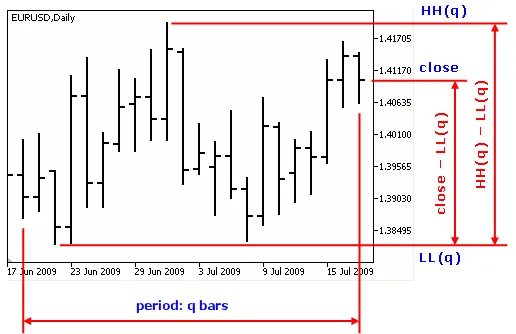
The Blau_TStoch displays how far the closing price is from the lowest price over the last q bars. Essentially, it provides a numerical value that indicates the price's position relative to the lowest price in that specific period, with values always being >=0.
- Make sure to place WilliamBlau.mqh in your terminal_data_folder\MQL5\Include\
- Drop Blau_TStoch.mq5 into your terminal_data_folder\MQL5\Indicators\
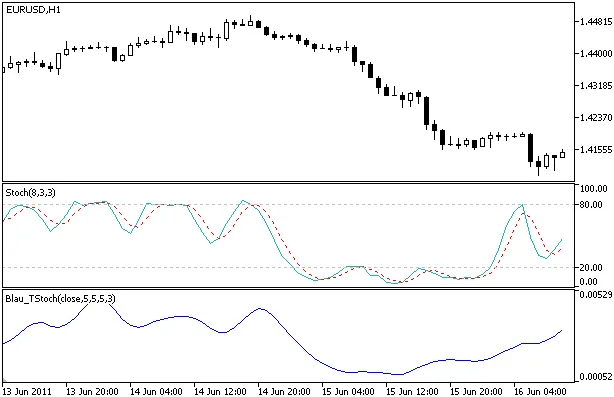
Stochastic Indicator Blau_TStoch
How It Works:
The calculation for the q-period Stochastic is straightforward:
stoch(price,q) = price - LL(q)
Where:
- price - the closing price of the current timeframe;
- q - the number of bars used in the Stochastic calculation;
- LL(q) - the lowest price over those q bars.
To get the smoothed q-period Stochastic, you would calculate it like this:
TStoch(price,q,r,s,u) = EMA(EMA(EMA( stoch(price,q) ,r),s),u)
Where:
- price - the closing price;
- q - the number of bars for the Stochastic calculation;
- stoch(price,q) - the q-period Stochastic;
- EMA(stoch(price,q),r) - 1st smoothing via exponentially smoothed moving average (EMA) over period r;
- EMA(EMA(...,r),s) - 2nd smoothing applying EMA over period s;
- EMA(EMA(EMA(...,r),s),u) - 3rd smoothing with EMA over period u.
Input Parameters:
- q - period for Stochastic calculation (default is q=5);
- r - period for the 1st EMA (default is r=20);
- s - period for the 2nd EMA (default is s=5);
- u - period for the 3rd EMA (default is u=3);
- AppliedPrice - the type of price used (default is AppliedPrice=PRICE_CLOSE).
Important Notes:
- Ensure q > 0;
- Make sure r > 0, s > 0, and u > 0. If any of r, s, or u equal 1, smoothing won't be applied;
- Minimum rates = (q-1+r+s+u-3+1).
Related Posts
- Unlocking MetaCOT 2: Your Ultimate CFTC Indicator Toolkit for MT4
- Unlocking the Power of Master Tools for MetaTrader 4
- Visualize Current Trends Across All Time Frames with This MetaTrader 4 Indicator
- Mastering the MACD Candle Indicator for MetaTrader 4
- Mastering the Waddah Attar Trend Alert Indicator for MetaTrader 5