
Introduction to the Informer Indicator
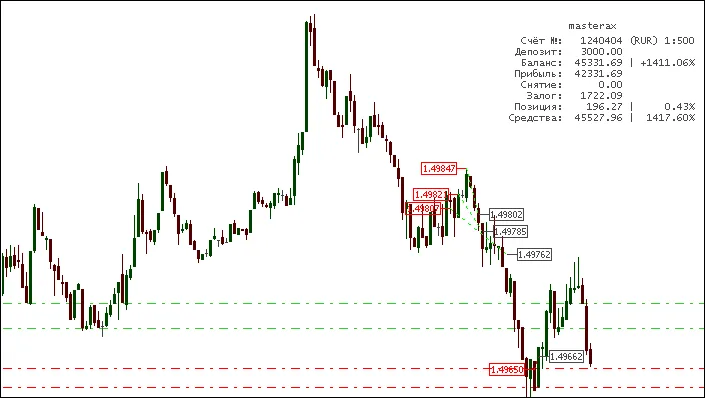
Discover an essential tool for your MetaTrader 4 platform. The Informer Indicator provides a clear view of your closed trades and current account stats right on your chart.
This handy indicator displays real-time account statistics, using green labels for long positions, red for short positions, and gray for closed trades.
It also draws lines connecting the opening and closing points of trades, with colors indicating the outcome—green for profits and red for losses. I find it incredibly useful for generating trade reports and conducting thorough analyses, as it presents trade results in an easily digestible format.
The code is well-commented, making it straightforward to understand and customize.
When you remove the indicator from the chart, it automatically cleans up all the objects it created, keeping your workspace tidy.
Indicator Parameters
The Informer Indicator comes with several customizable parameters:
- DealMarkers: True; // Show deals
- DepoStats: True; // Show statistics
- clAccName: Silver; // Color for account name
- clInfData: Gray; // Color for account information
- FontSize: 8; // Font size
- LeadingSpace: 9; // Spacing for alignment
- clLineProfit: Lime; // Color for profitable trades
- clLineLoss: Red; // Color for losing trades
- clMarkerBuy: Lime; // Color for buy labels
- clMarkerSell: Red; // Color for sell labels
- clMarkerClose: Silver; // Color for close labels
Special thanks to KimIV and xrust for their contributions!
Editor's Note
Keep in mind that this is a mirror version of the original Russian version.
If you have questions, suggestions, or comments for the author, the best place to share them is there.
If you find this code helpful for your trading or educational purposes, a shout-out to the author would be appreciated!
=============================================================================================================================================
Version Updates
Version #4
- Fixed "zero divide" error
- Added Magic filter
- Added labels for open positions
- Included TP & SL levels
- Language switcher
When you remove the indicator, it will also delete all objects it created, keeping your chart organized.
All Parameters
- Lang_Eng: True; // English or Russian
- DealMarkers: True; // Show deals
- DepoStats: True; // Show statistics
- ShowLive: True; // Show price markers for open trades
- MagicFilter: ""; // Comma-separated Magic Numbers to filter trades
- clAccName: Silver; // Color for account name
- clInfData: Gray; // Color for account information
- FontSize: 8; // Font size
- DigitsLength: 9; // Length of digits for alignment
- PercentLength: 5; // Length of percentage for alignment
- clLineProfit: Lime; // Color for profitable trades
- clLineLoss: Red; // Color for losing trades
- clMarkerBuy: Lime; // Color for buy labels
- clMarkerSell: Red; // Color for sell labels
- clMarkerClose: Silver; // Color for close labels
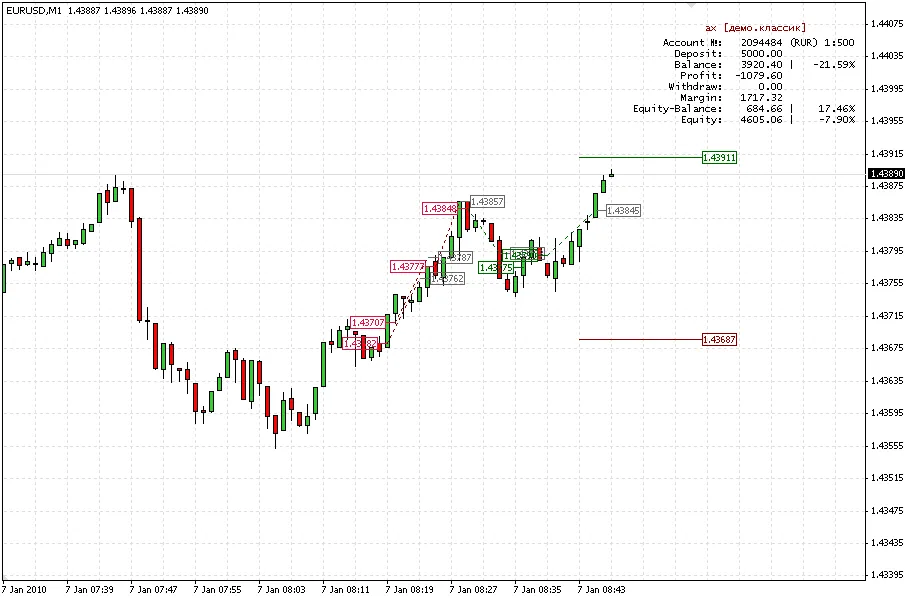
With ShowLive = True, you can see TP & SL levels on your chart.
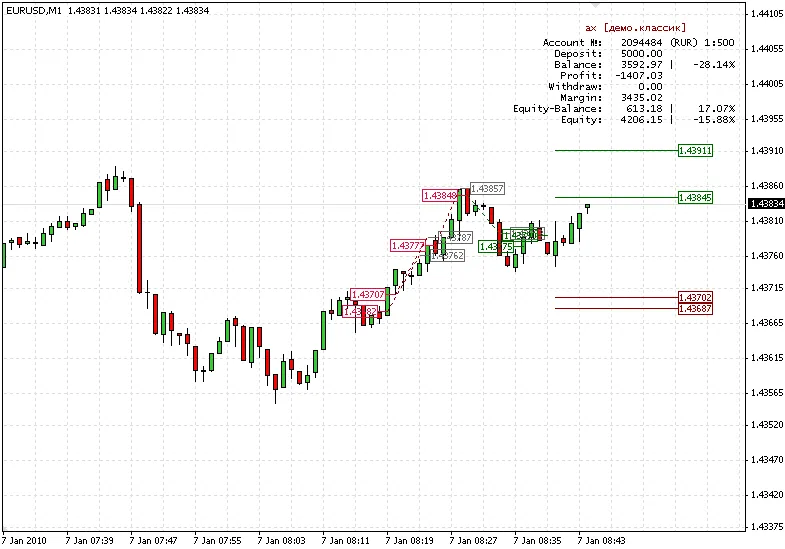
One order successfully closed by TP.
Recommendations
- In Account History, select All History.
- If using ShowLive = True, turn off trade levels (Tools > Options > Charts > [ ] Show trade levels).
Related Posts
- Unlocking MetaCOT 2: Your Ultimate CFTC Indicator Toolkit for MT4
- Unlocking the Power of Master Tools for MetaTrader 4
- Mastering the Open Range Breakout Indicator for MetaTrader 5
- Visualize Current Trends Across All Time Frames with This MetaTrader 4 Indicator
- Unlock Trading Insights with Volume Profile + Range v6.0 for MetaTrader 5