
Author: Akif TOKUZ
Hey there, fellow traders! Today, let's dive into a powerful tool for your trading arsenal—the WRB (Wide Range Bars) indicator for MetaTrader 4. This handy indicator doesn't just detect Wide Range Bars; it also helps you spot hidden gaps, giving you a clearer picture of the market's current dynamics.
Why are WRBs important? Well, while these wide-ranging candlesticks can provide insights on price movement, they become even more valuable when paired with the indicator's ability to identify filled and unfilled gaps. With this feature, you can swiftly assess the market situation and even set up alerts when prices enter those unfilled gap areas. Let's break down how to make the most of this indicator!
Input Parameters Explained
- UseWholeBars (default = false) — If set to true, the indicator will search for Wide Range Bars instead of just Wide Range Bodies.
- WRB_LookBackBarCount (default = 3) — This parameter determines how many bars to analyze to identify WRBs. The higher the number, the more significant and rare the WRBs will be.
- WRB_WingDingsSymbol (default = 115) — This is the text symbol code used to represent WRBs. A small rhombus is the default symbol.
- HGcolor1 (default = clrDodgerBlue) — The color for the first hidden gap rectangle.
- HGcolor2 (default = clrBlue) — A second color option for hidden gap rectangles.
- HGstyle (default = STYLE_SOLID) — This sets the line style for drawing hidden gap rectangles.
- StartCalculationFromBar (default = 100) — The number of bars in the chart history that the indicator will analyze to mark WRBs and hidden gaps.
- HollowBoxes (default = false) — If set to true, hidden gap rectangles will be drawn without filling.
- DoAlerts (default = false) — Turn this on by setting it to true to get notified when the price enters a hidden gap area.
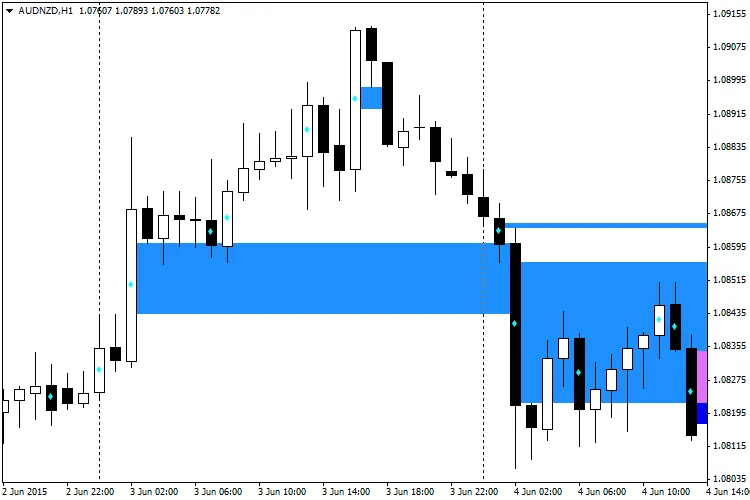
In conclusion, the WRB indicator is a fantastic tool that can enhance your trading strategy by providing insights into market gaps and price movements. Give it a try in your MetaTrader 4 setup, and watch how it can help you make more informed decisions on your trades. Happy trading!
Related Posts
- Hourly Buffers for Data Collection in MetaTrader 5: A Simple Guide
- Unlocking MetaCOT 2: Your Ultimate CFTC Indicator Toolkit for MT4
- Unlocking the Power of Master Tools for MetaTrader 4
- Mastering the Open Range Breakout Indicator for MetaTrader 5
- How to Use the Change Chart Symbol Menu for MetaTrader 4