
If you're looking to enhance your trading experience with MetaTrader 5, the Setka (grid) indicator is a great tool to have in your arsenal. This nifty indicator helps you quickly pinpoint the start and end times of the day, week, or month, and lets you track the highest and lowest prices during these periods. It also provides insights into price movements and highlights important levels and market events like news announcements.
I highly recommend giving this indicator a shot; it could be a game changer for your trading routine. Thanks to the MQL5 Language, you can utilize functions that were previously unavailable in MQL4 (check out this link for more details).
By default, the Setka indicator comes with these parameters:
//--- input parameters
input int   Step=250;         // vertical grid step in points
input int   Figure=1000;      // figure step
Sometimes, you’ll want to tweak these settings for specific symbols. You can easily adjust the input variables in the program code to create your own color scheme:
// color of vertical lines
color new_hour=DimGray;       // new hour
color new_day =Blue;          // new day
color new_week=DeepPink;      // new week
color new_mon =Yellow;        // new month

// color of horizontal lines
color new_Hfigure=RoyalBlue;  // new figure
color new_Hline=DimGray;      // new line
Feel free to customize your color scheme by modifying these variables.
If you find this indicator useful, here are some tips to get you started:
- Disable the standard grid.
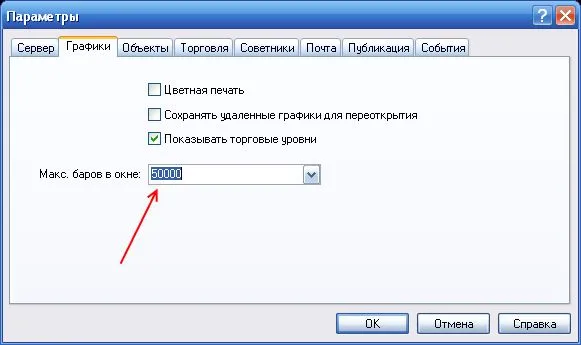
- Adjust the number of bars in history by going to Service → Settings:
- Restart your client terminal.
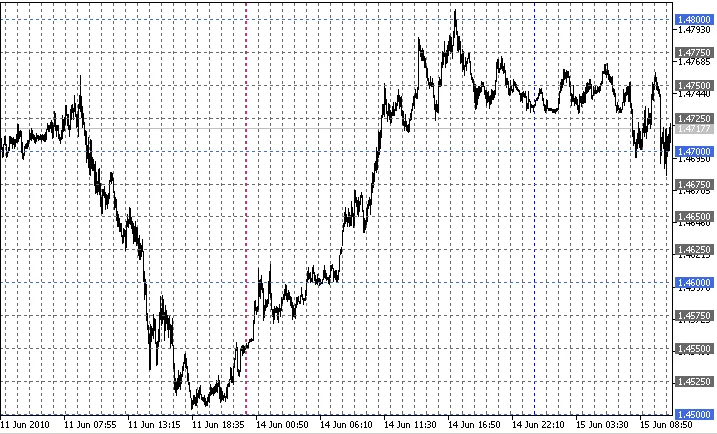
- Open the chart and attach the Setka indicator. You should see it displayed like this:
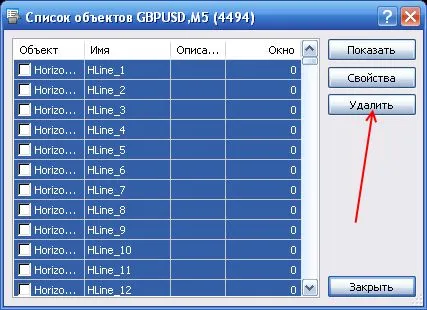
- Select all the created objects and delete them.
- Right-click to save the template (Templates → Save Template) under the name Default.tpl.

By doing this, your grid will automatically launch whenever you open or change any chart. All the relevant time and information will be logged as follows:
2010.06.15 11:53:16 Setka (AUDUSD,M15) Failure or first call Time= 1.4 sec for 50000 bars ObjectsTotal= 12718 MaxBars= 0
- If you want to speed up the grid startup time (and you don’t need the grid for all history), set MaxBars=2000 before saving the template.
- During flat market conditions or if you encounter issues (you’ll know when you see them), refresh the chart by clicking "Refresh" to recalculate the indicator.
A big shoutout to Renat for their invaluable help in creating the indicator and providing examples. You can check out more in this forum thread.
Related Posts
- Unlocking MetaCOT 2: Your Ultimate CFTC Indicator Toolkit for MT4
- Visualize Current Trends Across All Time Frames with This MetaTrader 4 Indicator
- Unlock Trading Insights with Volume Profile + Range v6.0 for MetaTrader 5
- Mastering the MACD Candle Indicator for MetaTrader 4
- Unlocking the Power of Master Tools for MetaTrader 4