
The Leading_HTF_Signal indicator is a powerful tool for traders using MetaTrader 5. It provides clear trend direction signals right at your chosen bar, visually represented with colored arrows to indicate the market's movement. Plus, it can trigger alerts and audio signals to keep you in the loop.
When the trend is on the rise at the selected bar, you’ll see a right arrow appear, colored to match the trend direction. Conversely, if there's a trend reversal, the indicator will display an arrow pointing in the new direction, again color-coded to reflect the trade direction.
Breaking Down the Input Parameters
There are three main groups of input parameters for the Leading_HTF_Signal:
- LeadingSign Input Parameters:
input string Symbol_=""; // Financial asset
input ENUM_TIMEFRAMES Timeframe=PERIOD_H6; // Indicator timeframe for calculation
input double Alpha1 = 0.25; // Indicator coefficient 1
input double Alpha2 = 0.33; // Indicator coefficient 2
- Visualization Input Parameters:
//---- Indicator visualization settings
input uint SignalBar=0; // Bar number for getting a signal (0 is the current bar)
input string Symbols_Sirname=INDICATOR_NAME"_Label_"; // Indicator labels names
input color UpSymol_Color=Lime; // Uptrend symbol color
input color DnSymol_Color=Magenta; // Downtrend symbol color
input color IndName_Color=DarkOrchid; // Indicator name color
input uint Symbols_Size=60; // Signal symbols size
input uint Font_Size=10; // Indicator name font size
input int X_1=5; // Horizontal name offset
input int Y_1=-15; // Vertical name offset
input bool ShowIndName=true; // Displaying the indicator name
input ENUM_BASE_CORNER WhatCorner=CORNER_RIGHT_UPPER; // The corner to display the symbol
input uint X_=0; // Horizontal offset
input uint Y_=20; // Vertical offset
- Alert and Audio Signal Parameters:
//---- Alerts settings
input ENUM_ALERT_MODE alert_mode=OnlySound; // Option for triggering alerts
input uint AlertCount=0; // The number of alerts
If you're using multiple Leading_HTF_Signal indicators on a single chart, each one needs a unique Symbols_Sirname for its labels. This will help keep everything organized and clear.
To get started, place the compiled indicator file LeadingSign.mq5 in your <terminal_data_folder>\MQL5\Indicators\ directory.
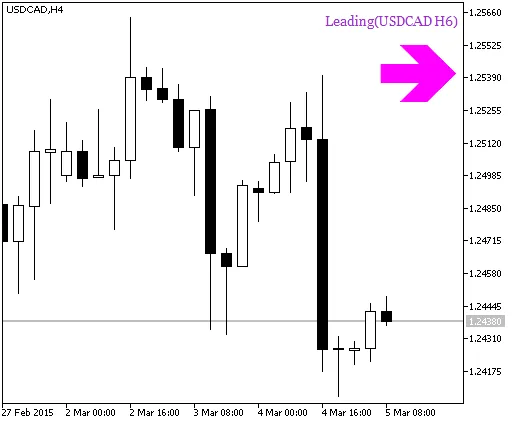
Fig. 1. Leading_HTF_Signal indicator - Trend Continuation Signal
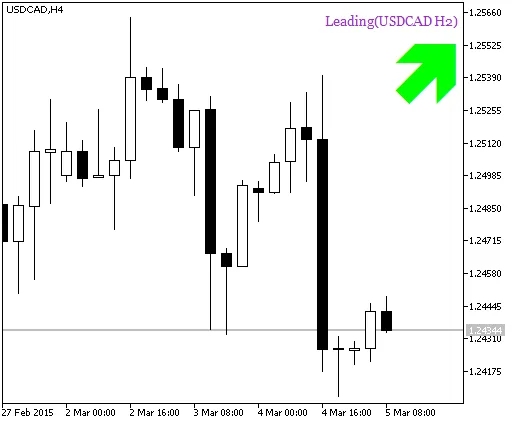
Fig. 2. Leading_HTF_Signal indicator - Deal Signal
Related Posts
- Unlocking MetaCOT 2: Your Ultimate CFTC Indicator Toolkit for MT4
- Mastering the Open Range Breakout Indicator for MetaTrader 5
- Discover AllAverages v4.9: The Essential Indicator for MetaTrader 4
- Visualize Current Trends Across All Time Frames with This MetaTrader 4 Indicator
- Unlocking the Power of Multi-Timeframe Tymen STARC Bands for MetaTrader 5