
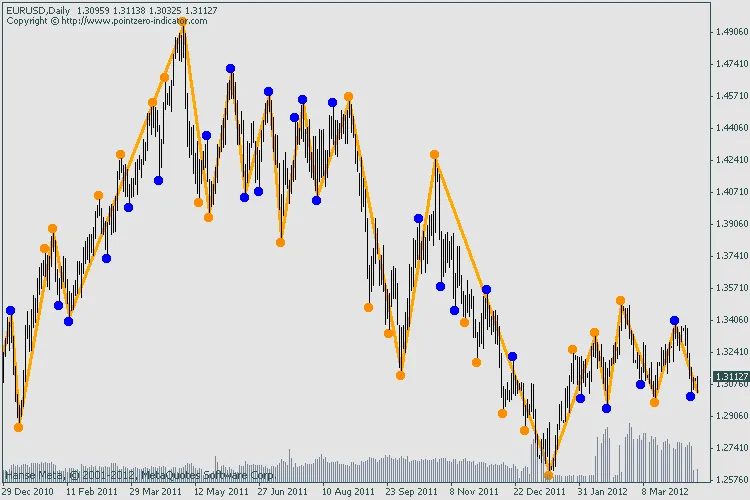
Hey there, fellow traders! Today, I’m excited to share a nifty tool that can help enhance your trading strategy: the Double ZigZag Indicator for MetaTrader 4. This indicator operates using two different ZigZag indicators—fast and slow—without any filtering, making it incredibly straightforward to use.
One of the best features is that it never—ever—repaints past signals. This is crucial for studying the real behavior of the ZigZag indicator, which, as we know, can repaint over time. This gives you a more reliable trading tool as you analyze your trades.
As you might have noticed, the traditional ZigZag indicator tends to repaint many signals. To tackle this, we’ve utilized fractals to help minimize the number of highs and lows displayed. The Double ZigZag relies on the original MetaQuotes ZigZag indicator, which is attached for your convenience.
Recommendations:
- Don’t trade this indicator in isolation
- This tool is designed for educational purposes only—not for actual trading
- Feel free to use this indicator template to filter ZigZag signals alongside your trading strategy
- Study the relationship between the non-repainting fast and slow ZigZag signals over time to get insights
Color Convention:
- Orange dots indicate signals from both ZigZags
- Blue dots represent only Fast ZigZag signals
- Red dots show only Slow ZigZag signals (visible only if Fast ZigZag is hidden)
Input Parameters:
- CalculateOnBarClose (default: true) - This decides if an unclosed bar is evaluated
- ZigZagFast (default: 6) - Set to 0 to hide the Fast ZigZag
- ZigZagSlow (default: 24) - Set to 0 to hide the Slow ZigZag
Related Posts
- Unlocking the Professional ZigZag Indicator for MetaTrader 5
- Unlocking MetaCOT 2: Your Ultimate CFTC Indicator Toolkit for MT4
- Hourly Buffers for Data Collection in MetaTrader 5: A Simple Guide
- Unlocking the Power of Master Tools for MetaTrader 4
- Unlocking the Power of the ZigZag Indicator for MetaTrader 4