
Diving Deeper into the ZigZag Indicator's Mechanics
The ZigZag Indicator often appears to be the "Holy Grail" for many traders looking to pinpoint Tops and Bottoms in their Swing or Trend Following strategies. New traders are often captivated by its promise, thinking it will lead them to consistent profits. However, the reality is a bit different due to a little phenomenon called "repainting". Essentially, as price action unfolds, the indicator may adjust previous Top or Bottom points based on the latest price data. By the time these points are finalized, the market conditions may have already shifted, rendering those signals less effective.
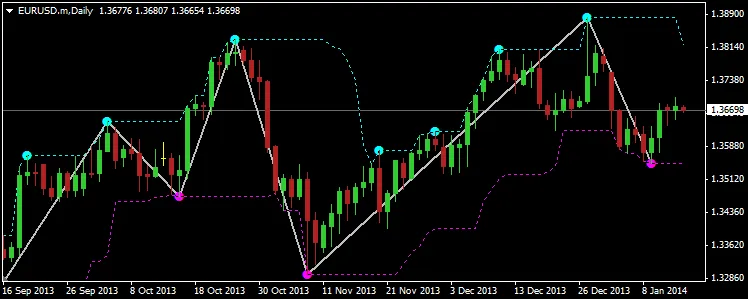
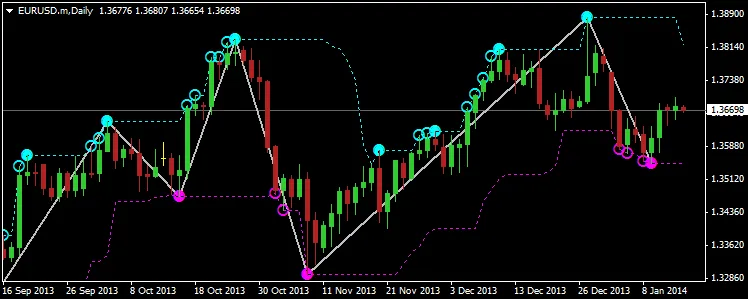
That said, this doesn’t mean the ZigZag Indicator is useless! In fact, it can be a powerful tool for analyzing historical price data and setting up strategies, just not in the straightforward way many beginners assume. There are numerous ways to utilize this indicator effectively, and I’d love to hear your thoughts and strategies in the comments below. However, my main focus today is to present an enhanced version of the original ZigZag code by Metaquotes, which I’ve reworked to make it more readable and to visually represent some of its inner workings that typically go unnoticed (see images below). Here’s what my revamped version, called ZigZagExtras, brings to the table:
- Graphical lines showcasing the Highest Highs and Lowest Lows for the "Depth" period, a key parameter from the original indicator.
- In addition to the current and finalized Top and Bottom points, it also highlights past points that were once strong candidates for valid Tops and Bottoms in the ZigZag pattern, represented as filled circles at Highs (●) and Lows (●).
- Optionally, the indicator can also display all BreakOut points that break above Highs (○) or below Lows (○) of the "Depth" period, which were considered potential Tops and Bottoms in the indicator’s calculations. These points are often the ones that get “repainted” as prices change, leading beginners to misinterpret them as valid current signals, which can be detrimental to both their confidence and trading accounts.
The main aim of this code and its additional visual cues is to enhance your understanding of the ZigZag Indicator and provide potential signals for various strategies you might want to employ. Whether you’re looking for quick scalping opportunities during Breakouts or pre-signals ahead of retracements, I’m confident these insights will stir up some creative ideas for you to explore further.
How to Get Started:
Simply attach the indicator to your Chart and set the parameters similar to those of the original ZigZag indicator. Do keep in mind that the order of parameters differs, and that Depth and BackStep are grouped together as they represent Bar Periods or Counts. The Deviation parameter also accommodates decimal fractions of a PIP for 3/5 digit brokers. Optionally, you can enable the Show BreakOut Points feature on the graph.
You can also set up an Alert for BreakOuts of Highs and Lows. The alert message is customizable, allowing you to tailor it to your preferences.
Version Update Log
If you encounter any bugs or have suggestions for features you’d like to see in future releases, please let me know!
- v1.5: Introduced compiler directive for strict compilation mode.
- v1.4: Fixed a sporadic "array out of range" error.
- v1.3: Alerts can now be used even if BreakOuts are not displayed.
- v1.2: Alerts now show the Symbol and Time Frame (Period), making it easier to manage multiple charts.
- v1.1: Added the ability to set alerts on BreakOuts of Highs or Lows, and fixed a bug preventing updates with fresh tick data.
Visual Examples of the Indicator:
Don’t forget, all my CodeBase publications’ source code is now accessible in the "Public Projects" tab of MetaEditor under the name "FMIC".




Comments 0