
Welcome to the Doji Reader Indicator! This tool can be a game-changer for your trading strategy. Let’s dive into its features and how to make the most of it.
Key Features of the Doji Reader Indicator
- 1. Reading Doji Candles:
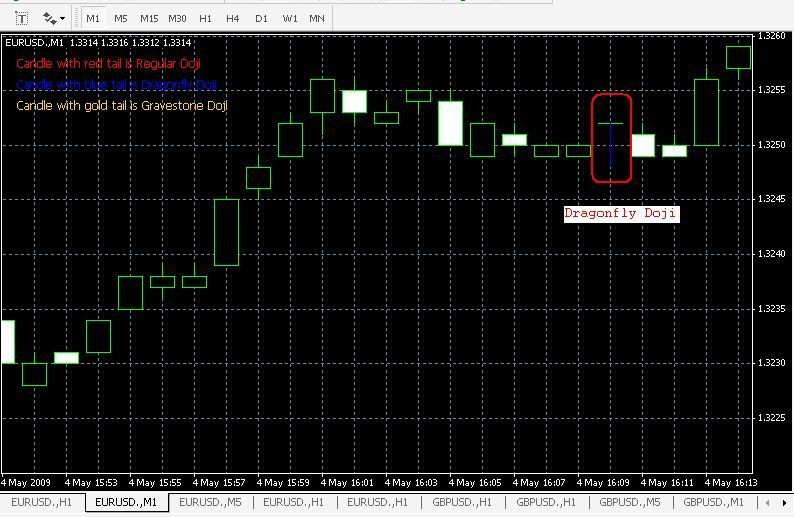
You can set the minimum length for both the uptail and lowtail to detect doji candles effectively. - 2. Identifying Gravestone Doji:
Customize the minimum length of the uptail and the maximum length of the lowtail to pinpoint gravestone doji patterns. - 3. Spotting Dragonfly Doji:
Set the maximum length for the uptail and the minimum for the lowtail to recognize dragonfly doji candles. - 4. Alerts for New Candles:
Enable alerts to get notified as soon as a new candle appears, so you never miss a trading opportunity!
Advanced Settings for Enhanced Functionality
- An Alert: Set to true if you’d like to be alerted when a new doji appears.
- Show Candle Box: Set to true to display a rectangle around the doji candle.
- Box Color: Choose your favorite color for the doji rectangle.
- Show Star: Set to true to show a star above the candle.
- Star Color: Pick a color for the star above the candle.
- Star Width: Adjust the width of the star to your liking.
- Show Text: Set to true to display the name of the doji above the candle.
- Font Color: Specify a color for the text.
- Font Size: Choose your preferred font size for better visibility.
- Vertical Text: If set to true, the text will be displayed vertically.
- My Broker Has 5 Digits: Set to true if you're using a 5-digit broker.
- Find Regular Doji: Set to true for the indicator to search for standard doji patterns.
- Min Length of Up Tail: Define the minimum size for the upper tail.
- Min Length of Lo Tail: Define the minimum size for the lower tail.
- Max Length of Body: Set the maximum size for the body of the doji.
- Find Dragonfly Doji: Set to true for the indicator to look for dragonfly doji patterns.
- Max Length of Up Tail 1: Set the maximum size for the upper tail of the dragonfly doji.
- Min Length of Lo Tail 1: Set the minimum size for the lower tail of the dragonfly doji.
- Max Length of Body 1: Set the maximum size for the body of the dragonfly doji.
- Find Gravestone Doji: Set to true for the indicator to scan for gravestone doji patterns.
- Min Length of Up Tail 2: Define the minimum size for the upper tail of the gravestone doji.
- Max Length of Lo Tail 2: Define the maximum size for the lower tail of the gravestone doji.
- Max Length of Body 2: Set the maximum size for the body of the gravestone doji.
With these features at your disposal, the Doji Reader Indicator can significantly enhance your trading experience. Happy trading!
Best regards,
Heartnet
Visit my blog for more insights!
Related Posts
- Unlocking MetaCOT 2: Your Ultimate CFTC Indicator Toolkit for MT4
- Unlocking the Power of Master Tools for MetaTrader 4
- Unlock Trading Insights with Volume Profile + Range v6.0 for MetaTrader 5
- Visualize Current Trends Across All Time Frames with This MetaTrader 4 Indicator
- Hourly Buffers for Data Collection in MetaTrader 5: A Simple Guide