
The ADX Trend indicator is a powerful tool for traders using MetaTrader 5, designed to analyze the values of three different ADX indicators and provide clear signal pointers. If you're looking to enhance your trading strategy, understanding how to configure this indicator can make a significant difference.
Here’s a quick rundown of the seven configurable parameters you’ll find:
- First ADX Period - This is the calculation period for the first ADX.
- Second ADX Period - The calculation period for the second ADX.
- Third ADX Period - The calculation period for the third ADX.
- Level 1 - The first threshold level for the ADX.
- Level 2 - The second threshold level for the ADX.
- Applied Price - The price point to which the indicator applies.
- Signal Point Anchor - The anchor point for the signal pointers:
- High/Low - Using High/Low for signal levels.
- Open - Using Open prices for signal colors.
Signal pointers are set under the following conditions:
ADX1_1 < ADX1_0 and ADX2_1 < ADX2_0 and ADX3_1 < ADX3_0 and ADX1_0 > Level 1 and ADX2_0 > Level 2
- If DMI > 0, a bearish (red) signal pointer is activated.
- If DMI < 0, a bullish (green) signal pointer is activated.
Where:
ADX1_1, ADX1_0 - ADX (First ADX Period, MAIN_LINE) on bar 1 and 0
ADX2_1, ADX2_0 - ADX (Second ADX Period, MAIN_LINE) on bar 1 and 0
ADX3_1, ADX3_0 - ADX (Third ADX Period, MAIN_LINE) on bar 1 and 0
DMI = PDI - MDI
PDI = ADX (First ADX Period, PLUSDI_LINE)
MDI = ADX (First ADX Period, MINUSDI_LINE)
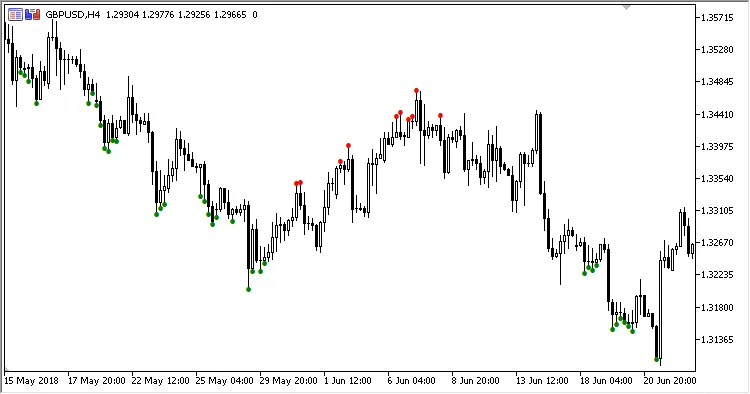
Fig. 1. ADX Trend, pointers to High/Low
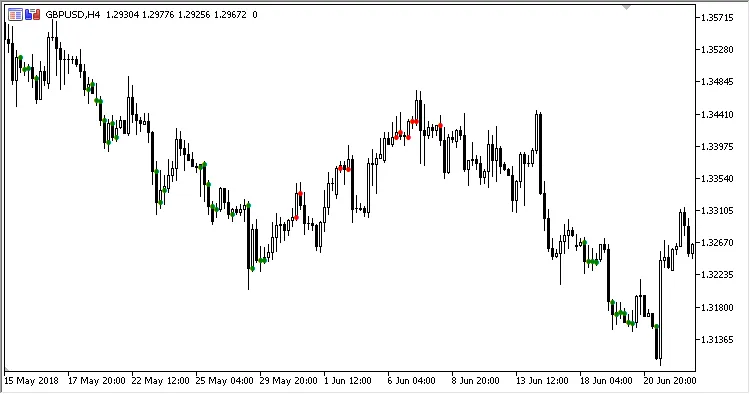
Fig. 2. ADX Trend, pointers to Open
Related Posts
- Unlocking MetaCOT 2: Your Ultimate CFTC Indicator Toolkit for MT4
- Mastering the ADX Wilder Indicator with the Ring Buffer in MetaTrader 5
- Understanding the Smoothed ADX: A Trader's Guide
- Mastering Market Signals: The Consensus of Five Indicator for MetaTrader 5
- Understanding the USDX_Slope Indicator for MetaTrader 5