
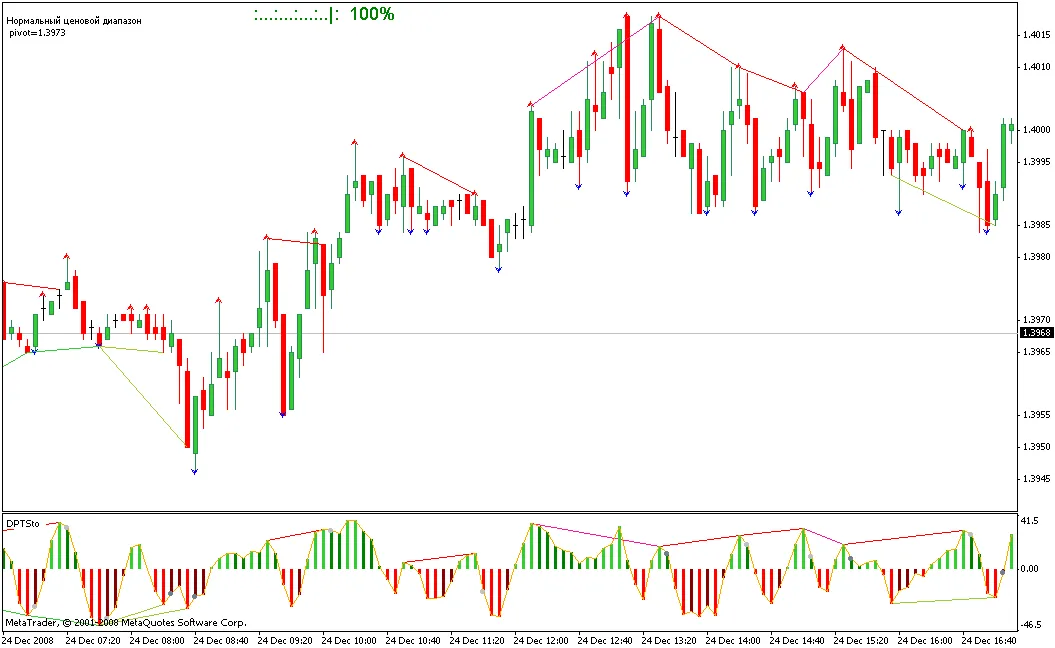
Hey fellow traders! Today, we’re diving into some nifty tools that can enhance your trading strategy—specifically the StohColored and StohDivergence indicators. If you're looking to fine-tune your analysis and spot potential market reversals, these might just be what you need.
Getting Started with StohColored
First things first, you’ll want to attach the ind_StoColored_v1 file to your trading platform. This is super simple: just drag the file onto the same chart window where you plan to analyze the market. Once you’ve got that set up, you’ll see how this indicator visually represents the stochastic values, making it easier to identify overbought or oversold conditions.
Integrating StohDivergence
Next up is the DivPeakTroughSto_SW_v1. Similar to the StohColored, you’ll drag this indicator into the same window. This tool helps you spot divergences, which can be a game-changer when forecasting price movements. Keep an eye out for those peaks and troughs—they can signal potential trend reversals!
Why Use These Indicators?
- Visual Clarity: The combination of colors and shapes makes it easier to spot key levels.
- Enhanced Decision Making: Helps to confirm trades when used alongside other indicators.
- Versatility: Works well across various currency pairs and timeframes.
So, gear up and give these indicators a whirl. They might just add that extra edge to your trading toolkit. Happy trading!
Related Posts
- Unlocking MetaCOT 2: Your Ultimate CFTC Indicator Toolkit for MT4
- Unlocking the Power of Master Tools for MetaTrader 4
- Mastering the Open Range Breakout Indicator for MetaTrader 5
- How to Use the Change Chart Symbol Menu for MetaTrader 4
- Discover AllAverages v4.9: The Essential Indicator for MetaTrader 4